




 Português
 English
Product walkthroughs are one of the more common methods in the industry. They can be applied at different stages of product development, where team members or external experts conduct a comprehensive review of the product to identify and improve potential issues. The process covers not only interface design but also functional integrity, usability, and performance.
Recently, DingTalk has refined and distilled a more targeted set of walkthrough methods—known as the "Eight Core Principles for B2B Product Walkthroughs"—by combining the unique characteristics of B2B products. These principles not only cover the basic elements of traditional walkthroughs but also specifically optimize for the functional characteristics and usage scenarios of B2B products, ensuring that each principle effectively enhances the user experience.
Next, we will unveil these principles one by one through selected case studies:
Tips 1: More Role Perspectives—Build Walkthrough Path Tasks Using the "3-3 System"
Unlike C2C products, B2B product features are not limited to individual use; they involve collaborative behaviors and interconnected scenarios among different roles. For example, within an enterprise, aspects such as people, finance, materials, and operations may all be involved. A simple travel approval process might require collaboration among three different roles.
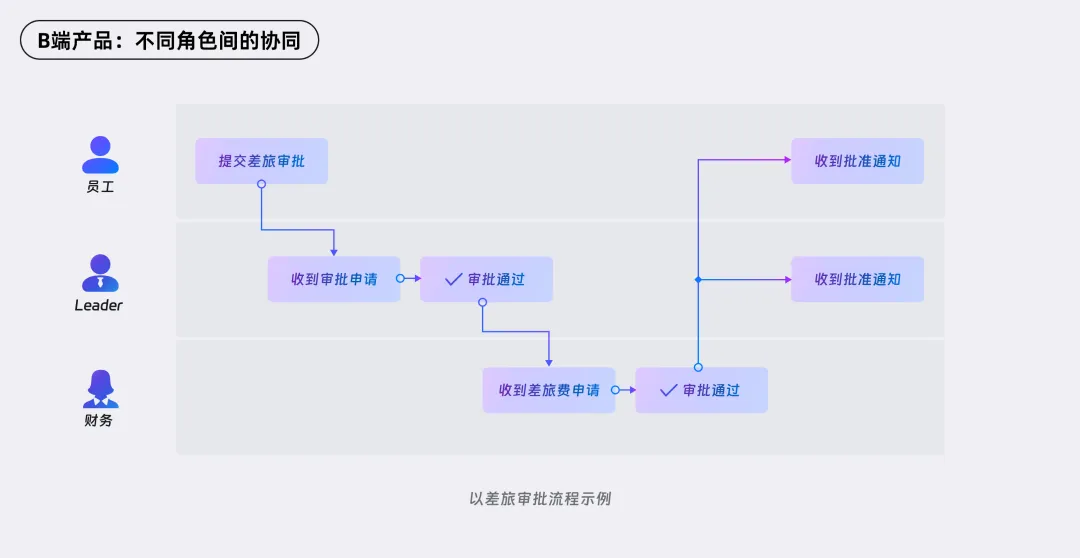
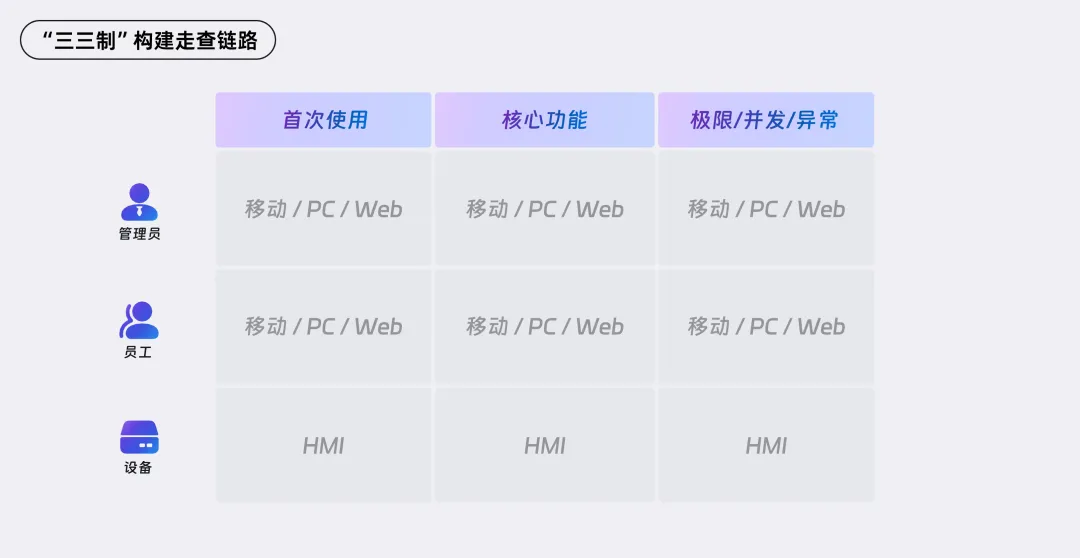
To ensure comprehensive coverage while focusing on key areas, we use the "3-3 system" to define specific walkthrough paths and tasks. This system is defined across three dimensions:
Different scenarios: Covers the main paths of the product's core journey, new-user onboarding during first-time use, and usage under abnormal conditions such as poor network connectivity.
Different roles: Designs corresponding paths and feedback mechanisms for different roles, including administrators, employees, KPs (key personnel), and devices.
Different endpoints: Includes mobile, PC, and device versions to ensure smooth completion of the main path walkthroughs across various devices.
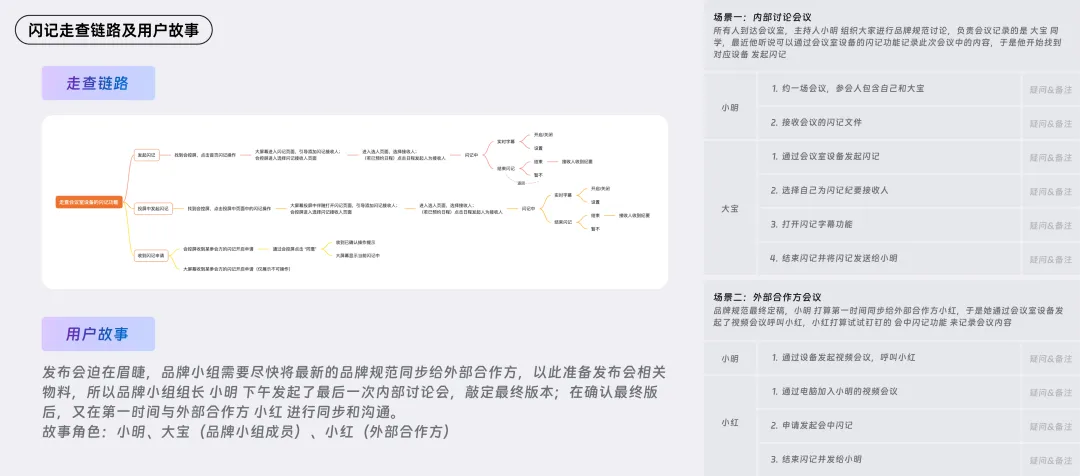
Below is an example of how the "3-3 system" was used to build a walkthrough path for the "Meeting Room Quick Notes" feature, along with the final user stories and task cards.
Tips 2: Prioritize "Newbies" Over Experts for Walkthroughs
Whether considering the importance of a new user's perspective or whether the product's mental model aligns with expectations, we should prioritize inviting new users who have never used the product before to participate in walkthroughs. This allows us to gain a more authentic understanding of a new user's first impression of the product and whether the onboarding experience meets expectations.
In a recent walkthrough of the Quick Notes feature, we observed that if the product itself lacks the ability to "speak for itself" in terms of conveying its core value, users may "go astray" and fail to complete the walkthrough tasks smoothly.
Therefore, when conducting internal team walkthroughs, we recommend prioritizing recent hires or colleagues from other business units—or those unfamiliar with the specific business—as walkthrough participants to ensure authenticity and objectivity.

Tips 3: Pre-Run Walkthrough Scenarios to Ensure Everything Goes Smoothly
In past walkthrough experiences, things generally went smoothly, but there were still occasional hiccups, such as poor network conditions, mismatched software versions, sudden device failures, or poorly designed walkthrough steps. To avoid such issues, we strongly recommend conducting a full rehearsal before the official walkthrough. A rehearsal not only helps the team become familiar with the overall process but also allows for the early identification and resolution of related equipment and technical problems, such as network conditions, hardware status, and account permission settings.

Tips 4: Streamline Staffing Ratios
In our daily walkthroughs, we've found that too many observers can make walkthrough participants feel nervous, which in turn affects the authenticity and effectiveness of the walkthrough. To address this, we recommend a staff ratio of 1:2:3 for walkthrough sessions—1 facilitator, 1–2 assistants, and 2–3 observers. This configuration ensures on-site order while allowing for effective recording and analysis of issues encountered during the walkthrough.
Tips 5: Ask More Questions, Provide Fewer Answers—Deepen Your Understanding of the Root Cause
After a walkthrough concludes, participants should be encouraged to describe the issues they encountered in detail. By asking questions, you can further clarify the root causes of these issues. At this stage, team members should focus more on "Why" and "How" rather than rushing to provide solutions. This approach helps accurately pinpoint the core of the problem and prevents misunderstandings later on.

Tips 6: Use the "Shan Cun Rule" to Categorize Issues and Prioritize Them
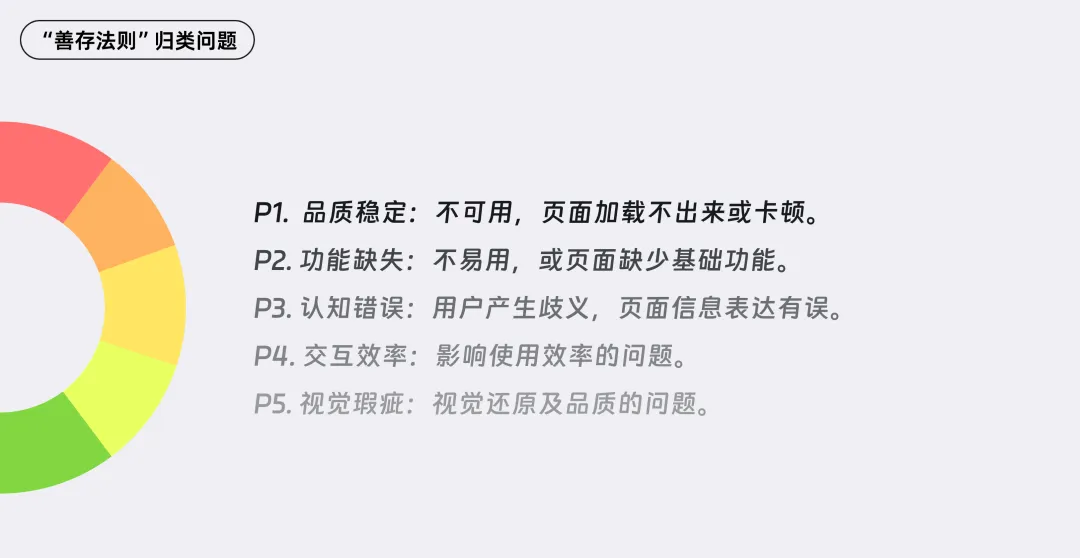
When faced with a large number of issues identified during a walkthrough, it is crucial to prioritize them effectively. We have introduced a classification standard known as the "Shan Cun Rule," which works as follows:
1. Quality stability: The product is unusable, pages fail to load, or performance is severely degraded.
2. Functional gaps: The product is difficult to use, or key features are missing from a page.
3. Cognitive errors: Users are confused due to unclear or misleading information on a page.
4. Interaction efficiency: Issues that negatively impact the efficiency of user interactions.
5. Visual defects: Problems related to visual fidelity and quality.
Based on this classification, and in alignment with the product's core MVP, we record all issues into a requirements pool according to their priority, ensuring that each issue is addressed in a timely manner.
Tips 7: Collaborate With Business Teams to Define Priorities and Drive Implementation
The purpose of a walkthrough session goes beyond identifying issues—it lies in resolving them. Therefore, when determining issue priorities, deep involvement from both business and product teams is essential to ensure that problems can be planned and resolved appropriately during routine iterations. This requires consensus among all parties on priority levels, with joint efforts to drive problem resolution forward.
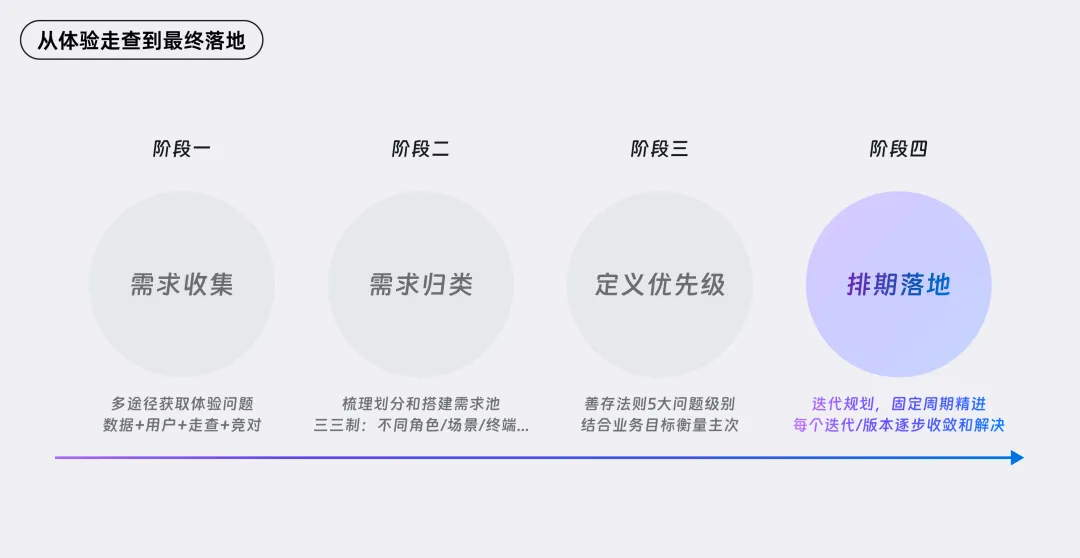
How can consensus be reached more efficiently? Bring the product manager along for the walkthrough! In the past, excessive pressure from business goals or commercialization metrics often made the entire business team less sensitive to experience-related issues. After a systematic walkthrough, the business team gains a more intuitive understanding of real user behavior, develops a stronger sense of certain pain points, and ultimately comes to recognize that unresolved experience issues can lead to user churn if left unaddressed.

Tips 8: Summarize and Reflect in a Timely Manner for Continuous Improvement
After each walkthrough, a timely summary and reflection should be conducted to distill general mechanisms and methods, enabling more efficient and accurate goal achievement in future work. For example, when users first interact with a product, they typically rely on certain cognitive pathways to understand the product. Therefore, when designing walkthrough scripts and task configurations, we can start from the perspective of new users and gradually move toward walkthroughs and testing of the product's core paths, ensuring that every step is thoroughly validated.

In Conclusion
Through the above "Eight Core Principles for B2B Product Walkthroughs," we can now more precisely and comprehensively identify core issues compared to the past. With the participation of business stakeholders, consensus on issue priorities can also be reached quickly, thereby ensuring the efficiency of product iterations and the resolution of problems. We believe that this highly targeted and comprehensive set of eight core principles will bring a newer and more complete set of standard approaches to optimizing the experience of enterprise-level products, enabling even better refinement of the product experience.
DomTech is DingTalk's officially designated service provider in Macau, specializing in providing DingTalk services to a wide range of customers. If you'd like to learn more about DingTalk platform applications, feel free to contact our online customer service, or call +852 95970612, or email [email protected]. We have an excellent development and operations team with extensive market service experience, ready to provide you with professional DingTalk solutions and services!