




 Português
 English
In modern team management, as teams grow in size, handling multiple tasks becomes crucial to overall efficiency—and directly impacts the team's future development.
When managing multiple tasks in parallel, teams often face issues such as slow response times, unclear responsibilities, and inconsistent alignment on overall goals. These challenges can drag down productivity and even prevent teams from achieving their objectives.
To boost efficiency and ensure progress toward team goals, we've designed a "Task Oversight" multi-dimensional table template based on the unique features of multi-dimensional tables. This template is designed to help teams manage tasks more scientifically and efficiently.
✦Template Overview
The "Task Oversight" multi-dimensional table template consists of four sub-tables that cover the entire workflow—from task assignment and follow-up to summarization and statistical analysis. With its intuitive data display and user-friendly interface, this template provides powerful support for driving tasks forward.
No matter where you are in the task flow—whether you're a frontline worker, a department head, or senior management—you can use this multi-dimensional table to meet your specific needs or find your role within the system.
01 Task Assignment Table
—Integrate new tasks into the workflow and respond quickly to new demands
The Task Assignment Table is the core component of the template. It records detailed information for each task that requires oversight. Here, you can easily assign each task to the responsible department and person in charge, and set an expected completion date.
The table also includes a one-click reminder feature. When you notice that a task is falling behind schedule, simply click a button, and the system will automatically send a reminder to the person in charge, ensuring that the task stays on track.
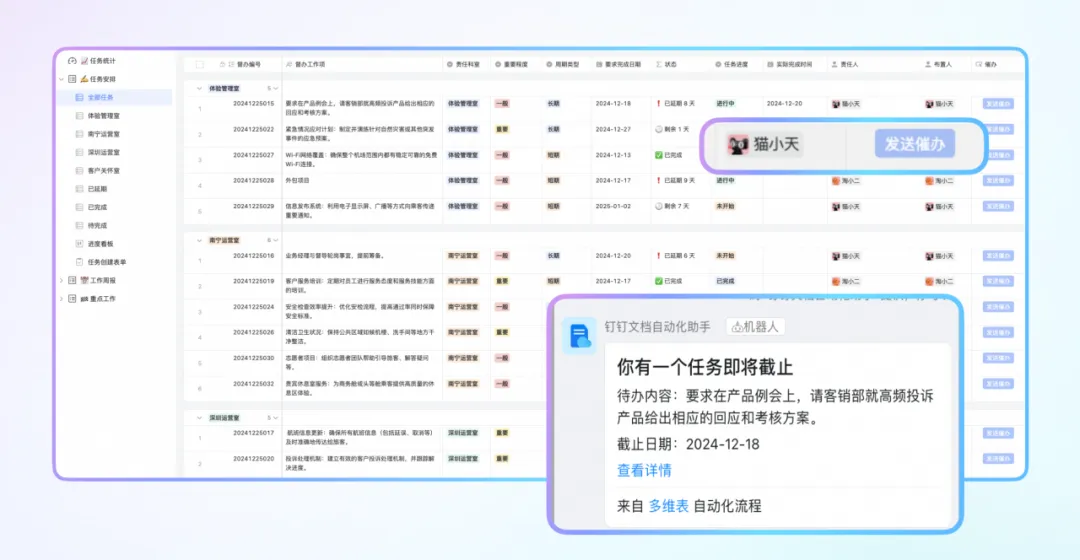
For example, suppose the customer service team receives feedback about a product issue that requires technical support. You can create a new task entry, assign it to the technical department, and set a reasonable deadline.
If the task isn't completed by the due date, you can initiate a reminder with a single click to ensure the issue is resolved promptly, improving customer satisfaction.
02 Weekly Work Report Table
—Enhance internal communication and coordination to support synchronized team planning
The Weekly Work Report Table collects work outcomes from various projects, including weekly summaries and next week's plans—critical information that helps management understand current progress and provides valuable insights for future planning.
To make reporting easier, we've also prepared a simplified weekly report submission form, allowing relevant personnel to quickly and accurately submit their work updates.
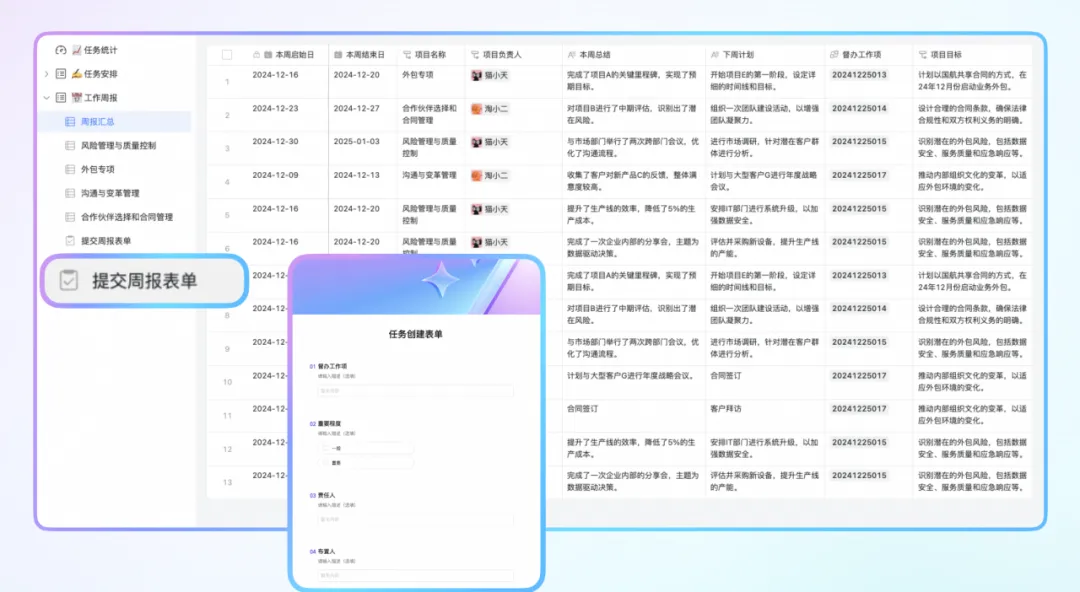
At weekly meetings, for example, departments can use the aggregated weekly report table to stay updated on the latest developments and clarify priorities within their respective areas of responsibility. Project managers can use this table to evaluate team performance, adjust resource allocation, and ensure that each project moves steadily toward its goals.
03 Key Task Table
—Clarify responsibility assignments to avoid duplicate work
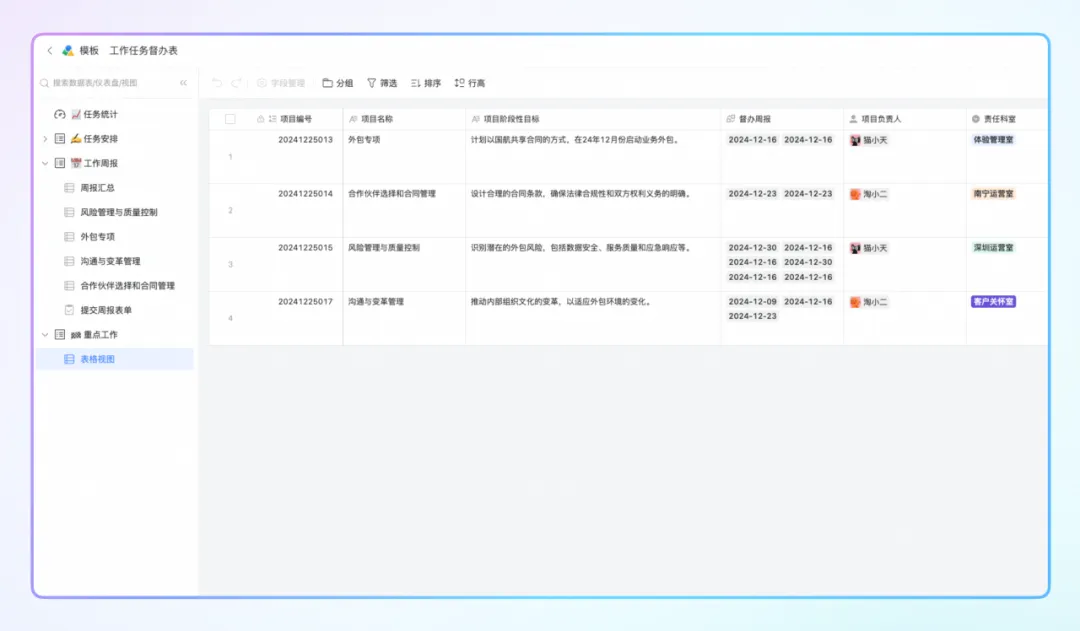
The Task Relationship Table leverages the linking capabilities of multi-dimensional tables to establish connections between major projects and specific tasks, clearly defining which department is responsible for each task. This linking mechanism makes task tracking more precise, preventing missed or duplicated work caused by unclear responsibilities and further boosting efficiency.
04 Task Statistics Dashboard
—Monitor business status in real time to support decision-making
The Task Statistics Dashboard is the highlight of the entire template. It uses charts to clearly display the progress of all tasks, such as the number of tasks in different states (e.g., pending, completed, overdue).
In addition, it can analyze data across different dimensions—such as person in charge or responsible department—to help businesses identify factors affecting productivity and take targeted actions to improve efficiency.
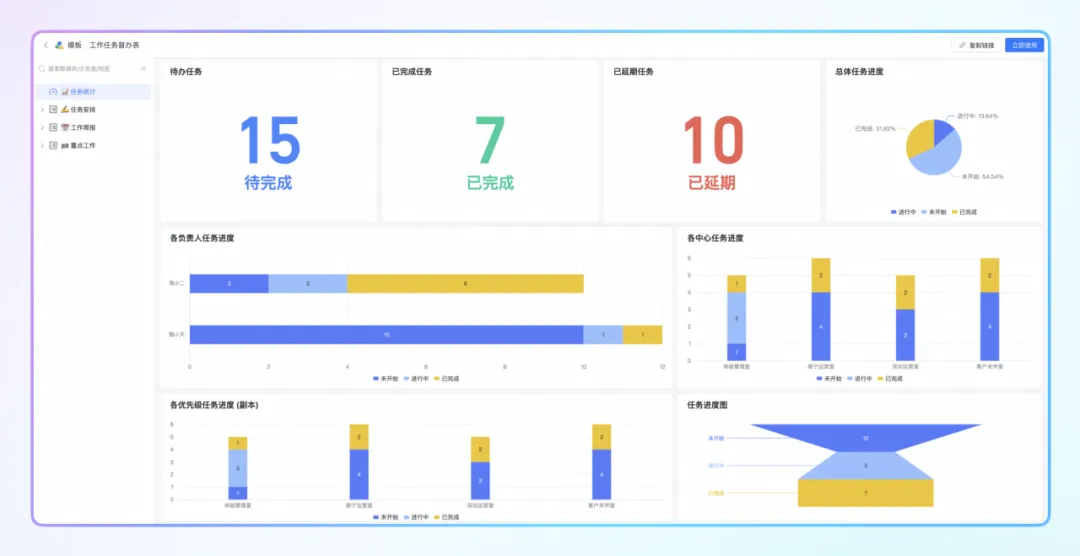
Managers can use the Task Statistics Dashboard to monitor the overall progress of tasks in real time and make more informed strategic decisions based on the data. For example, if a particular department has a low task completion rate, managers can investigate the root cause and decide whether to add staff or optimize processes.
In summary, the "Task Oversight" template can be applied in a wide range of scenarios. It simplifies complex task workflows into several clear and easy-to-understand tables, enabling integrated management of task assignment, execution oversight, and performance evaluation.
For teams looking for ways to improve efficiency, this template is an invaluable tool you won't want to miss.
Scan the QR code in the article to get this multi-dimensional table template for free. Explore the endless possibilities of multi-dimensional tables today!
DomTech is DingTalk's official designated service provider in Macau, specializing in providing DingTalk services to a wide range of customers. If you'd like to learn more about DingTalk platform applications, feel free to contact our online customer service or reach us by phone at +852 95970612 or by email at [email protected]. Our skilled development and operations team brings extensive market experience to deliver professional DingTalk solutions and services!