




 Português
 English
C-end products are familiar to most people—we use Taobao for shopping, Amap for ride-hailing, and other enterprise-enhanced software services to meet specific needs in particular life scenarios. In these cases, the user is also the decision-maker.
But B-end products are more long-term oriented. Enterprise needs don’t stem from individual user demands; instead, they arise from the connections and extensions of production relationships. The user is not necessarily the decision-maker.
At the same time, businesses of different sizes have varying demands for products. Take DingTalk as an example: we must design standardized products to meet the needs of small and medium-sized enterprises with limited resources and large numbers. At the same time, we need to build a sufficiently open platform to address the personalized needs of large organizations under complex architectures.
Meanwhile, ecosystem co-creation enables DingTalk to better enhance the scope and quality of enterprise services. Not only can organizations collaborate efficiently internally, but they can also quickly break down information barriers between enterprises, accelerating the formation of positive network effects. In today’s volatile economic environment, cost reduction and efficiency improvement are clearly key concerns for businesses.
Therefore, when designing enterprise collaboration products for B-end scenarios, it’s crucial to balance the actual user experience while also supporting business growth and meeting objective enterprise needs.
Through industry data analysis, we’ve found that users often exhibit characteristics such as “wide geographic distribution of enterprises” and “a broad age range among employees.” When purchasing external tools, 71% of enterprises cite “lack of understanding or trust” as a key factor influencing their purchasing decisions. At the same time, nearly 30% of enterprise application systems are built in-house. How to enable seamless integration between these in-house systems and AI is another critical consideration in product framework design.

So in designing the DingTalk AI assistant, we not only aim to help enterprises understand, trust, and closely connect with DingTalk AI, but also to help users from diverse backgrounds quickly get up to speed with AI and boost their work efficiency.
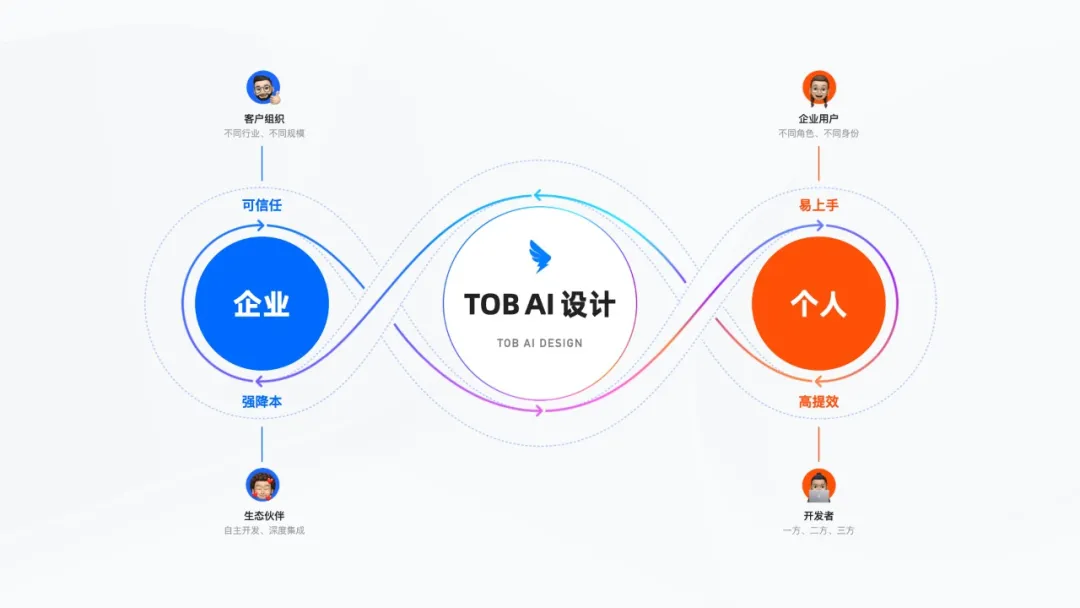
- Design for individuals
Lower the AI usage threshold and provide an intuitive, simple AI interaction experience to make AI easier to use
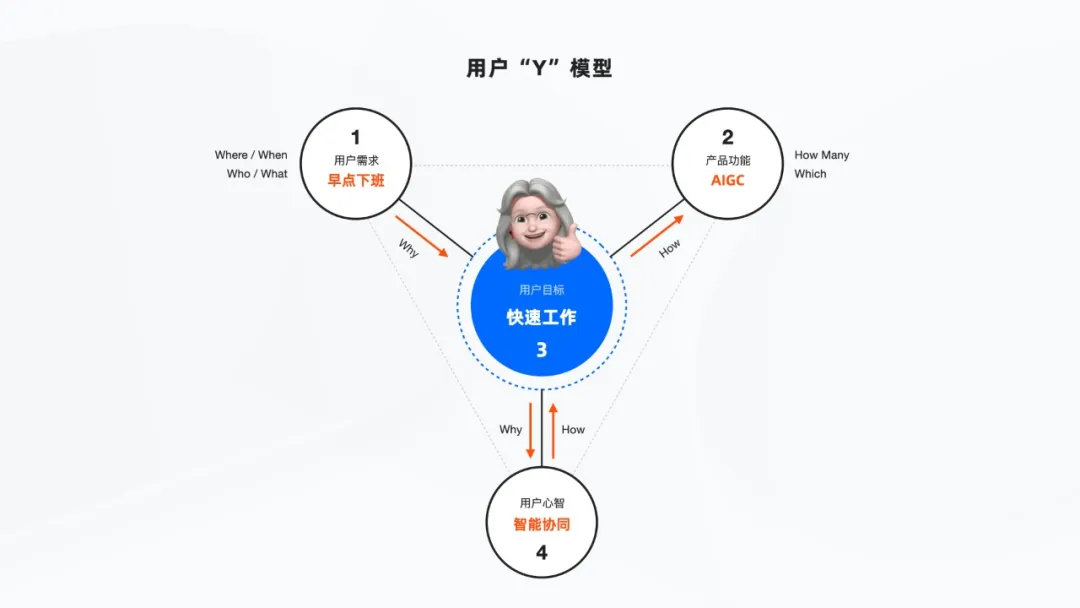
Whether they’re users or developers, everyone hopes AI will help them get their work done faster—rather than completely replace them and cause job loss. That’s why we tend to view AI as a productivity tool. In interaction design, we lower the AI usage threshold to make AI more accessible, ensuring that users of different ages, backgrounds, roles, and identities can all use it easily.
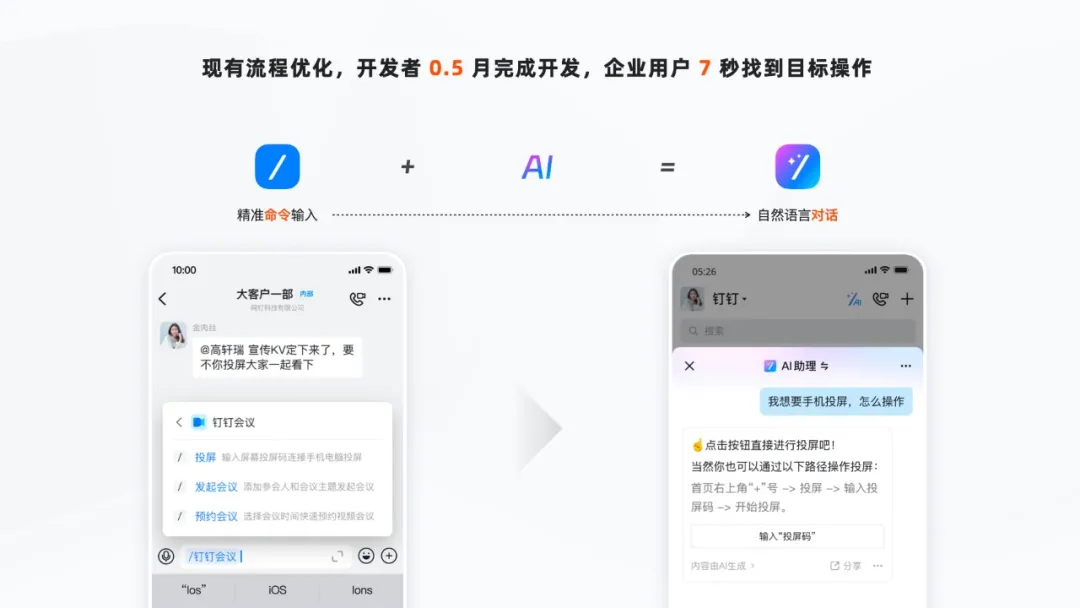
01. Optimize existing app workflows to double your productivity
First, for developers, the “shortcut command” feature—which previously took six months to implement through understanding business processes, writing code, and testing—can now be developed in just half a month using AI.
For ordinary users, only a small fraction previously used the “/” shortcut key to quickly find and execute app actions. Now, by chatting with the AI assistant, anyone can experience this convenient app operation, upgrading efficiency from “commands” to “conversations.”
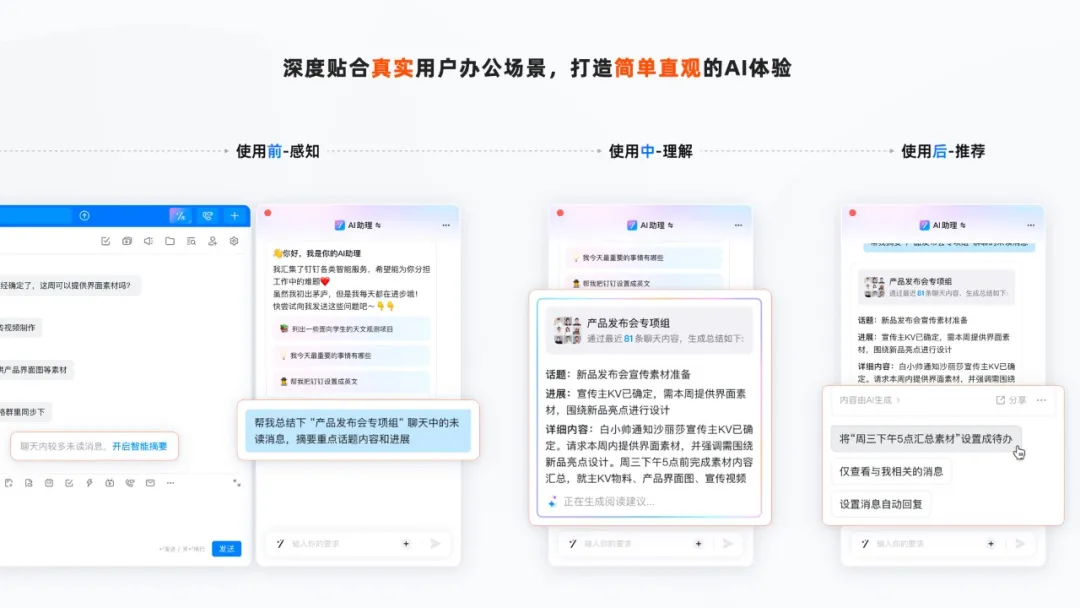
02. Align with real user scenarios to boost communication and collaboration efficiency
In addition to optimizing existing workflows with AI, we aim to deeply align with real office scenarios to create a simple and direct AI experience. In daily office work, communication and collaboration are extremely frequent activities. When using DingTalk, users are often overwhelmed by unread messages.
Before use: Awareness
Based on this pain point, when a user opens a group chat with a large volume of unread messages and rich context, we design a “AI Summary” value-presentation entry upfront to spark interest in using AI. At the same time, we provide clear operational guidance so users can summon the AI assistant with a single tap and quickly experience its capabilities.
During use: Understanding
When a user taps “AI Summary,” we use interaction strategies such as prompt expansion and interactive trace retention to eliminate noise during human-AI conversations, guiding users and AI toward effective communication and fostering a “positive feedback loop” for two-way dialogue. As AI generates content, we use streaming gradients, typewriter animations, and other visual, dynamic interactions along with explanatory language to ease users’ anxiety during the waiting process while also helping them understand AI’s thought process.
After use: Recommendation
Once the AI results are delivered, users can also follow AI’s personalized behavioral recommendations to reduce unnecessary steps.
03. Low-input, high-output to accelerate task processing
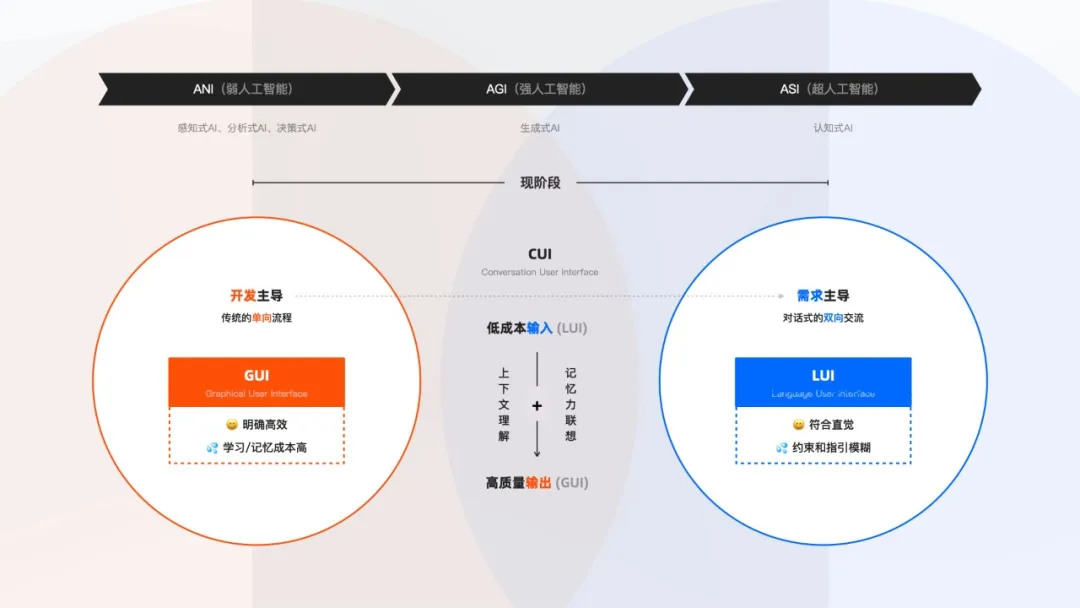
In 1973, the first computer using Alto appeared, bringing with it the GUI (Graphical User Interface) interaction. But as product features grew, users often found it difficult to learn or remember the locations of various buttons and operations.
By contrast, the LUI (Language User Interface) interaction based on large language models uses natural-language conversations, effectively sidestepping this issue.
However, when dealing with complex tasks, pure conversational interactions often require many rounds of communication. Vague guidance and constraints during the process can easily lead users astray.
So we appropriately combine LUI and GUI interaction formats, leveraging new technologies to reduce memory costs while minimizing ambiguity during task execution.
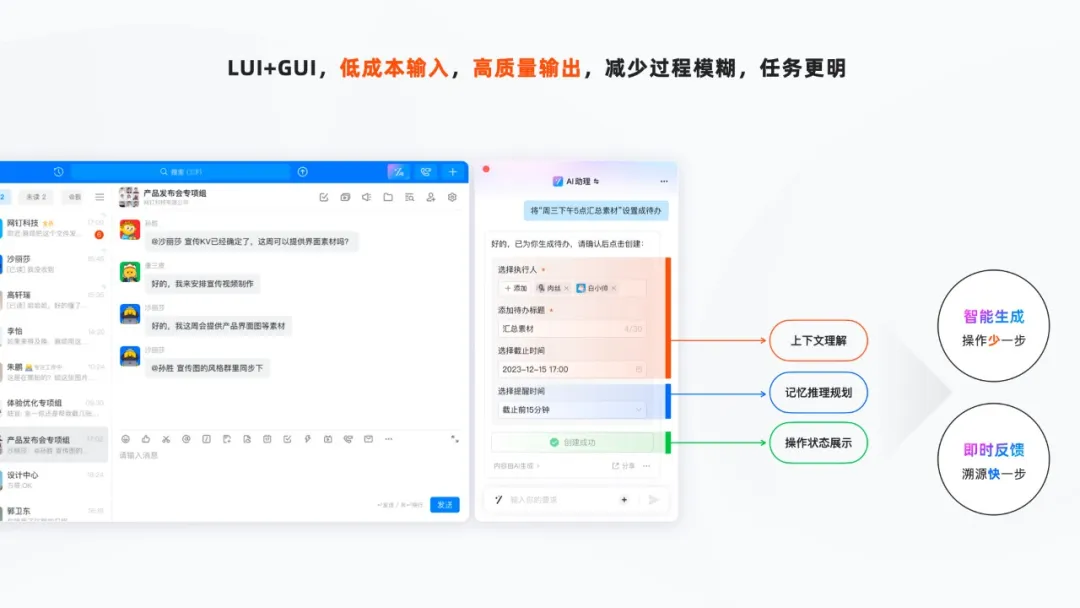
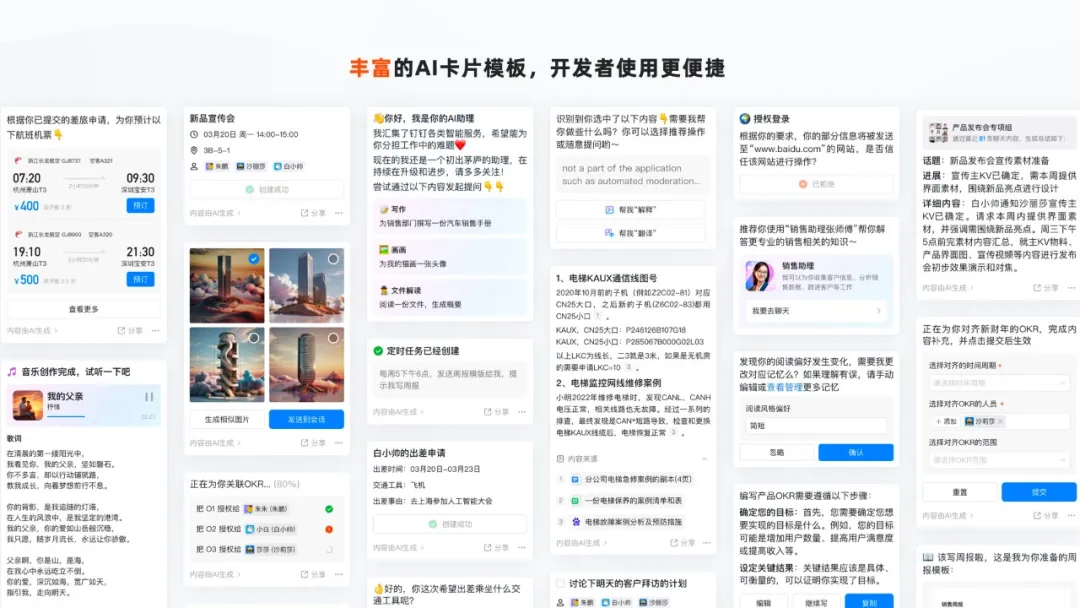
Users can input information in a low-cost, natural-language format, and AI can output high-quality results through structured data presentation. At the same time, we leverage AI’s powerful capabilities in contextual understanding, memory, reasoning, and planning to automatically extract key information and reduce user steps. By clearly displaying the task status, users receive immediate feedback, making it easier to trace back issues. In addition, we’ve designed a rich set of AI card templates to help developers present AI results more conveniently and consistently.
- Design for enterprises
Build sustainable enterprise trust with universal and open processes and frameworks to make AI dependable
After addressing usability challenges in individual communication and collaboration, we shift our perspective to the enterprise level to explore how AI can facilitate efficient knowledge and application collaboration within companies.
As mentioned earlier, 71% of enterprises believe that “lack of understanding or trust” is a major factor affecting their purchasing decisions.
Only by establishing trust with enterprises will they be willing to adopt and confidently use AI products.
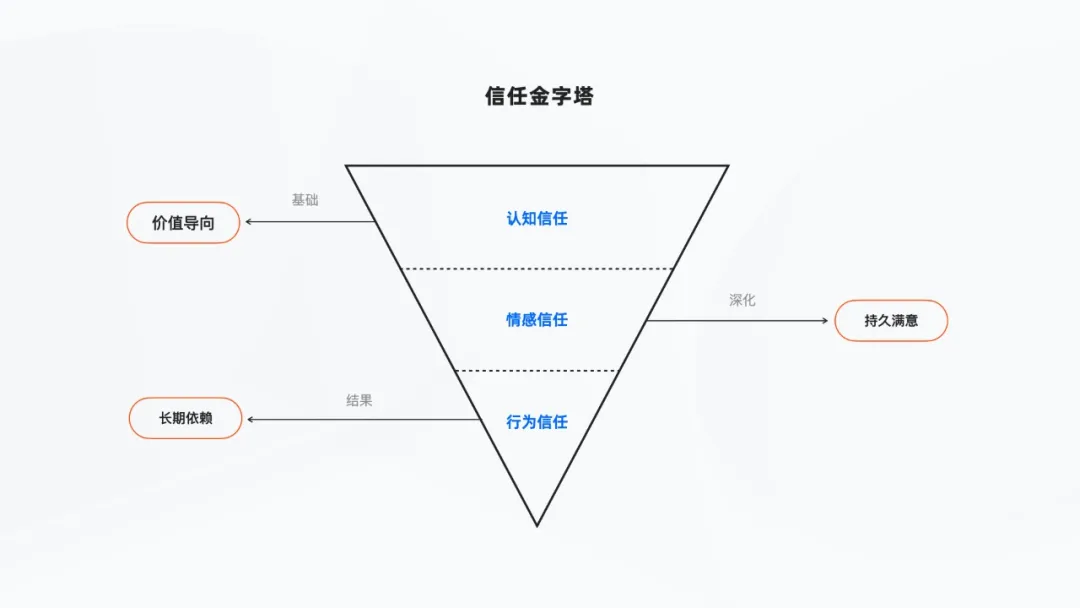
We divide trust into three levels: cognitive trust, emotional trust, and behavioral trust.
01. Build cognitive trust in cost-saving value to encourage enterprises to use AI
First, we need to establish initial cognitive trust with enterprises, showing them that AI products can indeed solve real business problems and deliver cost-saving and efficiency-enhancing benefits.
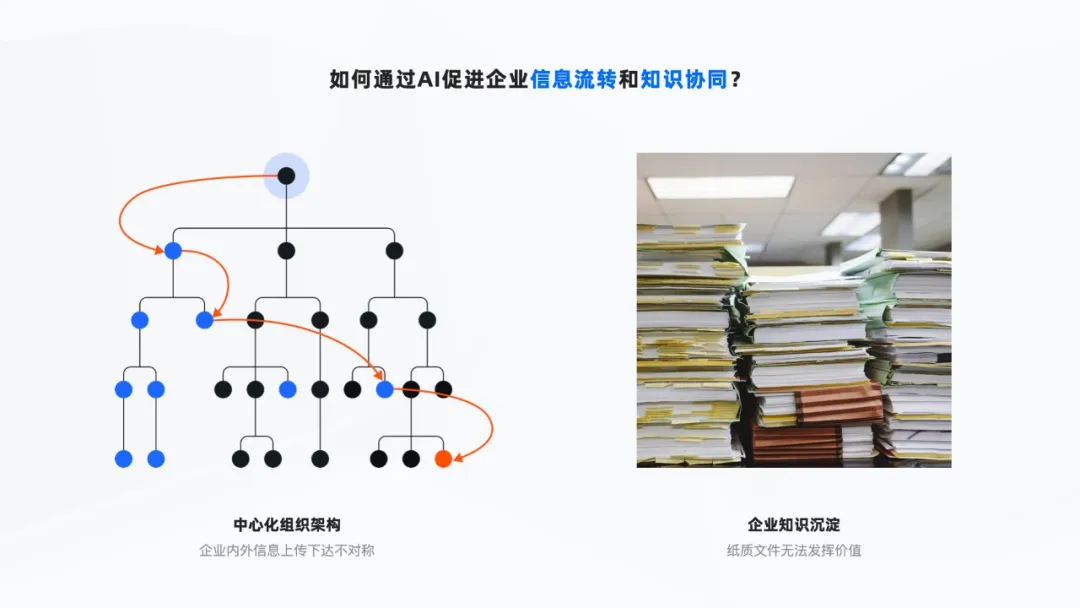
Based on our design insights into the “centralized organizational structure and hierarchical decision-making” of enterprises, we’ve found that information distortion or delays often occur during upward and downward communication, impacting the efficiency of information collaboration. Meanwhile, as companies grow, they accumulate vast amounts of corporate knowledge—past contracts, manuals, and other paper materials that often gather dust in warehouses, rarely realizing their true value.
How can AI effectively activate corporate assets, promote information flow, and reduce the cost of knowledge collaboration?
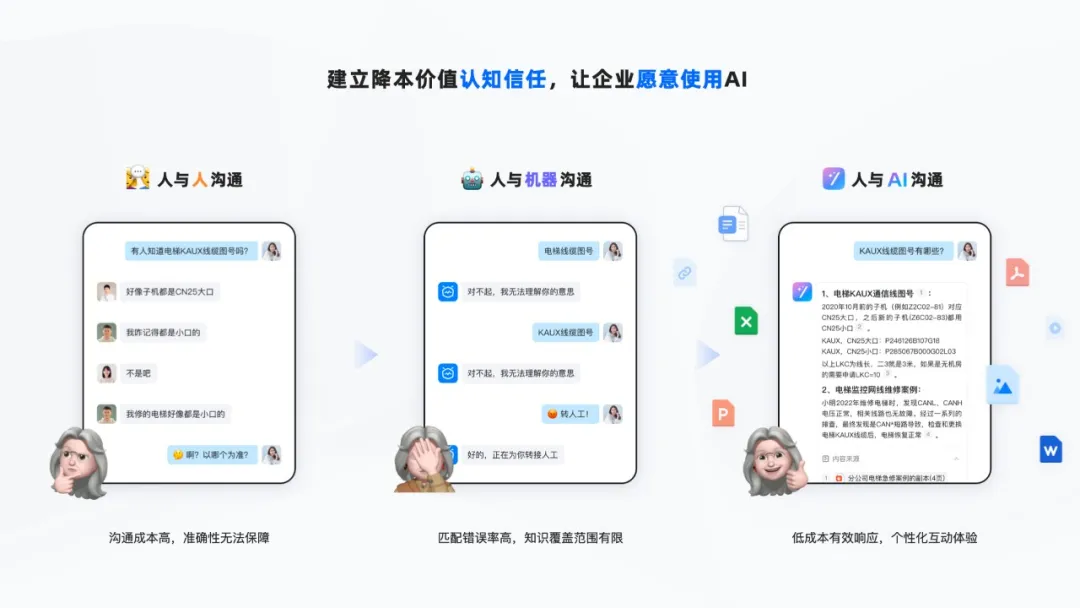
Take Mitsubishi Elevator maintenance as an example:
Human-to-human communication
Historically, elevator repairs were handled by master craftsmen mentoring apprentices, with knowledge passed down orally. This approach was not only costly in terms of communication but also highly susceptible to subjective interference, making it hard to ensure accuracy and leading to repeated bugs and errors.
Human-to-machine communication
Later, Mitsubishi deployed robots to provide technical support to frontline employees nationwide. However, the knowledge coverage of machine-based Q&A was limited. Frequently, the system couldn’t find relevant information or failed to match keywords correctly. In the end, the queries had to be transferred to human agents—and the robots were often accused of being unintelligent.
Human-to-AI communication
The emergence of generative AI not only allows it to accurately parse natural semantics and understand user intent, providing high-quality, effective Q&A responses, but also enables enterprises to upload local knowledge. A simple photo of a paper document can be recognized. If users want richer results, they can quickly search the internet for industry solutions. This enhances the knowledge interaction experience while reducing the cost of knowledge collaboration.
02. Foster emotional trust in AI results to deepen user satisfaction with AI use
AI can quickly generate results based on user queries using predefined data and patterns, but current technical limitations such as AI hallucinations and biases still leave users feeling insecure when using the product.
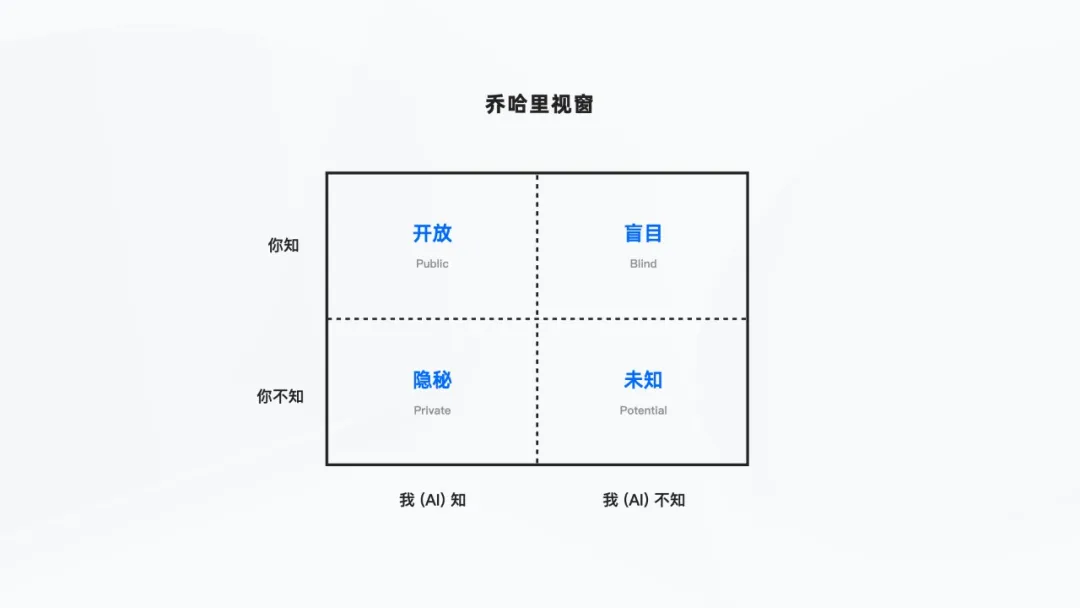
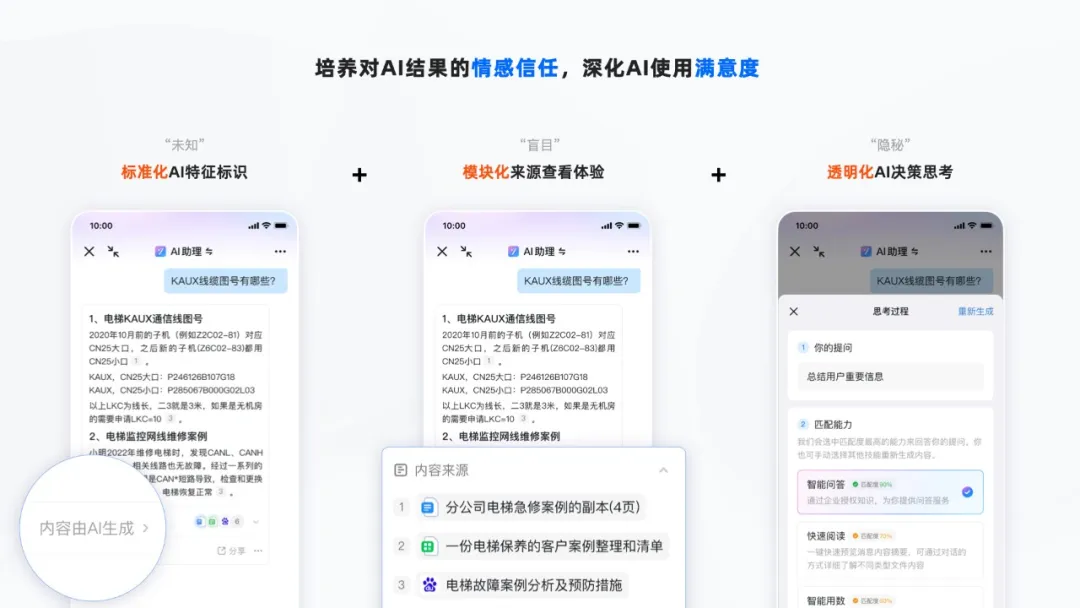
Clearly label AI information to avoid “unknown” content
To alleviate users’ anxiety about AI being fictional or unreliable, we apply the “Johari Window” concept, clearly marking AI-generated results with a “Generated by AI” label. This helps distinguish between AI-generated and non-AI-generated information, allowing users to decide for themselves whether to trust the content.
Label AI information sources to help “user knowledge” identify the origin
To help users better understand whether AI-generated content draws from internal corporate knowledge or includes public-domain information, we clearly mark the sources cited by AI, ensuring users can click through to access and trace the original materials at any time.
Make algorithm “black boxes” transparent to understand AI’s operating mechanisms
When AI executes complex algorithms, the underlying logic is often treated as a “black box.” Through white-box interaction design, we make AI’s decision-making process transparent, helping users better understand how large models operate.
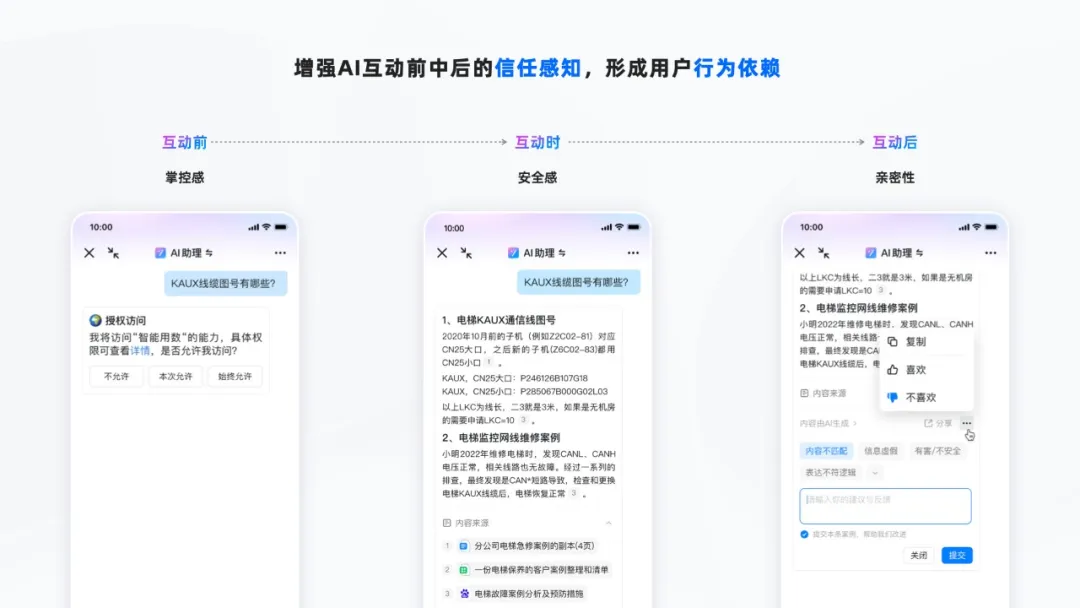
03. Enhance trust perception before, during, and after AI interaction to foster user behavioral dependency
Before interaction—sense of control
When AI fulfills user requests, we use natural, conversational authorization interactions to give enterprises a strong sense of control over data security.
During interaction—sense of safety
For the AI-generated results mentioned earlier, users can verify the authenticity of the data source at any time, gaining a sense of certainty and safety.
After interaction—sense of closeness
When AI generates results that don’t meet expectations, we provide convenient, lightweight feedback channels. While enhancing the closeness between the product and users, AI can also use user feedback to reflect and improve itself.
04. Provide appropriate AI interaction modes to co-create a sustainable AI experience
In addition to helping enterprises recognize the value of AI and build trust, it’s crucial for DingTalk customers and partners to form close connections with the AI assistant for the product to achieve sustainable development.
Statistics show that nearly one-third of enterprise application systems are built in-house. It’s impractical to rebuild these systems entirely using AI. As a platform product, we must consider how to integrate existing application systems with AI.
We’ve engaged in deep customer co-creation and business scenario exploration, designing three AI interaction framework paradigms: standalone (Copilot), embedded (Inside), and agent-based (Agent). Enterprises can choose the AI interaction mode that best suits their application scenarios and integration costs.
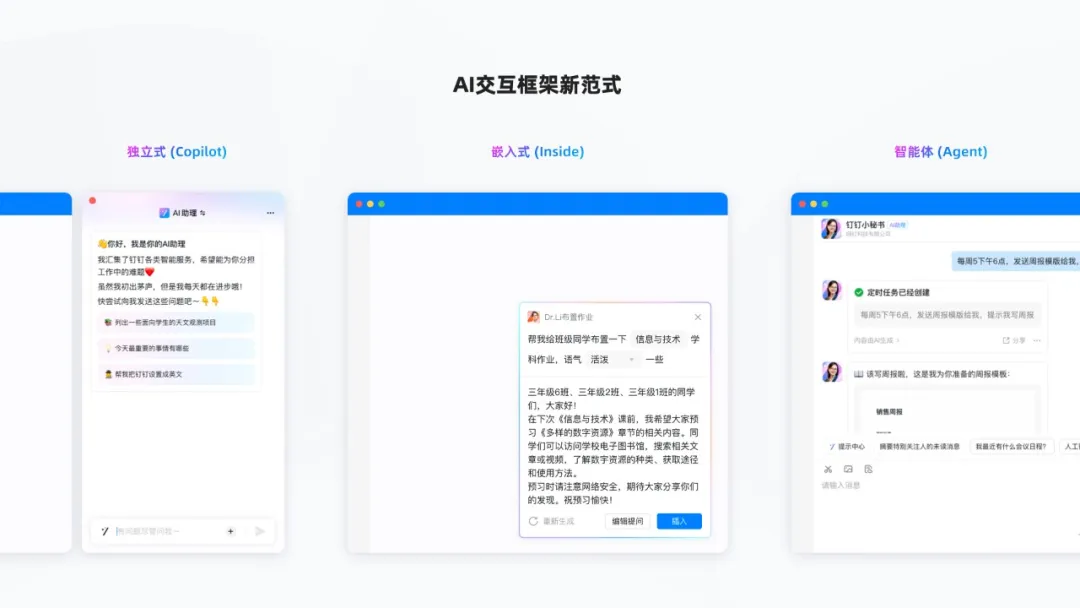
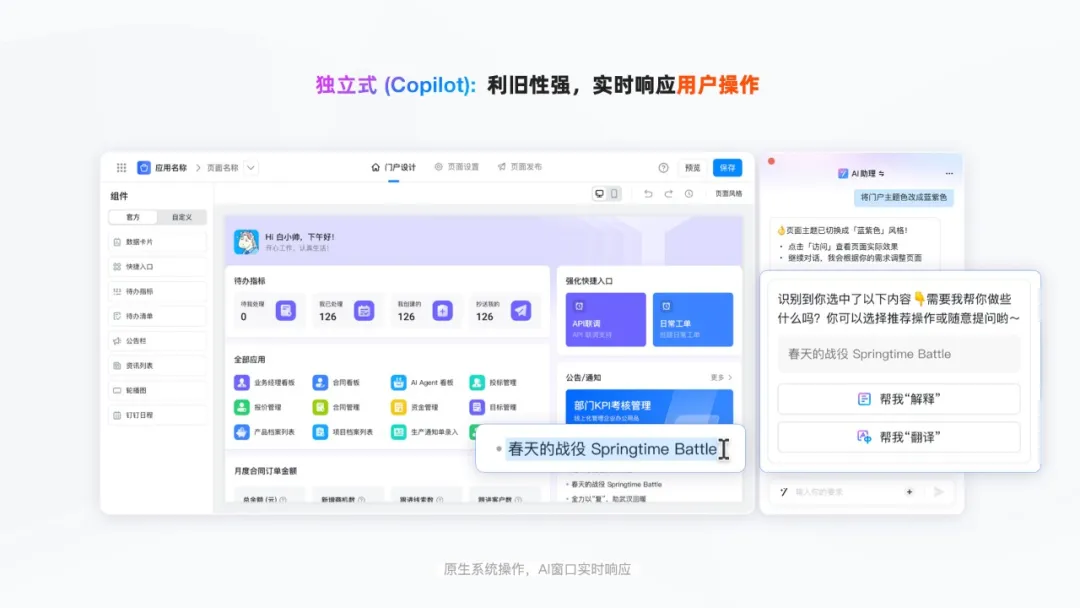
The standalone AI container works efficiently alongside user operations
The standalone AI container is like a co-pilot—it can form an efficient synergy with the AI assistant without disrupting the native app architecture.
For example, when creating a portal, you can use natural language to quickly modify and preview the latest configuration of the left-side in-house system’s settings page, eliminating the need for complex setup procedures.
At the same time, you can use a shortcut key to summon the standalone AI container at any time. The AI instantly senses actions such as text selection or screenshot capture outside the container and provides intelligent recommendations, closely linking with user operations.
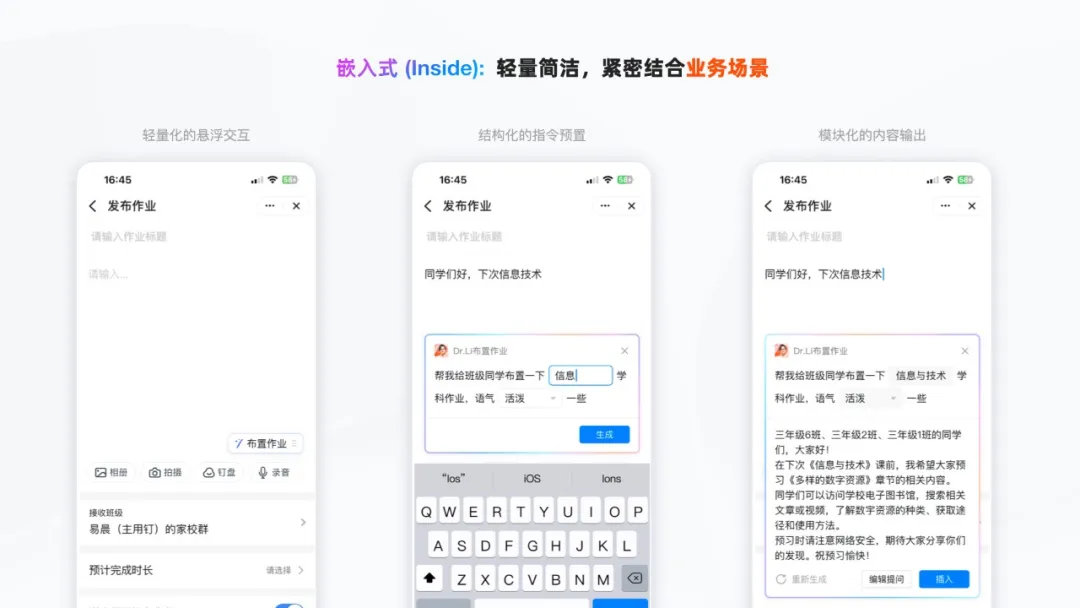
The embedded AI framework is closely aligned with business scenarios
The Inside embedded framework tightly integrates AI capabilities with business scenarios. Through lightweight floating interactions, structured preset instructions, and modular content output, users can access AI capabilities at low cost and achieve targeted results.
For example, in a clearly defined scenario like “assigning homework,” AI can automatically pull in contextual information based on the teacher’s subject, class, and current lesson progress. With pre-set parameterized prompts, teachers can easily assign homework.
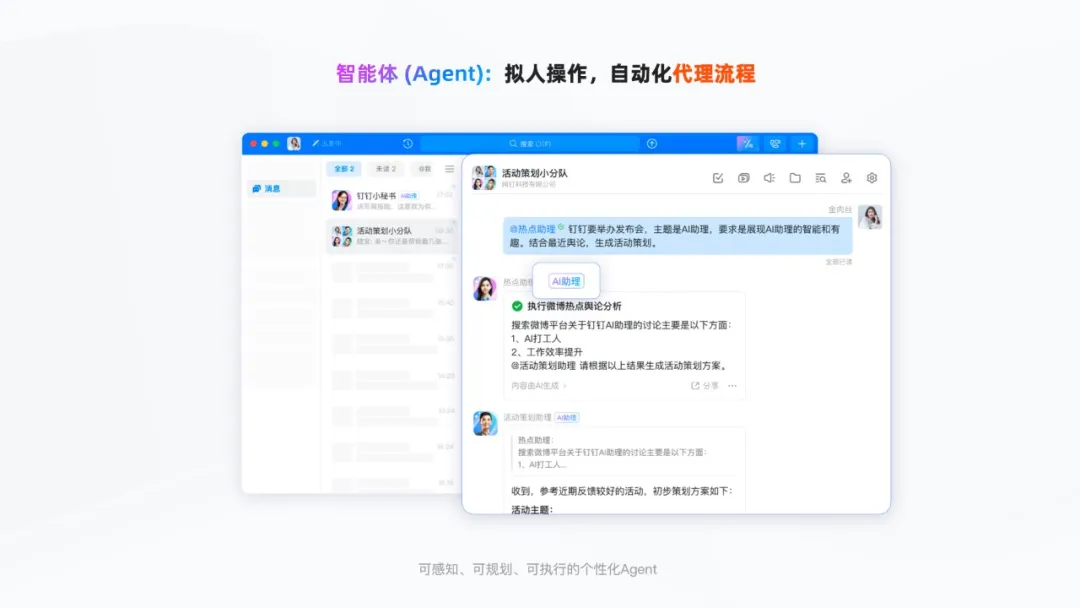
The agent-based AI architecture enables human-like automated execution
In addition, in enterprise collaboration scenarios, there are often diverse roles—such as sales, finance, and development—each with its own specific functions and workflows. The Agent is an AI assistant with a distinct identity and set of capabilities, so we’ve given Agents a more human-like appearance.

Agents act like “remote colleagues,” sensing the environment and automatically planning to execute tasks assigned by users. They help handle repetitive tasks, such as “sending weekly report reminders on schedule.”
In terms of interaction design on the user side, we’ve adopted the communication habits of regular colleagues. You can find Agents in the contact list or main search and quickly start a conversation. You can even, like a manager, bring multiple Agents with different roles into a group, letting them assign tasks to each other and jointly fulfill set requirements.
But AI is still different from humans, so to avoid misunderstandings and risks, we’ve included a clear “AI Assistant” label in the product design.
- Conclusion
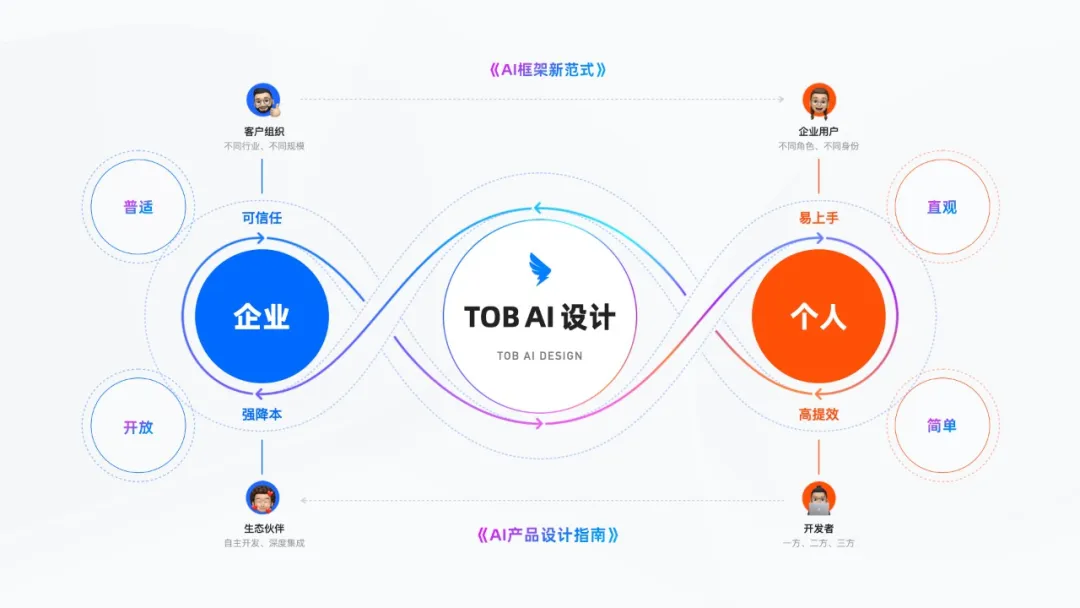
In summary, facing the complex business processes and massive data assets in B-end enterprise collaboration, we take a dual perspective—enterprise and individual—and design a simple, intuitive, universal, and open AI assistant experience. This lowers the barrier to AI use, builds trust in AI products among enterprises, and positions AI as a key productivity tool for boosting enterprise efficiency.
At the same time, the design abstracts three AI interaction framework modes—standalone, embedded, and agent-based—to meet the diverse usage needs of different application scenarios. We’ve also released the “DingTalk AI Design Guidelines: Industry Intelligence Practices,” working with industry partners to co-create a sustainable AI product experience.
We believe that “design that solves real problems is good design,” and DingTalk will always adhere to the principle of “designing for both enterprises and individuals.”
DomTech is DingTalk's official designated service provider in Macau, specializing in providing DingTalk services to a wide range of customers. If you’d like to learn more about DingTalk platform applications, feel free to consult our online customer service, or contact us by phone +852 95970612 or email [email protected]. We have an excellent development and operations team with extensive market service experience, ready to provide you with professional DingTalk solutions and services!