




 Português
 English
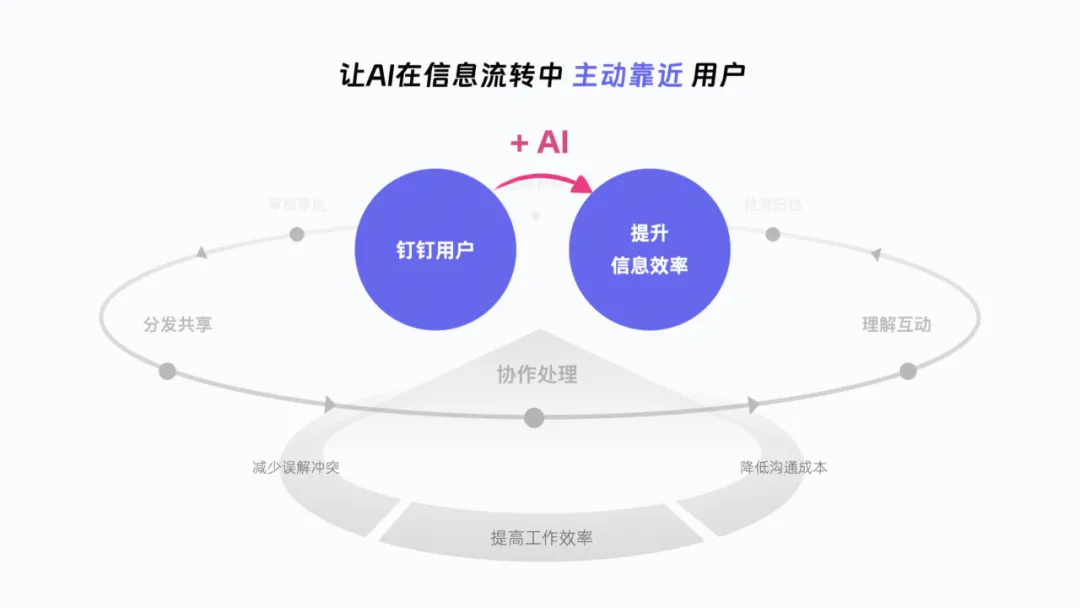
In daily office work, information flows across different domains such as DingTalk group chats, email, and documents. Enterprises want employees to instantly access and understand key information, such as project progress and task assignments. As a result, information efficiency has become a crucial metric for collaborative work: the higher the information efficiency, the lower the communication costs, the fewer misunderstandings and conflicts, and the faster the overall pace of enterprise development.
In the AI era, how will AI reshape office efficiency as it becomes deeply embedded in various collaborative processes, including team communication, task management, and knowledge sharing?
Scenario + AI: Exploring Practical Applications
$“The first half of AI is driven by computing power upgrades; the second half is driven by scenario innovation.”$
In July 2023, MiaoDuck Camera went viral across major social media platforms, offering high-quality personal portraits for just $9.90 plus $20 for 20 photos. Although MiaoDuck Camera’s generation quality and detail aren’t as advanced as MidJourney’s, it simplified steps like makeup styling, photo selection, and editing in the portrait scenario. Through rapid user-driven spread, it became the first AI application to break into mainstream popularity.
MiaoDuck Camera’s success clearly points to a clear direction for AI application deployment: if the first half of AI was driven by computing power upgrades, then the second half should be driven by scenario innovation.
In “The Essence of Interaction Design 4.0,” a concept called “goal-oriented design” breaks down scenarios into three elements: who the role is, what task they perform, and what goal they aim to achieve. The collaborative office domain happens to feature multiple roles and goals, with workers in different positions participating in information flows with distinct objectives. This makes the collaborative office space rich with opportunities for innovative “scenario + AI” explorations.

Next, we’ll share three design innovation case studies to show how we’ve integrated AI into different stages of information flow.
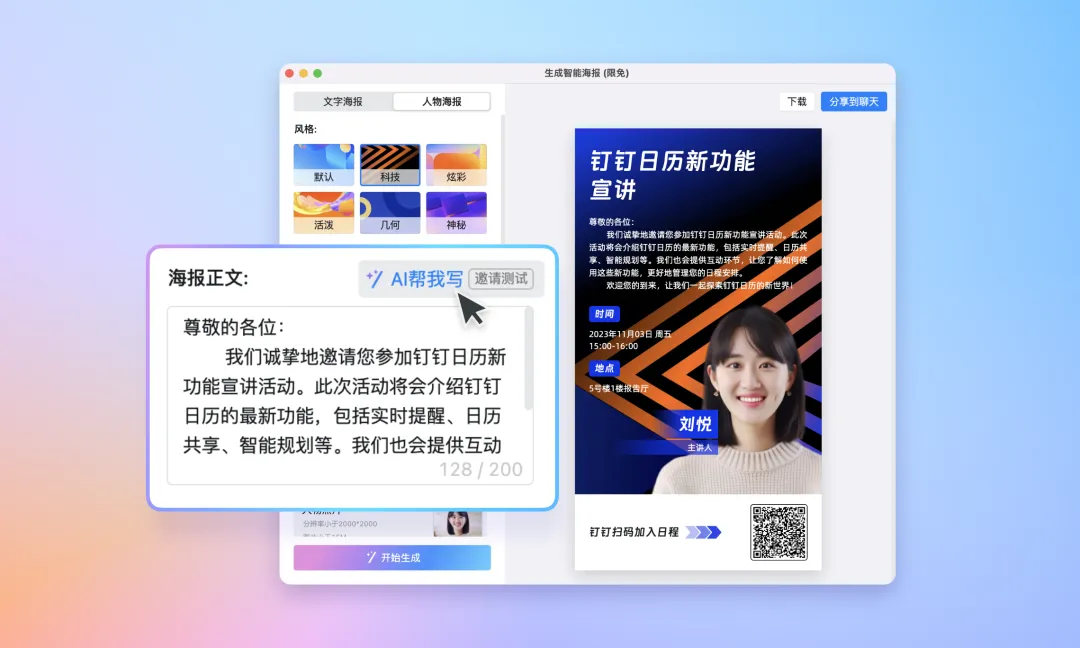
01. Smart Schedule Poster
$“Promotional scenario + AI: making information sharing more visually appealing.”$
Scenario Insight
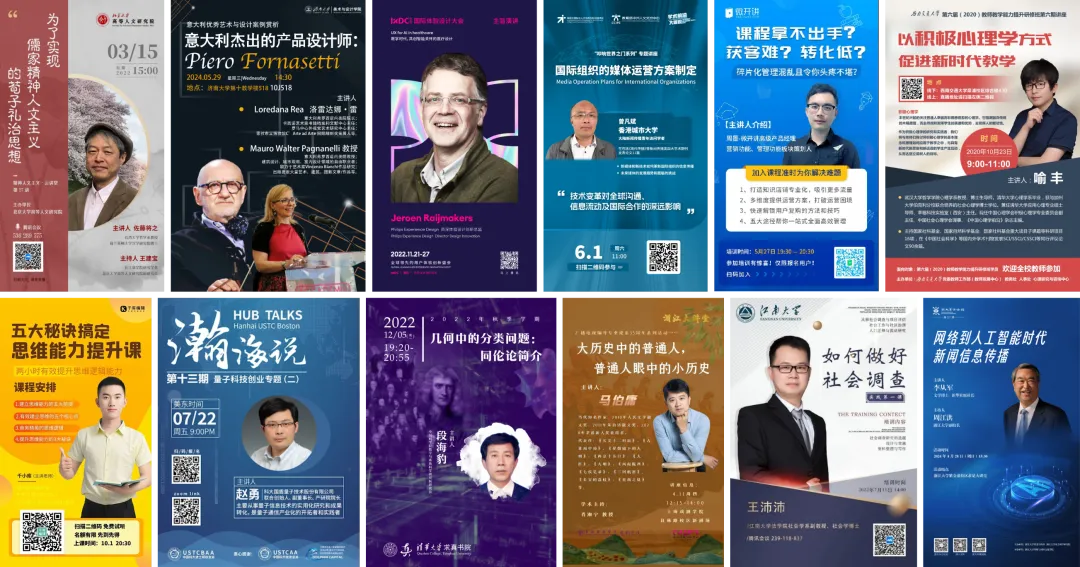
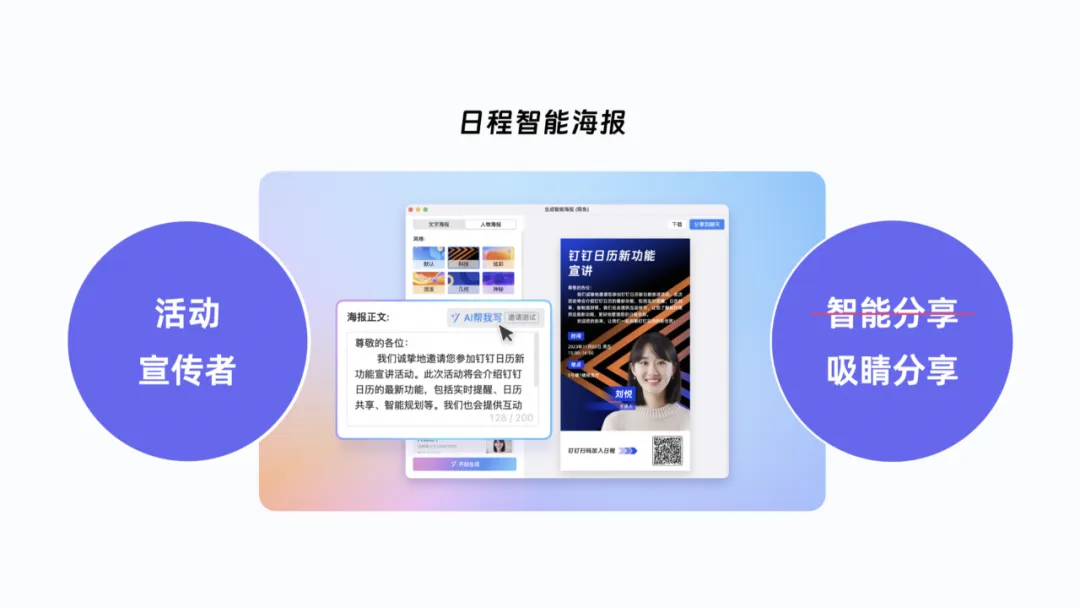
When a company hosts events at schools, organizers create an event poster, add a photo of the speaker, and use it to attract audiences to join the interaction.
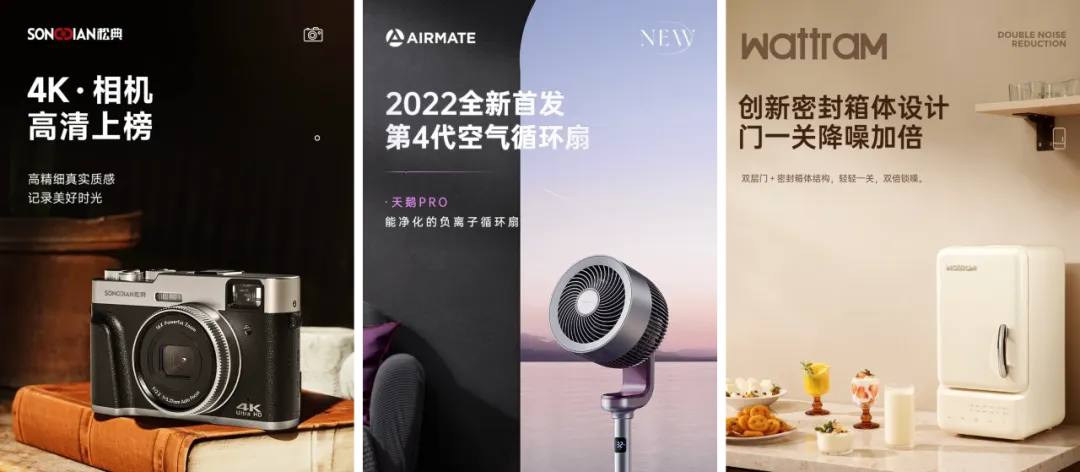
Qwen has the ability to intelligently generate product main images, automatically cropping products and quickly combining them with product descriptions to create a promotional image. A simple product description paired with a product image and an attractive background can entice users to make a purchase.
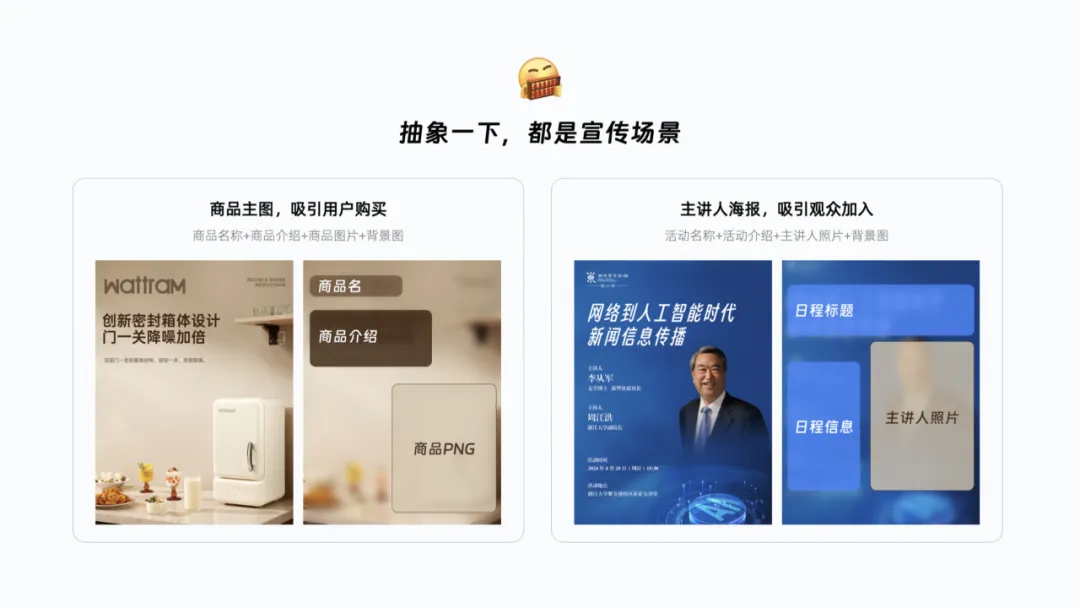
We can abstract these two types of images together—the composition is very similar, both serving a promotional purpose.
Scenario Analysis
In the previous section, we highlighted from a book that the three elements of a scenario are “role, task, and goal.” Let’s break down the scenario of creating a poster to promote a training event from this perspective: the roles are administrative staff and poster designers on the organizing committee. From information collection to promotional distribution, they need to complete at least seven tasks. The ultimate goal of creating the poster is to attract other colleagues to join.
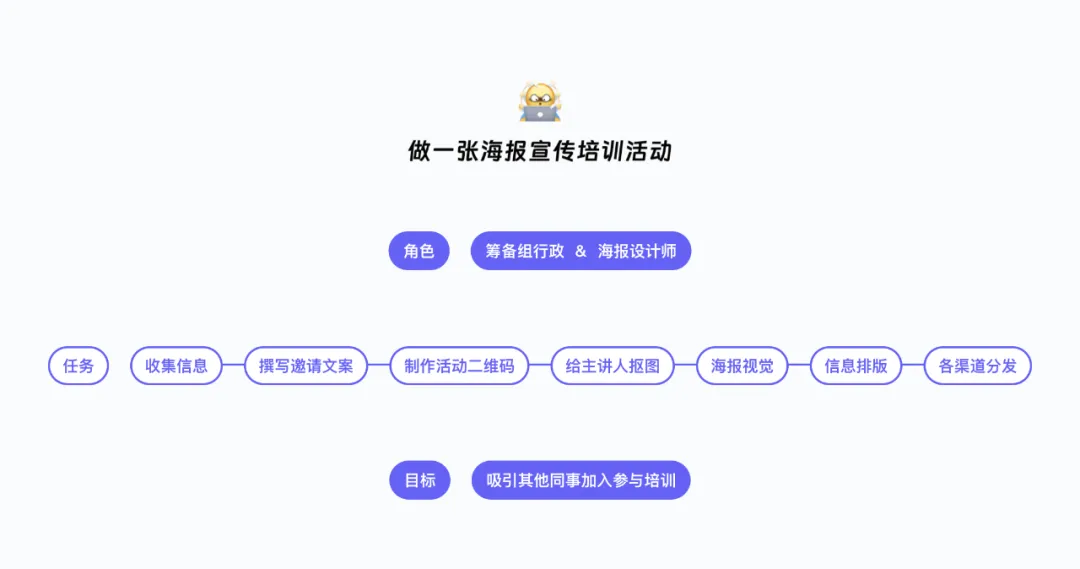
Looking at these task stages—writing copy, generating QR codes, cropping images, and visual layout—it seems that all of them can be completed using existing technologies combined with AI capabilities. So we decided to use AI to eliminate these repetitive and tedious tasks, allowing event promoters to achieve their goals more quickly.
Solution Design
We broke down the poster structure: “event information” can leverage AI’s creative abilities to help write promotional copy; “background images” can be generated by AI; “speaker photos” can be quickly cropped using mature technology; and “event links” can be automatically converted into QR codes so that attendees can scan to register and join.
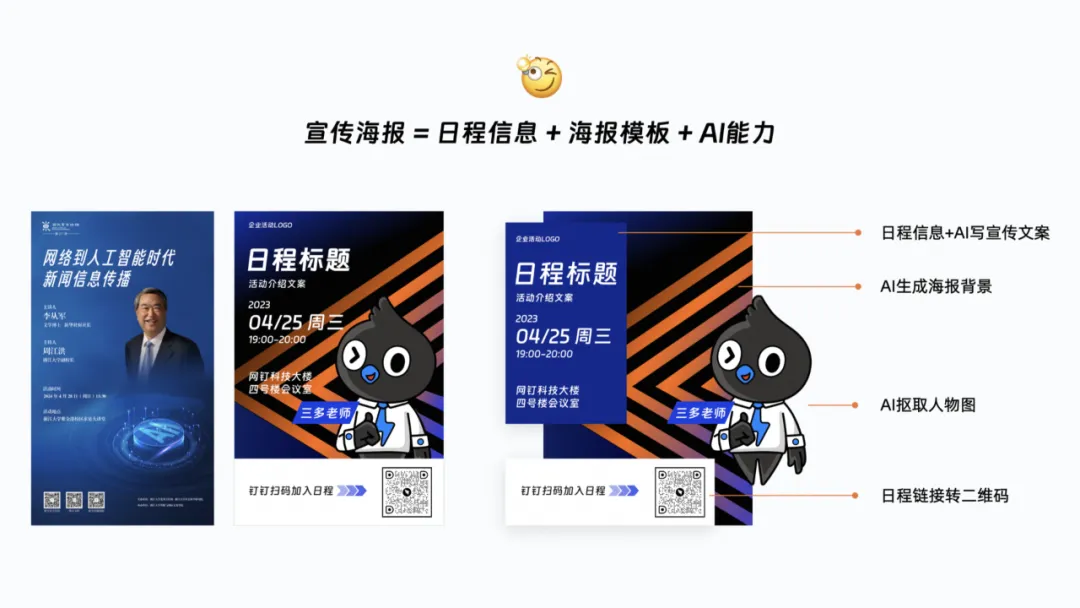
After eliminating these repetitive and tedious tasks, the plan for intelligently generating promotional posters began to take shape. Next, we needed to figure out how to turn this idea into a truly valuable feature for users.
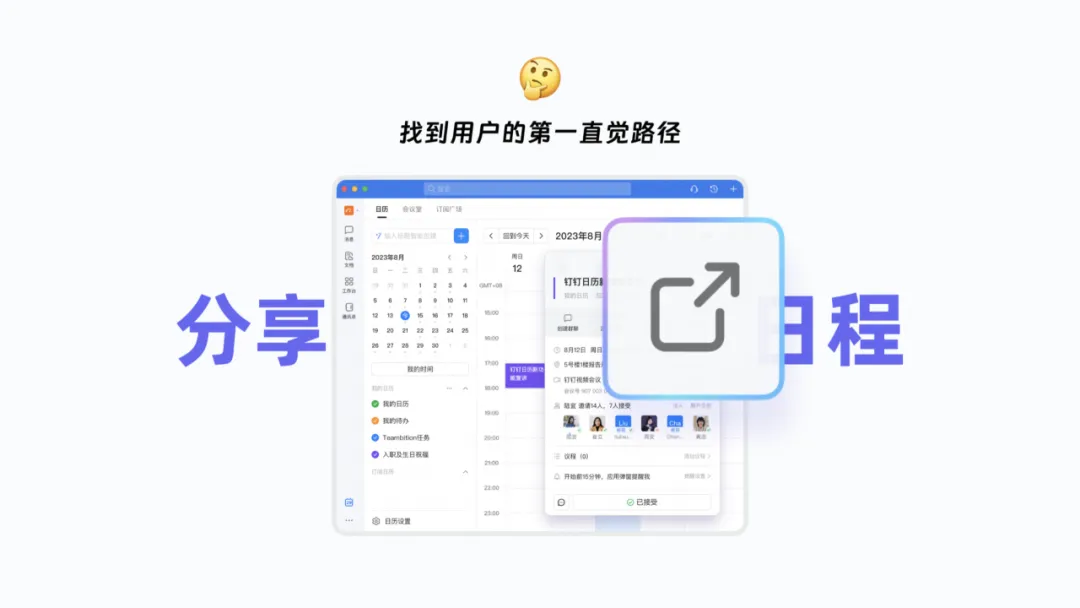
Find the user’s first instinctive path:
First, we needed to find a suitable entry point for the idea. When people want to invite others to an event, the first step is to share the schedule.
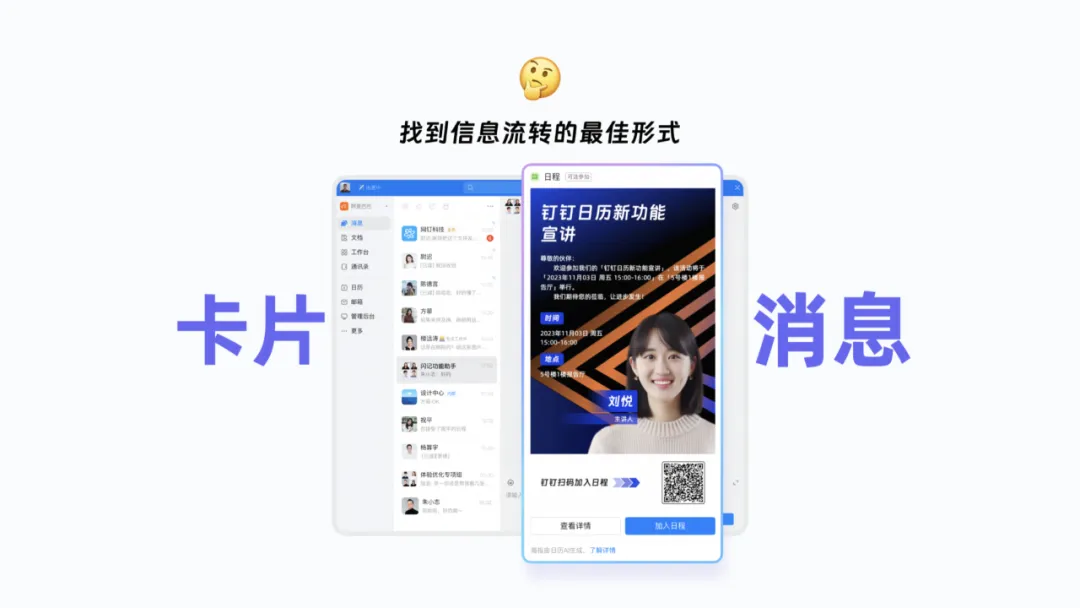
Find the optimal form for information flow:
In DingTalk, group chats are undoubtedly the best domain for widespread information dissemination. Posters are distributed in group chats as card messages, and interested colleagues can directly join the scheduled event through the action button at the bottom of the card.
Let more people experience the value of the feature:
Add a small tail to the card to guide interested users to learn more details and highlight the feature’s strengths. Perhaps the next time someone needs to create a poster, they’ll remember this feature.
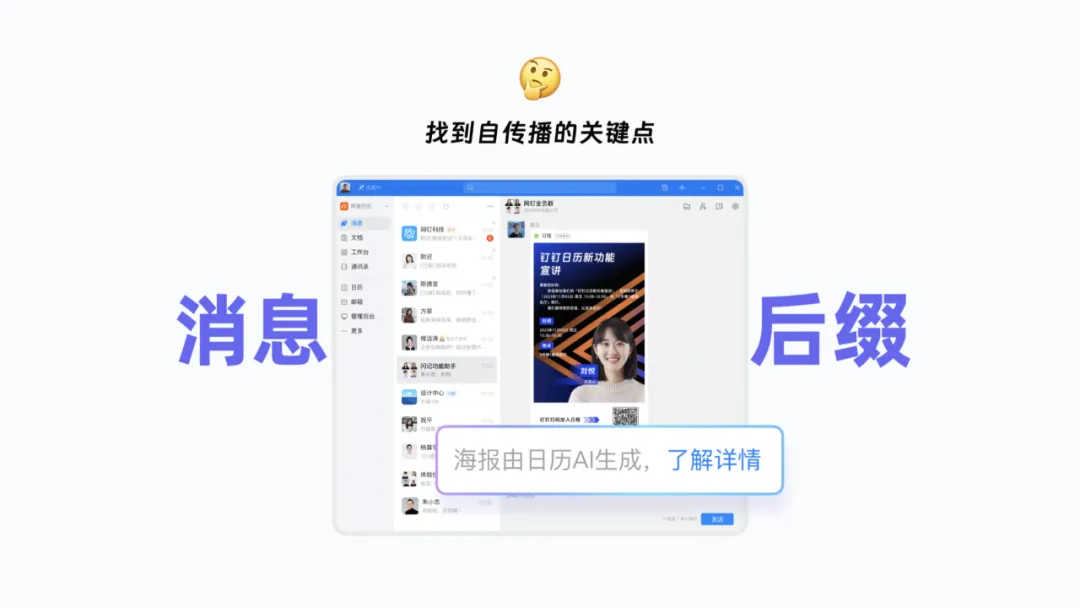
Innovation Implementation
And just like that, our smart poster solution was successfully implemented. In DingTalk, schedule information can be turned into a promotional poster with a single click and shared in group chats, supporting both text-based and image-based posters.
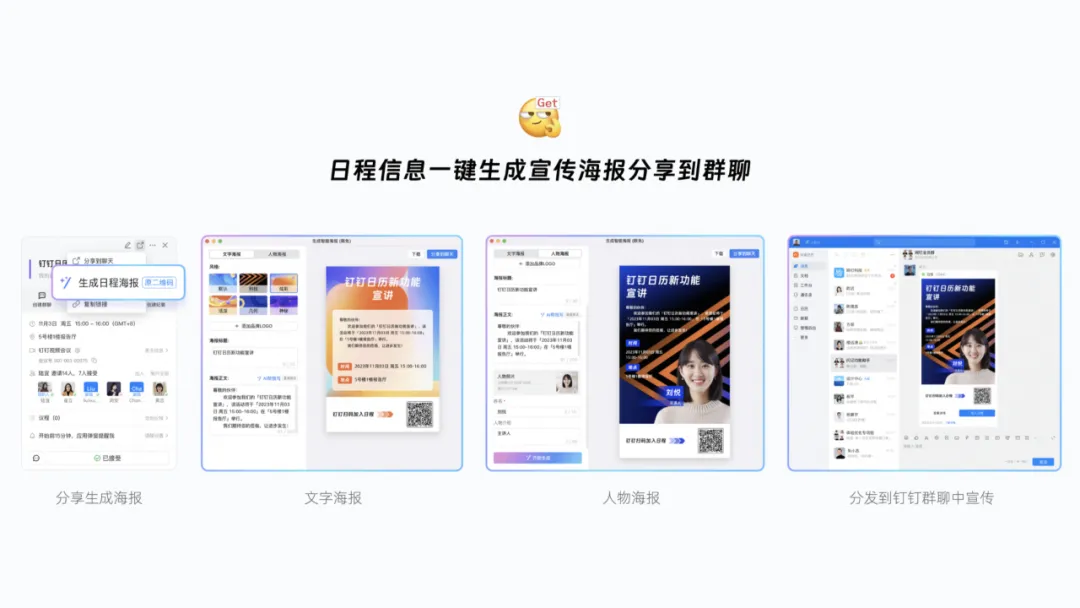
After the feature went live, it received many positive reviews from large customers, reducing the cost of promoting corporate training sessions, knowledge lectures, and other meetings while freeing event promoters from tedious, repetitive labor.
02. Natural Language Schedule Creation
$“Meeting scenario + AI: making information distribution more convenient.”$
Identifying the Problem
In daily work, when you want to meet with colleagues to discuss something, you typically create a schedule in the DingTalk calendar and send out meeting invitations in advance to reserve their time. However, the schedule creation form has drawn a lot of complaints: scheduling is too complicated.
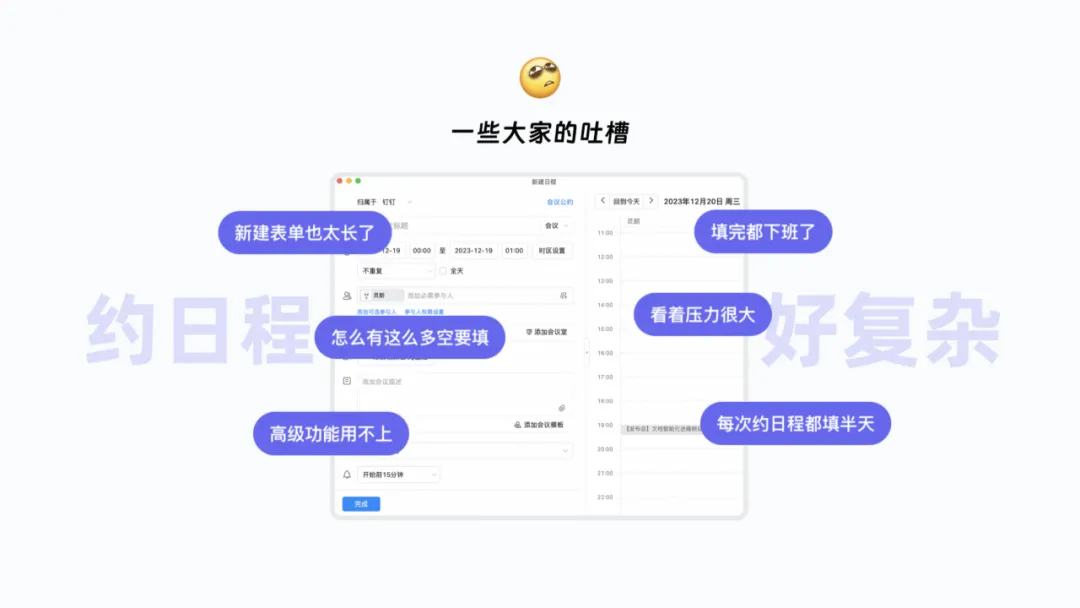
The current new schedule form has 13 input fields, which can feel overwhelming to fill out.
Following traditional optimization approaches, we would adjust the form’s layout, group and categorize the input fields, and try to simplify the form by tweaking its information architecture. But now that AI has arrived, shouldn’t we explore alternative optimization strategies?
Scenario Analysis
Take scheduling a design review meeting as an example. We again break down the scenario into three dimensions: “role, task, and goal.” The role is the designer organizing the meeting; first, they need to determine the meeting topic, then check the availability of relevant participants and the meeting room to set the time, and finally fill out the long schedule creation form to send out meeting invitations. The ultimate goal is to find a suitable time and place and notify everyone to discuss the design proposal.
What can we uncover from these tasks? Data shows that filling in just four fields—“title, time, participants, and meeting room”—can satisfy 84% of new schedule requests. User interviews reveal that determining the time based on participant and room availability is the most troublesome step.
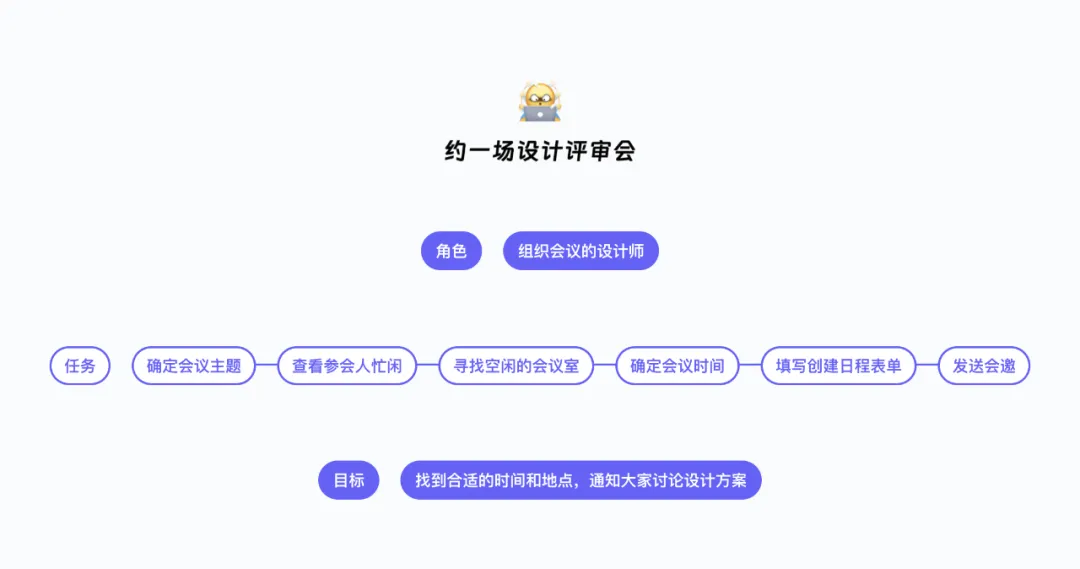
So let’s not limit ourselves to the original task process. With AI’s help, we can explore simpler forms, allowing meeting organizers to directly find the right time and place and notify everyone to discuss the matter. People say dealing with 13 input fields at once is too complex—what if we could create a schedule by filling in just one input field? Wouldn’t that be much simpler?
Innovation Implementation
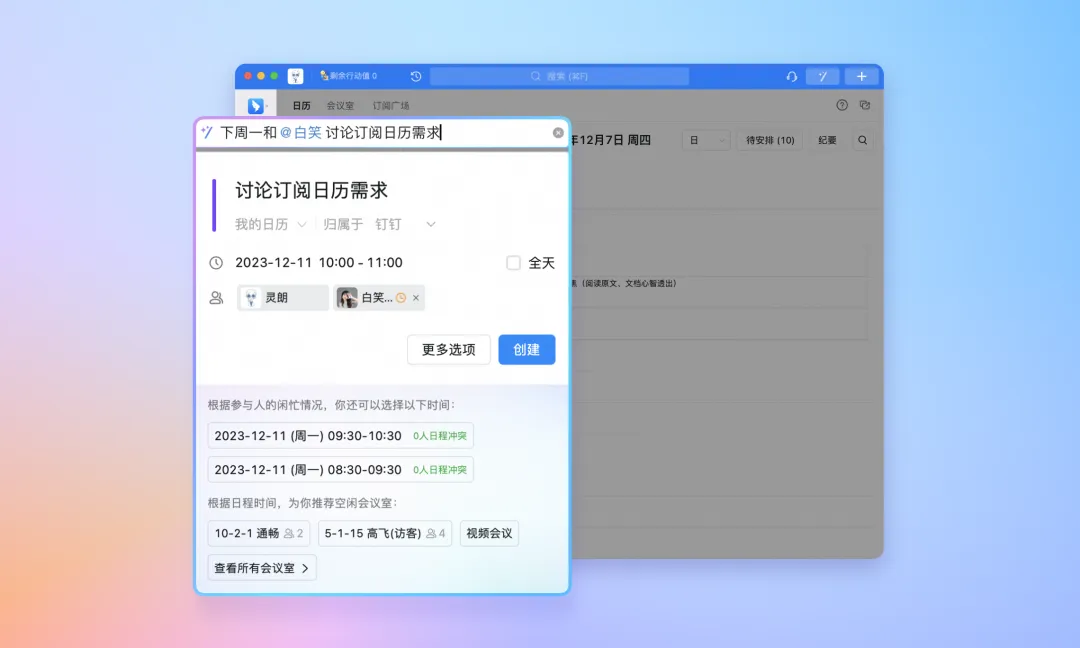
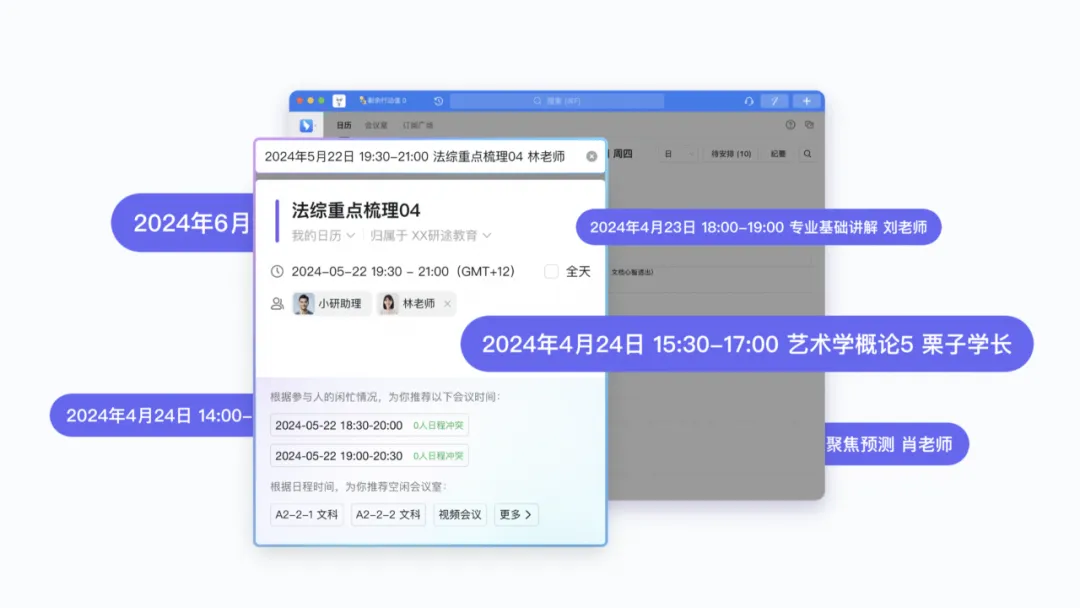
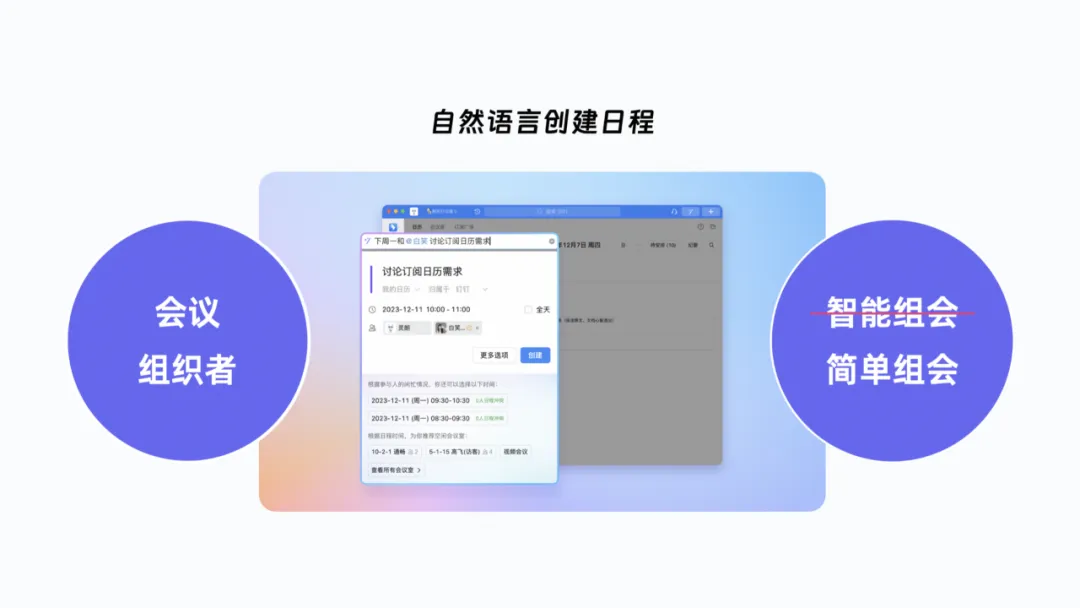
With this in mind, we proposed a natural language–powered intelligent schedule creation solution, allowing users to schedule an event with a single sentence.
After the user inputs “time, topic, and participants,” the system automatically recognizes and fills in the form. Based on the availability of participants and meeting rooms, it calculates the intersection of available time slots and recommends appropriate time and location options to the organizer. With a single click, the schedule is created in just a few dozen seconds.
Since the feature went live, it has been especially popular among training companies. They copy and paste course names, class times, and teacher information from their syllabus into the intelligent new input field, then select an available classroom to complete the creation. Within a minute, they can schedule at least ten classes, greatly improving the efficiency of course information distribution for teachers responsible for scheduling.
03. File Preview Feature Recommendations
$“Preview scenario + AI: making information processing more precise.”$
Scenario Insight
March and April are peak seasons for college students seeking summer internships. One day, my niece sent me her resume via DingTalk, asking me to take a look and offer some revision suggestions.
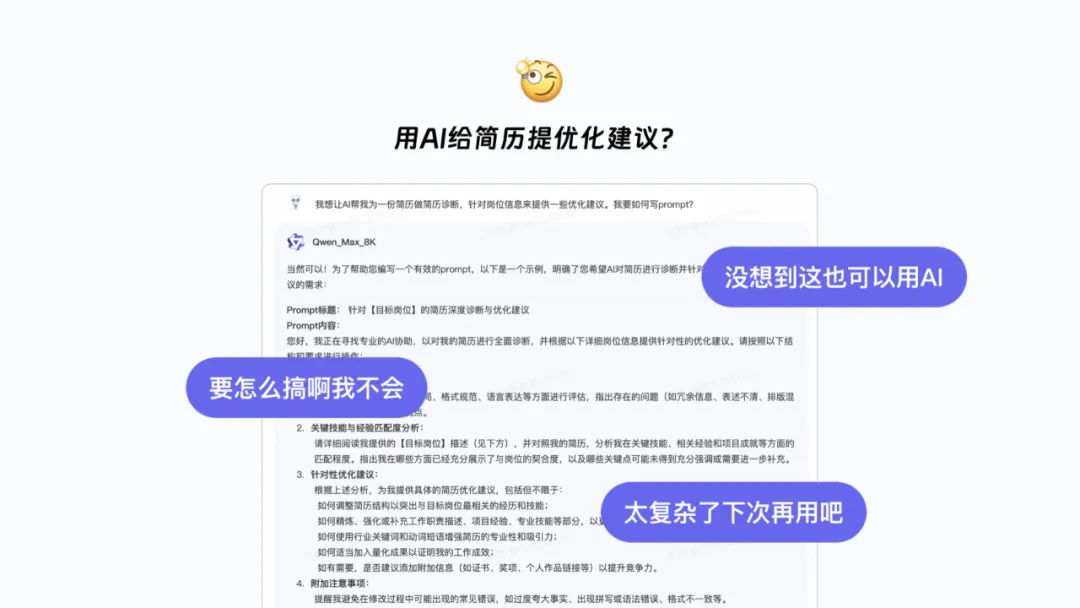
Having worked on AI features for a year, I immediately wondered whether AI could help her improve her resume. I obtained a resume diagnosis prompt from Qwen and used AI to generate a decent-quality set of revision suggestions, which I sent to her along with a recommendation to try this approach. To my surprise, she responded with three questions: “I never thought AI could do this,” “I don’t know how to use it,” and “It’s too complicated.”
Should I try teaching this method to users like her?
Scenario Analysis
Let’s break down the scenario again, using AI–powered resume optimization for college students as an example, as shown in the figure below. In fact, the steps involved in using AI to revise a resume are not complicated, and the quality of the revised suggestions generated after a few rounds of tuning is quite high.
But her three questions made me realize that the key issue is that users don’t think to use AI. The same is true for people in the workplace—they don’t interact with AI every day like we do. In their fixed work processes, they don’t realize how everyday problems can be solved using AI.
Should we strengthen the visibility of the goal to guide users through the task and cultivate their awareness of AI’s value?
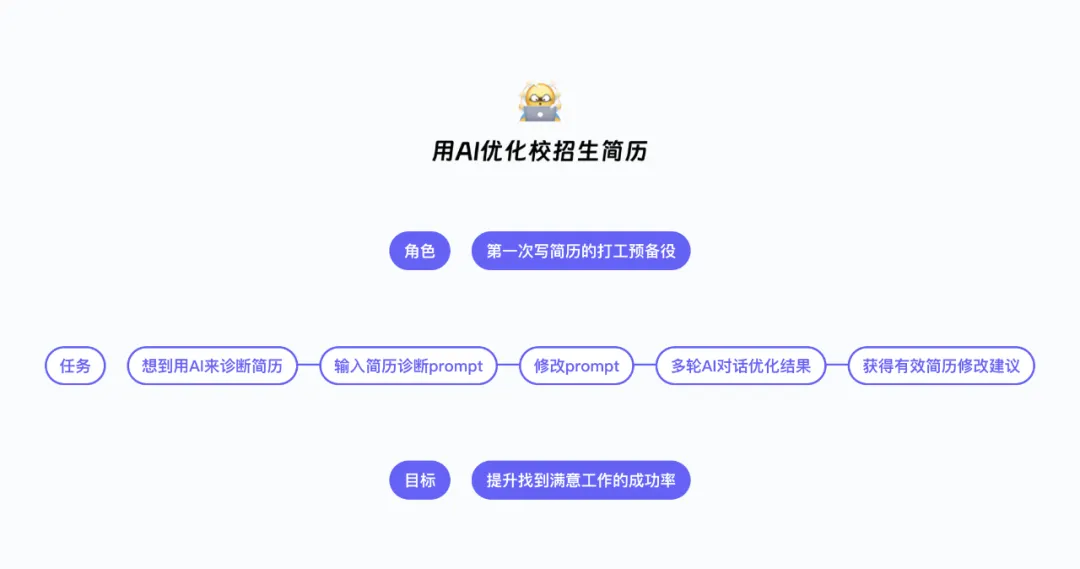
Scenario Analysis
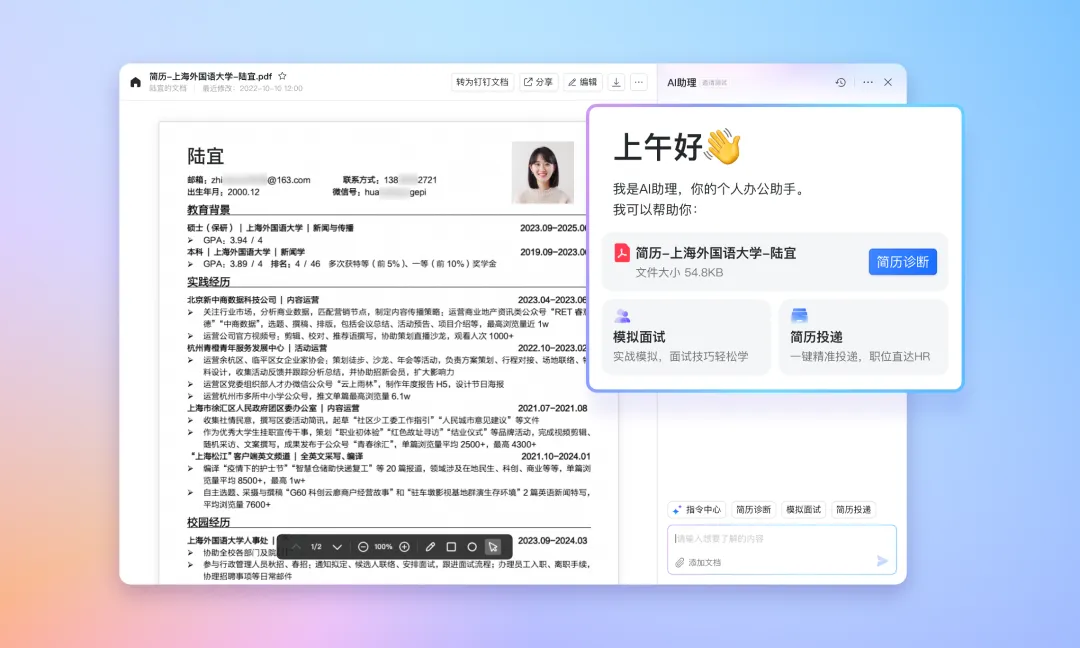
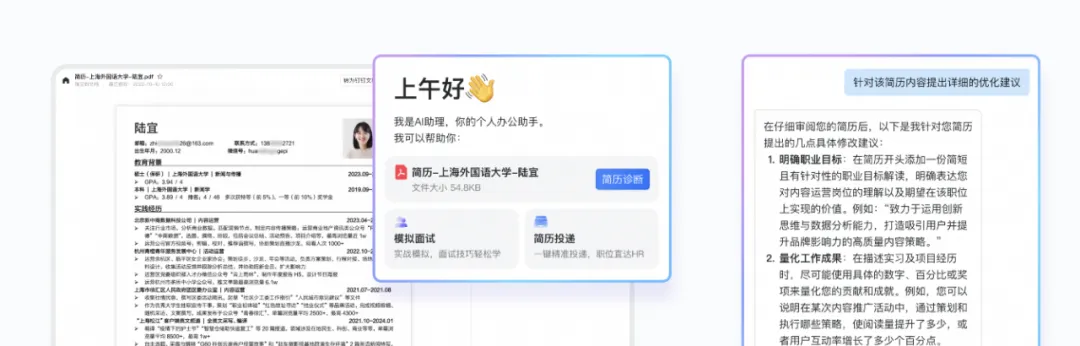
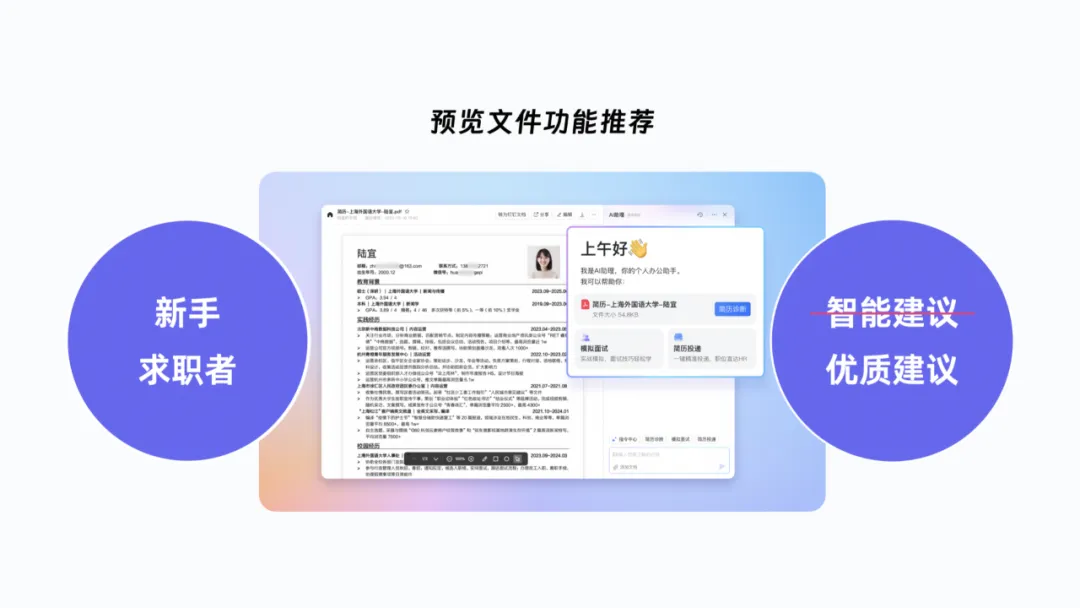
When we open a resume file in a DingTalk chat, the file preview interface is an ideal domain for highlighting the goal. By identifying the file type as a resume, we can package relevant AI prompts into scenario-based features and present them to users, such as resume diagnosis and mock interviews. Once users are attracted and click the resume diagnosis button, AI quickly generates revision suggestions. AI helps users solve scenario-specific problems quickly—from users seeking AI to AI proactively finding users.
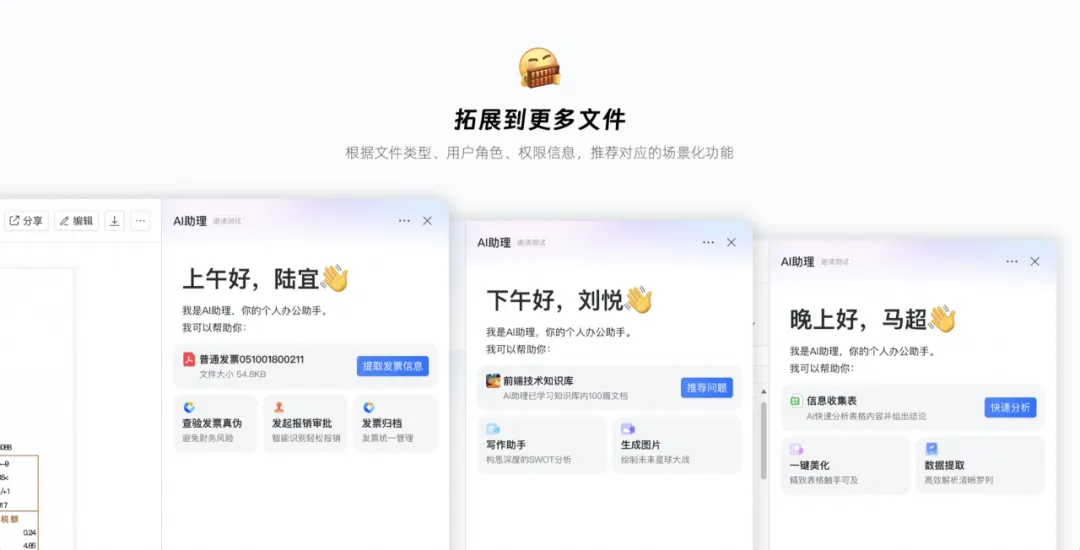
The same approach can be extended to all files in DingTalk. We can not only recommend packaged AI capabilities but also suggest deep-value features already available in DingTalk. For example, with invoice files, the same approach can guide finance staff to verify the authenticity of invoices or help traveling employees submit expense reimbursement forms with a single click.
Based on file type, user role, file permissions, and other information, we recommend corresponding scenario-based features, making file processing and handling in DingTalk more precise and efficient.
In the three cases above, we used design innovation to help different workers solve real-world problems with AI, improving the efficiency or effectiveness of work information flowing within DingTalk.
Conclusion
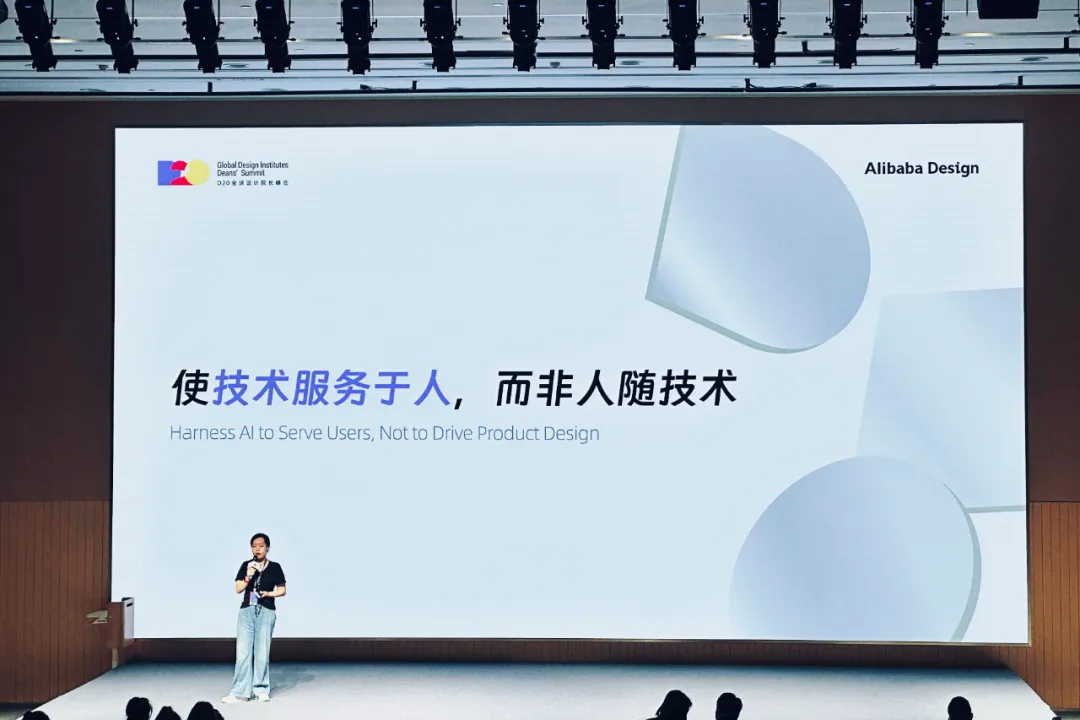
$“Let technology serve people, not the other way around.”$
There’s a saying within DingTalk: “Every product in DingTalk deserves to be rebuilt with AI.” From the perspective of DingTalk designers, we believe that every product deserves to be rethought from a “scenario + AI” angle.
The combination of scenarios and AI mainly involves using AI capabilities to accomplish tasks—some tasks are better handled with AI, and some operations can be replaced more quickly with AI. AI’s outstanding capabilities have focused attention on questions like: What processes can AI simplify? What operations can AI replace? Deep exploration of the integration between AI and specific functions during task completion aims to provide users with various intelligent features to accomplish tasks. However, this line of thinking can easily overlook the “role” and “goal” in a scenario.
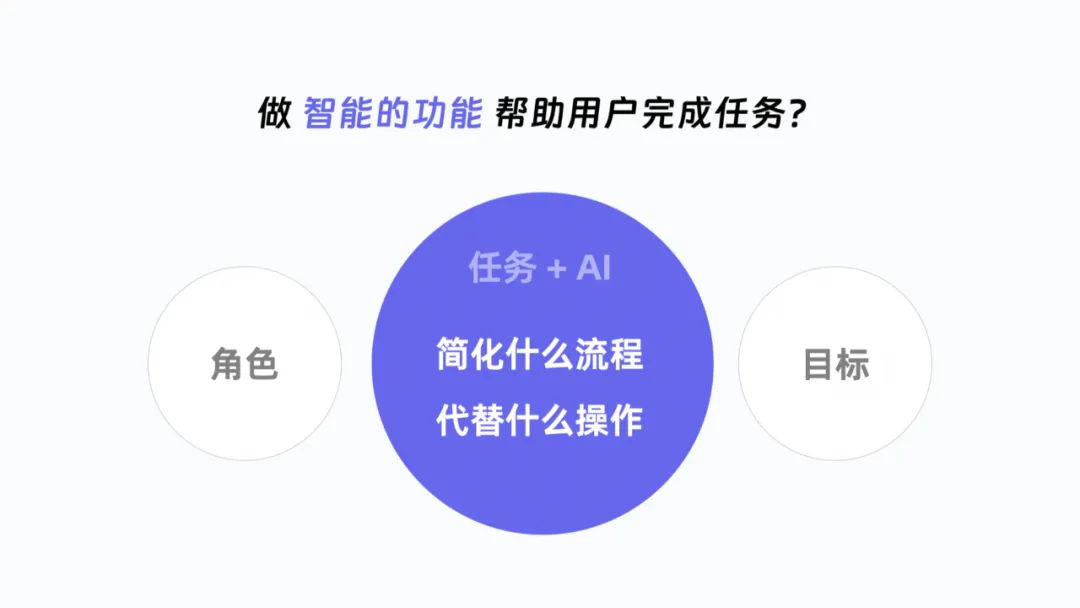
It’s AI that makes promotional posters more attractive and draws more people to events; what satisfies meeting organizers is not the intelligence of the meeting itself, but AI’s ability to simplify the process of organizing meetings; what gives job seekers peace of mind is not the intelligence of the advice, but AI’s ability to provide high–quality, low–cost recommendations even to those without experience.
We’re not actually creating intelligent features for users; instead, we’re using appropriate AI capabilities to help users achieve their goals.
In the AI era, we must embrace intelligence and learn to apply these advanced technologies to boost work efficiency and enhance quality of life. However, in product design, we must also step back from pure intelligence, avoiding turning products into showcases for AI while neglecting users’ true needs. Let intelligence be a tool for creating better experiences, not an end in itself.
We envision AI as a new weapon for enhancing information collaboration efficiency for DingTalk users. As AI capabilities are applied to specific scenarios, how should we explore intelligent design?
Understand user characteristics and needs:
First, we need to consider the existing work habits of hundreds of millions of DingTalk users, as well as their varying levels of trust in and acceptance of AI. We cannot ask them to change their habits to accommodate AI; otherwise, we would only increase their workload.
Combine design methods to identify efficiency–boosting entry points:
Through co–creation interviews, data analysis, and other methods, collect information on users’ daily tasks, challenges, and areas for improvement. Combining this with designers’ empathy, uncover opportunities to boost efficiency in various work scenarios.
Stay curious and keep learning; make good use of new tools:
Thoroughly understand AI’s strengths and limitations, select the AI capabilities that best fit the scenario, and carefully consider how to integrate AI into users’ task flows through natural interactions, using appropriate guidance at the user’s first instinctive entry point.
Find the most natural path for AI to integrate into work information flows, allowing AI to proactively approach users and help them achieve their goals better, faster, and more beautifully.
“Let technology serve people, not the other way around”: We want AI to serve users’ goals, designers’ inspiration and innovation, and enterprises’ quest for higher information efficiency through DingTalk.
DomTech is DingTalk's official designated service provider in Macau, specializing in providing DingTalk services to a wide range of customers. If you'd like to learn more about DingTalk platform applications, please contact our online customer service directly, or call +852 95970612, or email [email protected]. We have an excellent development and operations team with extensive market service experience, ready to provide you with professional DingTalk solutions and services!