




 Português
 English
3 months ago, we launched a company-wide campaign called "Users Teach Me How to Make DingTalk," inviting users to vote for the features they most want DingTalk to implement.
Now, the three most requested features have been fully rolled out! Let's take a look.
01
Group names can now include personal notes—visible only to you
Customer feedback:
Zhe* University
We have too many school groups, and long group names don’t display fully, making it hard to quickly identify each group. Searching is also inconvenient. We hope DingTalk can add a feature that lets each person add a note to the group name.
Gu* Home Furnishings
In daily work, various project groups are created by different people, with no consistent naming standards. It’s very confusing to search through them. We hope DingTalk can add a group note feature like WeChat, where each person can rename the group for easier searching.
Youai** Robotics
For information security reasons, all group names in our company are coded. When back-end staff handle N projects at once, it’s impossible to quickly locate the right group. We hope DingTalk adds a group note feature so we can rename groups according to our own habits, while others still see the original code name.
Hangzhou Yucai** Primary School
I’m a parent with two children in school, and the number of DingTalk groups has increased. At a glance, the names and icons look similar—one is Class 204, another is Class 104—and I’m getting dizzy 😵💫. Can we add a DIY group name feature that’s visible only to me, without affecting other parents or teachers?
In daily work and life, we often join various group chats, such as departmental groups, project groups, client groups, school groups, and interest groups. Sometimes there are too many groups, group names are too long or too similar, making it hard to find the right group—or even leading to embarrassing mistakes when sending messages to the wrong group.

Now, you can add personalized notes to DingTalk group names.
You can rename the group according to your own preferences, and this note is visible only to you, helping you keep your groups organized and doubling your communication efficiency.
No more worrying about accidentally replying to the wrong message or sending files to the wrong group!
02
Video playback supports HD streaming—1080P plays instantly
Customer feedback:
Zuo* Bang
When we send video files to a group chat, the online playback quality drops. We suggest allowing higher resolution during online viewing.
Xin** Education
Videos uploaded to the knowledge base lose clarity during online preview—they become blurry, and the viewing experience is poor. We hope that after uploading a video, its resolution won’t be changed and that it can be previewed in its original resolution online.
Hangzhou** Group
Employee training videos are transcoded during online playback, becoming very blurry. You have to download them to view in HD, which is inefficient.
Shanghai** Automotive Technology
Videos uploaded to the cloud drive aren’t very clear, but we don’t want them to be downloaded freely. We hope DingTalk can optimize this feature so that uploaded videos aren’t compressed and maintain their original clarity.
This may seem like a small feature, but it greatly enhances the user experience.
Most communication tools on the market compress video playback quality online to reduce transmission costs. Users must download videos to watch them in HD, but downloading each file individually adds extra steps and wastes time.
Moreover, in some critical business scenarios, directly allowing videos to be downloaded is not secure.

Now, DingTalk supports higher-resolution video playback online.
Whether you’re in a one-on-one chat, a group chat, or the departmental knowledge base, you can watch videos in HD online without downloading, significantly improving work efficiency and user experience.
03
Yida forms under approval can now be linked to each other, boosting operational efficiency
Customer feedback:
Tianjin** Technology
Our company’s inventory preparation form and contract approval form are initiated simultaneously, and the inventory preparation process can only be approved after the contract process is completed. Currently, the linked form component only links data from completed and approved processes, which doesn’t meet the need for linking data from processes that are still in progress.
** Province Expressway
We hope the scope of linked form data can be optimized. Linked forms should be able to link data from processes that are still underway, allowing users to configure instance status as a filter condition. Only then will this feature be truly complete, since queries shouldn’t be limited to just completed data.
Zhejiang Province** Institute of Information Technology
We hope low-code forms can link to uncompleted processes, allowing multiple related business processes to be initiated in parallel and speeding up approval efficiency.
Qingdao** Environmental Engineering
DingTalk’s native OA approval system includes a control called “linked form,” which allows the initiator to link other processes related to the current workflow—for example, linking a contract approval or a plan approval to a cost request as part of the approval process. We hope Yida’s linked forms can also achieve this functionality.
DingTalk Yida is a practical low-code business tool that lets you quickly digitize business processes through drag-and-drop. It’s suitable for a wide range of scenarios, including contract approval, visitor management, financial reimbursement approval, and customer order management. Businesses across industries can use Yida to improve operational efficiency.
Take the e-commerce industry as an example: procurement, sales, and inventory management are at the core of a company’s operations—what people often call “inventory-sales-procurement management.” However, in daily operations, companies often face the following challenges:
Low communication efficiency: delivery orders aren’t dispatched in a timely manner, and information sharing across multiple locations is inefficient;
Data discrepancies: warehouse or procurement data can’t be matched one-to-one with sales orders, making reconciliation difficult;
Unclear business conditions: without real-time data, it’s impossible to calculate costs and gross profit in a timely manner, leaving the company’s profitability unclear.
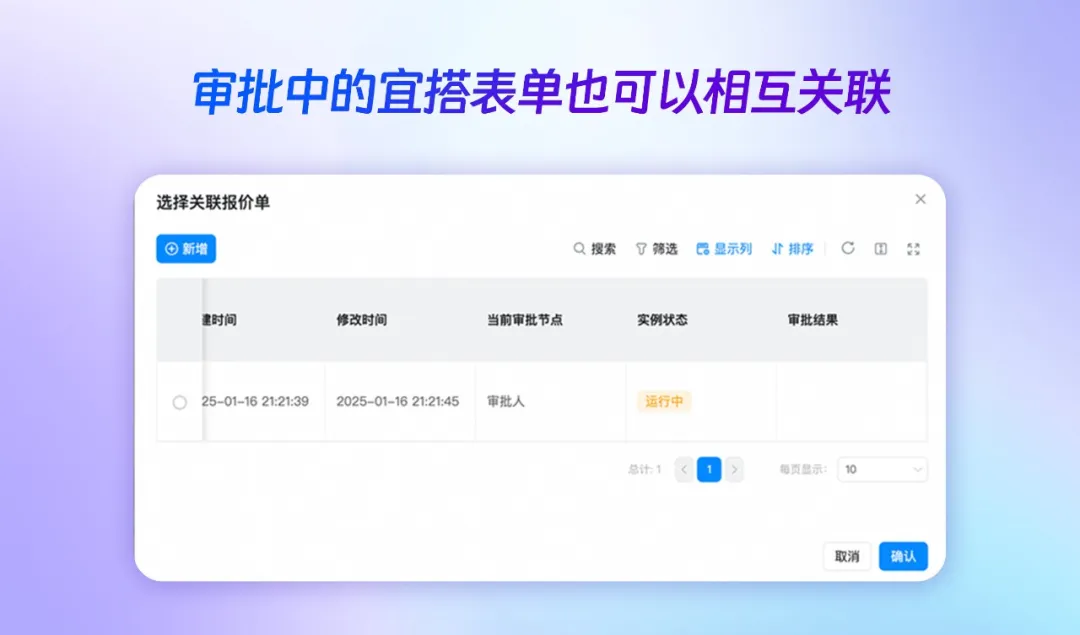
Now, Yida has added the ability to link forms that are still under approval. When users initiate related processes, they can simultaneously link another process, further strengthening the connectivity of business data and accelerating approval efficiency.
This means that when sales staff initiate a sales order, they can simultaneously start the warehouse inventory preparation approval process, making it easier for warehouse managers and finance staff to verify data later.
DingTalk listens carefully to your voice,
Every one of you is a DingTalk creator!
What are you waiting for?
Open your DingTalk and try these new features today!
DomTech is DingTalk’s official designated service provider in Macau, specializing in providing DingTalk services to a wide range of customers. If you’d like to learn more about DingTalk platform applications, feel free to contact our online customer service, or call +852 95970612 or email [email protected]. We have an excellent development and operations team with extensive market service experience, ready to provide you with professional DingTalk solutions and services!