




 Português
 English
The concept of a workflow is familiar to many, and with the support of AI agents, it has become even more of a hot topic.
Simply put, workflows are ideal for tasks that have clear objectives but require long or multi-step processes—like following a recipe in the kitchen. They reduce the time humans spend on repetitive, tedious, and deterministic tasks. In contrast, agents are often used in scenarios that demand flexible responses and creative freedom, fully leveraging the power of large models.
In real-world work, what matters most is the accuracy of task execution—and at the heart of this lies the "workflow." It allows users to orchestrate processes based on specific problems and work scenarios, much like a carefully laid track that ensures every step of a large model runs efficiently along a predetermined path.
Now, you can use "workflows" in DingTalk AI Assistant or DingTalk groups to automate complex, multi-stage tasks.
What Is a Workflow?
A workflow is a feature that uses a visual interface to combine various skills, code blocks, AI capabilities, and execution steps to orchestrate complex business processes. Each step is clearly defined and controllable. Users can quickly build workflows through simple drag-and-drop operations, requiring no programming background—making it easy for business users to get started.
Specifically, DingTalk's workflows consist of multiple nodes, each capable of executing a specific task. Users can freely arrange these tasks on a canvas to simplify complex processes and automate tasks.
Currently, DingTalk's workflow capabilities have been seamlessly integrated into several high-frequency user scenarios: AI Assistant, group bots, multi-dimensional tables, and approval processes—helping boost our efficiency in everyday office collaboration.
Newly Upgraded Workflows
1. New Branching and Looping Capabilities Enhance Process Flexibility
To handle business processes that are logically complex and demand higher stability, we've added two new capabilities to workflow execution logic: conditional branching and looping.
● Conditional Branching Capability:
Previously, DingTalk workflows supported only a single execution logic. However, for most tasks, this single approach often fails to meet the needs of complex scenarios. Every business scenario may involve multiple conditions, each requiring different handling strategies.
Therefore, we've added conditional branching to workflows, enabling flexible execution of different task branches based on custom business rules across various scenarios. This helps improve both accuracy and flexibility in execution.
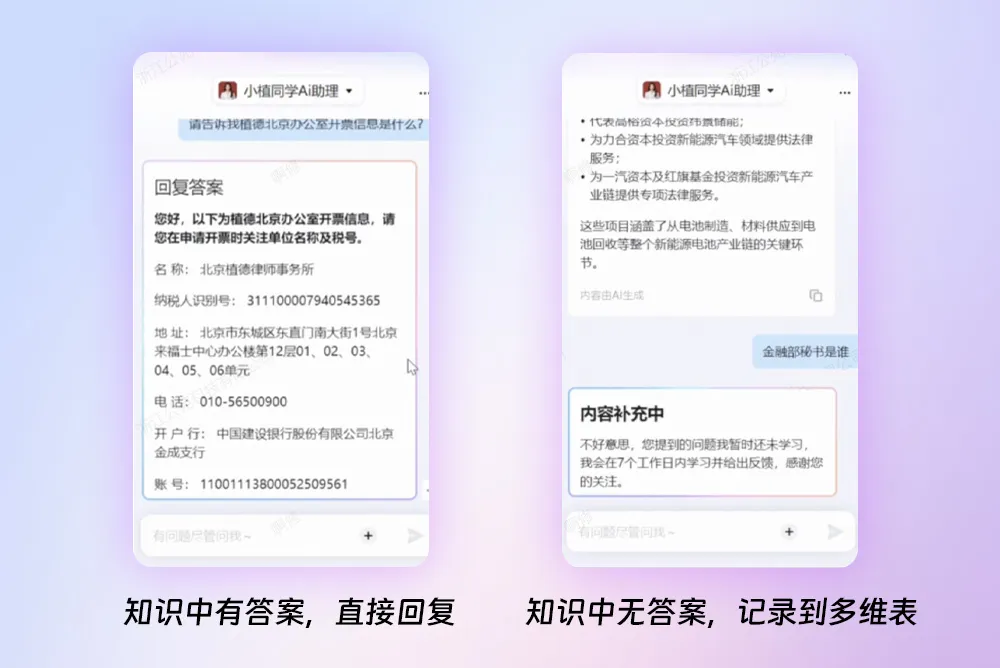
For example, the "Xiao Zhi Tongxue" legal assistant built by Zhede Law Firm. When a user poses a question, the legal assistant first calls on its knowledge-answering capability to respond directly. If no answer is found in the knowledge base, the workflow automatically triggers another branch: the question is logged in a multi-dimensional table and handed over to human staff for follow-up.
● Looping Capability
In daily work, we often face repetitive tasks. These tasks are important but time-consuming and prone to errors.
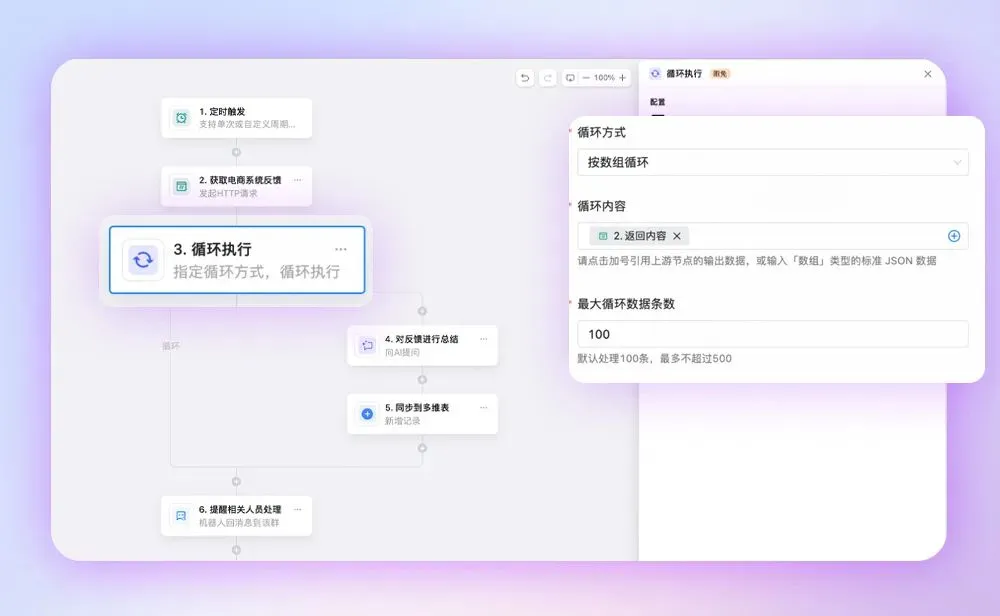
Therefore, we've added looping capabilities to workflows. Simply put, looping enables the repeated execution of a specific action. Imagine you need to generate content in bulk, process large datasets, or repeatedly perform a certain operation—this is where looping comes in handy.
For example, an e-commerce team set up a scheduled workflow in a DingTalk group to track customer reviews. A group bot weekly synchronizes customer feedback from the e-commerce system to a multi-dimensional table and reminds service staff in the group to address the feedback promptly. Through this automated approach, the team can quickly capture genuine customer feedback, inform business decisions, and further improve product purchase conversion rates.
2. New Button-Triggering Capability Enables Process Automation
Common AI applications typically rely on iterative conversations to guide users or have AI assistants complete tasks on their behalf. However, in real-world scenarios, multiple AIs or tasks often depend on one another during execution, and relying solely on conversation may not always ensure precise command delivery. For many users, understanding the relationships between different AIs and fine-tuning commands remains a significant hurdle.
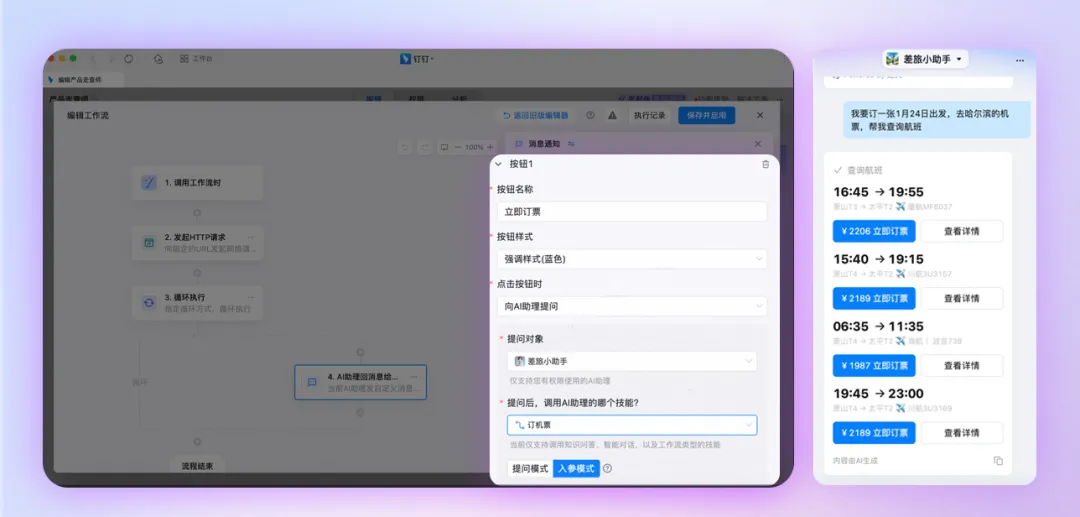
Therefore, we've upgraded workflow capabilities by introducing "buttons" into message cards—elements that align with current user habits. In multi-step tasks, users can click a button instead of typing commands in a conversation. Buttons can activate another AI assistant or skill, enabling seamless process transitions and accurate parameter passing. This way, users only need to focus on their needs without worrying about the underlying interactions between AIs.
For example, a manufacturing company created a travel AI assistant in DingTalk using workflows. When employees book flights, they can simply tap a button to select and automatically complete the booking—no need to repeatedly enter information in a chat window.
3. Integration with OA Approval and Email Systems Boosts Connectivity
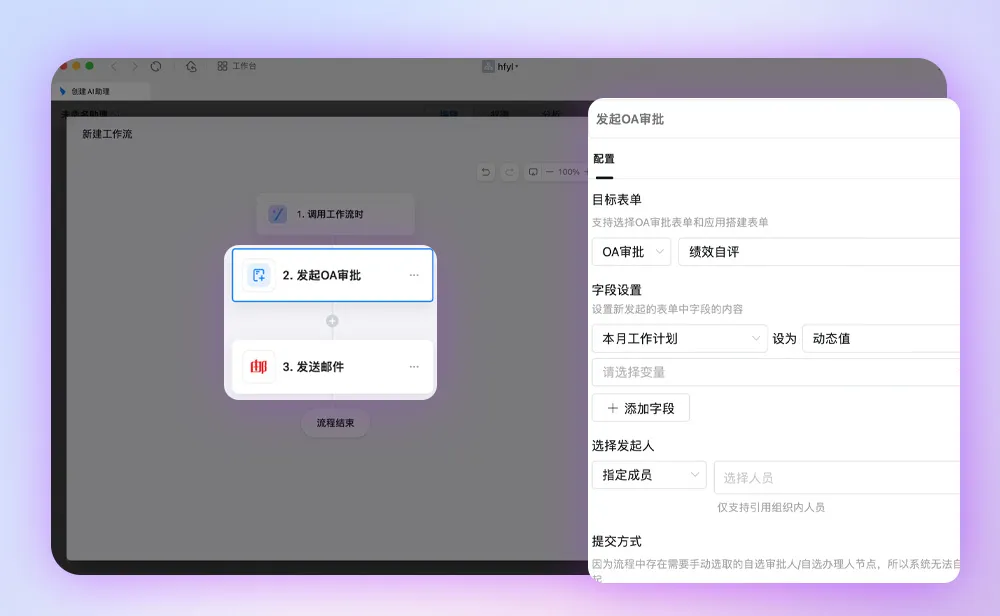
The upgraded workflows now also connect to DingTalk OA approval systems and external email services (163 Mail, QQ Mail, and Alibaba Mail), further expanding the capabilities of AI assistants and group bots.
In traditional workflows, users often have to switch back and forth between different systems and manually input data—time-consuming and error-prone. The connectivity features of workflows allow users to achieve seamless interaction across multiple systems within a single platform. For example, when approving a project, an AI assistant or group bot can automatically initiate a DingTalk OA process while simultaneously sending approval information to email, ensuring that relevant personnel receive timely notifications. This reduces redundant work while improving the accuracy and timeliness of information.
Currently, DingTalk workflows offer more than 90 rich connectivity capabilities, allowing users to configure basic functions such as creating groups, generating documents, scheduling events, setting up to-do lists, and managing knowledge bases directly within workflows. They also support third-party services like news search, route queries, QR code generation, and OCR recognition.
Build a Podcast Creation AI Assistant from Scratch
Workflows have wide-ranging applications across multiple fields, including stock analysis, copywriting, short-video creation, intelligent customer service, and reputation management. In practical applications, users can learn how to build and use workflows through tutorials and case studies on the DingTalk AI Assistant platform.
Below, we'll take "podcast creation assistant" as an example to demonstrate the specific workflow design process.
First, let's look at the outcome:
Our goal is to enable the assistant to query trending news on the internet and generate corresponding podcast scripts. If users are satisfied with the generated scripts, the assistant can further convert them into podcast audio or add them to a topic planning list.
To achieve this goal, we need to build three workflows:
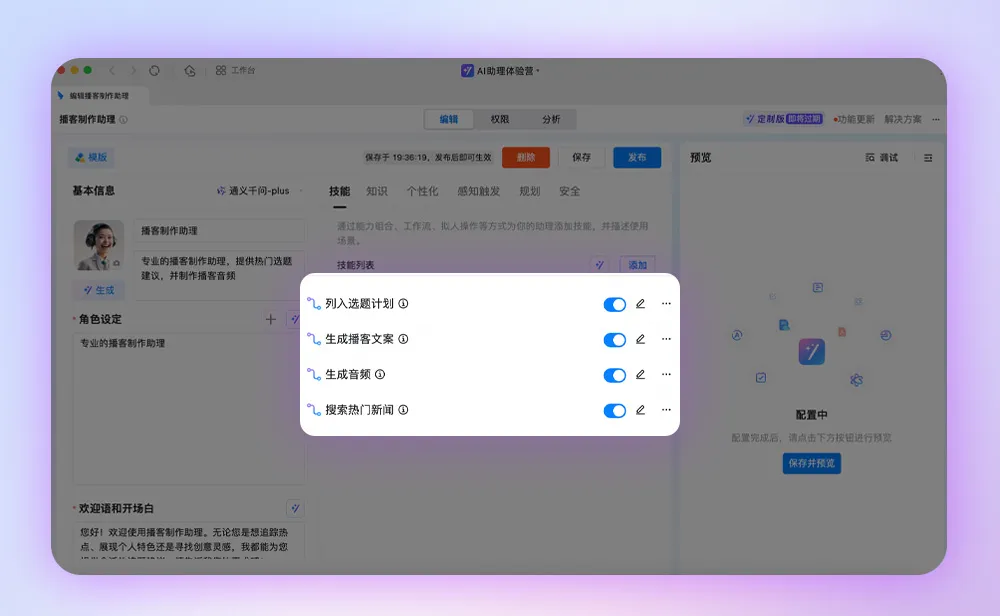
Workflow 1: "Generate Audio," responsible for converting podcast scripts into corresponding podcast audio.
Workflow 2: "Generate Podcast Script," which can create a podcast script based on news content.
Workflow 3: "Search for Trending News." Here, we'll use looping capabilities so that each piece of news retrieved comes with an actionable button labeled "Create Podcast Now."
Here's the key: When users click the "Create Podcast Now" button, the AI assistant immediately invokes Workflow 2—"Generate Podcast Script"—and quickly creates a podcast script based on the news content.
Whether in DingTalk groups, multi-dimensional tables, or AI Assistants, there are countless automation scenarios that can be achieved with well-designed workflows.
As an advanced way to use agents, workflows mimic human thought processes by carefully designing AI execution flows, thereby enhancing the flexibility and automation capabilities of large models in handling tasks.
Only in this way can AI truly become a powerful engine for driving business growth and boosting workplace efficiency—benefiting everyone involved.
DomTech is DingTalk's officially designated service provider in Macau, specializing in providing DingTalk services to a wide range of customers. If you'd like to learn more about DingTalk platform applications, feel free to contact our online customer service or reach us by phone at +852 95970612 or by email at [email protected]. We have an excellent development and operations team with extensive market experience, ready to provide you with professional DingTalk solutions and services!