




 Português
 English
Automation is not a new concept. From smart homes and self-driving cars to industrial production lines, the core goal of automation remains the same: to simplify complexity and boost efficiency. For example, Tesla has streamlined its complex manufacturing processes through automated production lines, dramatically increasing output. In the medical field, automation systems are helping doctors shift away from tedious record-keeping tasks so they can focus on more precise diagnoses and treatments. These examples show that automation not only improves efficiency but also ensures resources are allocated more effectively, allowing humans to concentrate on "more important tasks."
In corporate project management, automation is equally a powerful tool for boosting productivity. In today's fiercely competitive business environment, a company's ability to manage efficiently often determines whether it can stand out. Like a high-performance race car, only when the engine runs smoothly can it maintain a lead on the track. Similarly, businesses need efficient tools to empower their management processes.
To address this need, DingTalk Project (Teambition) has launched an automation tool designed to optimize project management workflows. With automation capabilities, teams can accelerate project progress while delegating repetitive daily tasks to the system. This allows employees to focus on more strategic and innovative work, ultimately enhancing overall business efficiency.
✦What problems can automation solve?
In your daily work, do you constantly encounter small, repetitive tasks and constant reminders? These seemingly minor details often consume a significant amount of time and energy for the team. What would happen if these routine yet essential tasks could be handled automatically?
Automation is the key to unlocking high productivity.
✦How to use automation capabilities
Each automation rule consists of two parts: a trigger condition and an action. DingTalk Project (Teambition) provides a simple, visual interface that makes it easy for users to configure automation rules. No coding skills are required—project managers and business users can flexibly set up automated workflows to handle a wide range of use cases.
Trigger conditions
A trigger condition works like flipping a light switch: a specific action (the trigger) automatically initiates the system's response. Common trigger events include changes in task status, expiration of deadlines, and adjustments to task priority. Users can also set more detailed triggers—for example, when a task is assigned to a specific member, a particular tag is added, or an attachment is uploaded—the rule activates immediately.
Action execution
Once the trigger condition is met, the system acts like a highly efficient assistant, automatically performing tasks based on pre-set rules. Common actions include changing task status (e.g., moving a task from "In Progress" to "Completed"), updating deadlines, reassigning responsibilities and sending @-reminders in DingTalk group chats, and linking related tasks.
Automation rules have the following features:
● Timely: Like a fast-responding alarm system, rules execute automatically after configuration takes effect, with response times in the seconds range.
● Efficient: Automation frees teams from tedious manual tasks, allowing them to focus on more creative work.
● Error-proof: Automation minimizes the likelihood of mistakes, ensuring tasks move forward smoothly.
✦Continuous upgrades to automation capabilities
DingTalk Project (Teambition) is committed to staying at the forefront of automation technology, continuously updating and optimizing its features to provide teams with the most advanced and efficient ways of working. Recently, our automation capabilities received a major upgrade, supporting a wider range of trigger conditions and actions to help teams quickly build automation rules tailored to their specific needs.
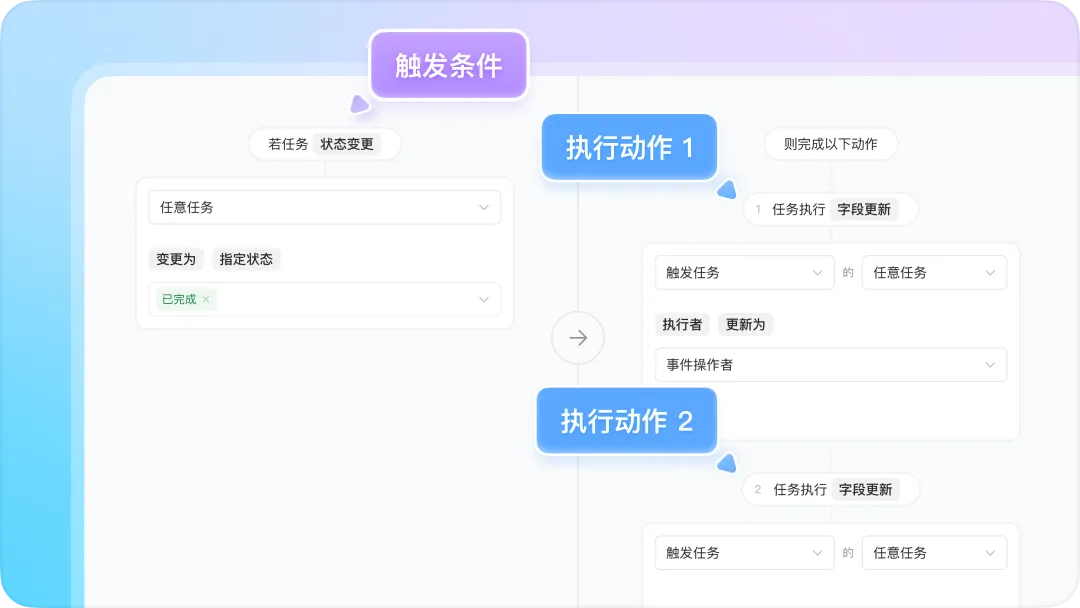
More flexible rule configuration
A single rule can now include multiple conditional branches and actions, significantly reducing the number of automation rules needed and simplifying management.
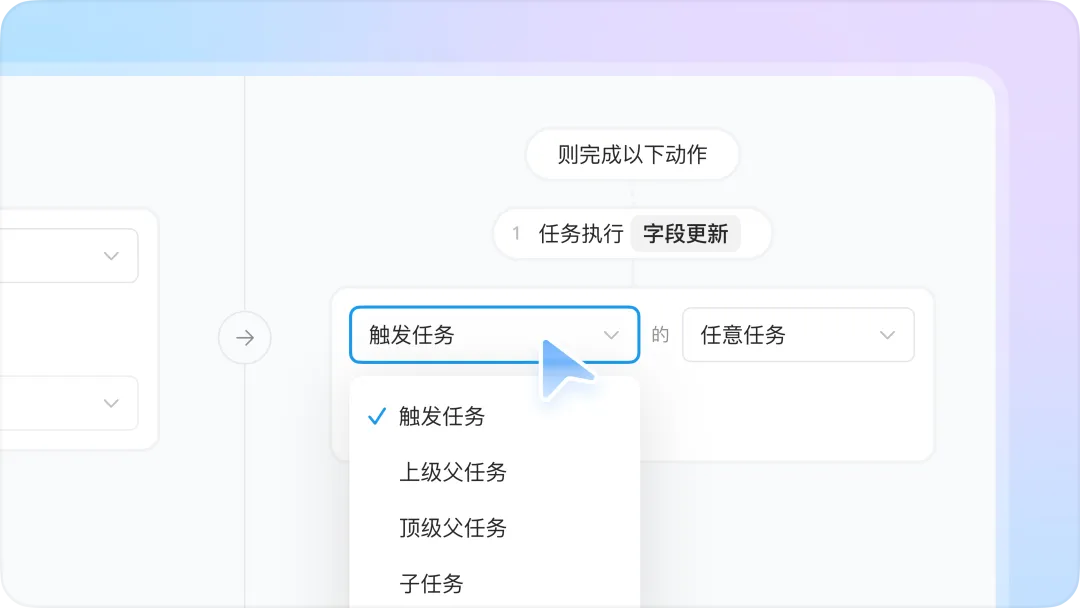
Automation across tasks and projects
Support for automating subtasks, parent tasks, linked tasks, and prerequisite/successor tasks enables full-scale automation across tasks and projects.
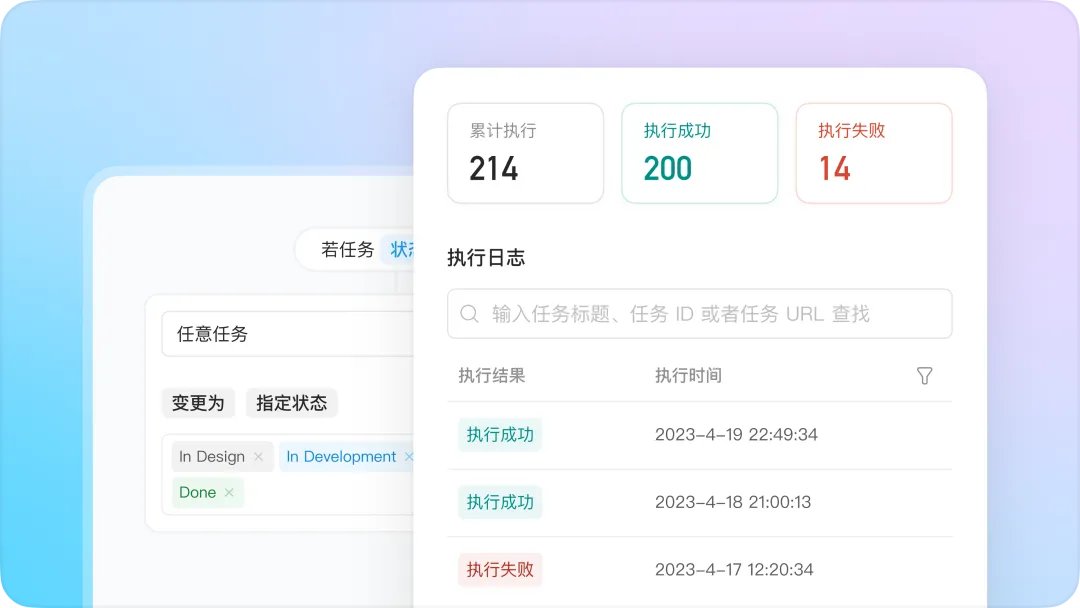
Real-time monitoring of automation performance
A new execution log feature helps teams track the usage of automation rules at any time.
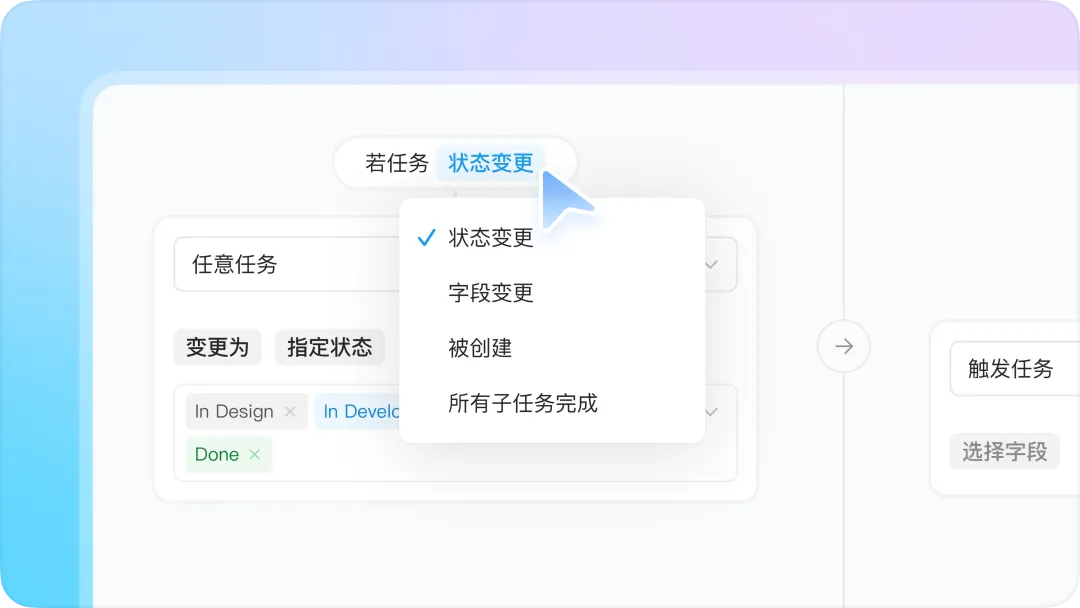
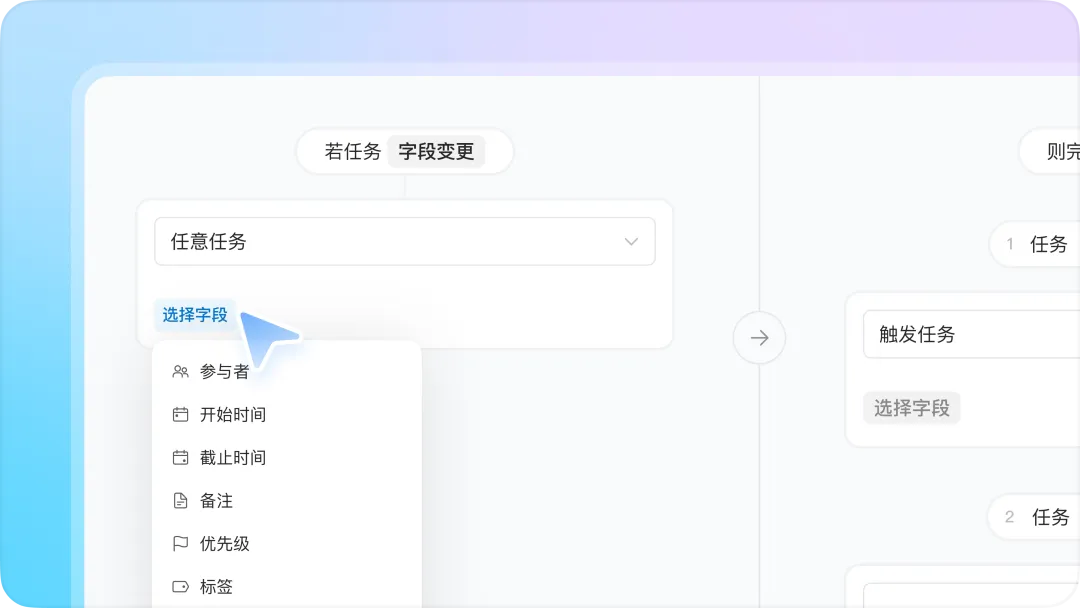
Expanded trigger scenarios
More task field changes can now serve as triggers, making automation more versatile and adaptable.
Open integration capabilities
Seamless connection with DingTalk collaboration products enables data synchronization and process integration across DingTalk group chats, OA approvals, documents, and other applications, creating a unified workflow across projects and business processes.

✦How do DingTalk Project users leverage automation?
Let's take a demand process—from "problem identification - analysis & evaluation - solution design - development - testing - release"—as an example to see how automation in DingTalk Project (Teambition) helps teams collaborate efficiently.
1. Problem identification
Automatically assign a responsible person to ensure immediate action: After a problem is created, the system automatically assigns the task to the appropriate person based on the business module, ensuring timely communication without manual intervention.
Automatically set processing time to ensure timely responses: Based on predefined rules, the system automatically sets start and due dates for demands, preventing delays caused by poor time management.

2. Analysis, evaluation & solution design
Automatically sync demand background information to avoid manual updates: When demand information changes, related tasks and sub-tasks are automatically updated, ensuring consistent information across the team.
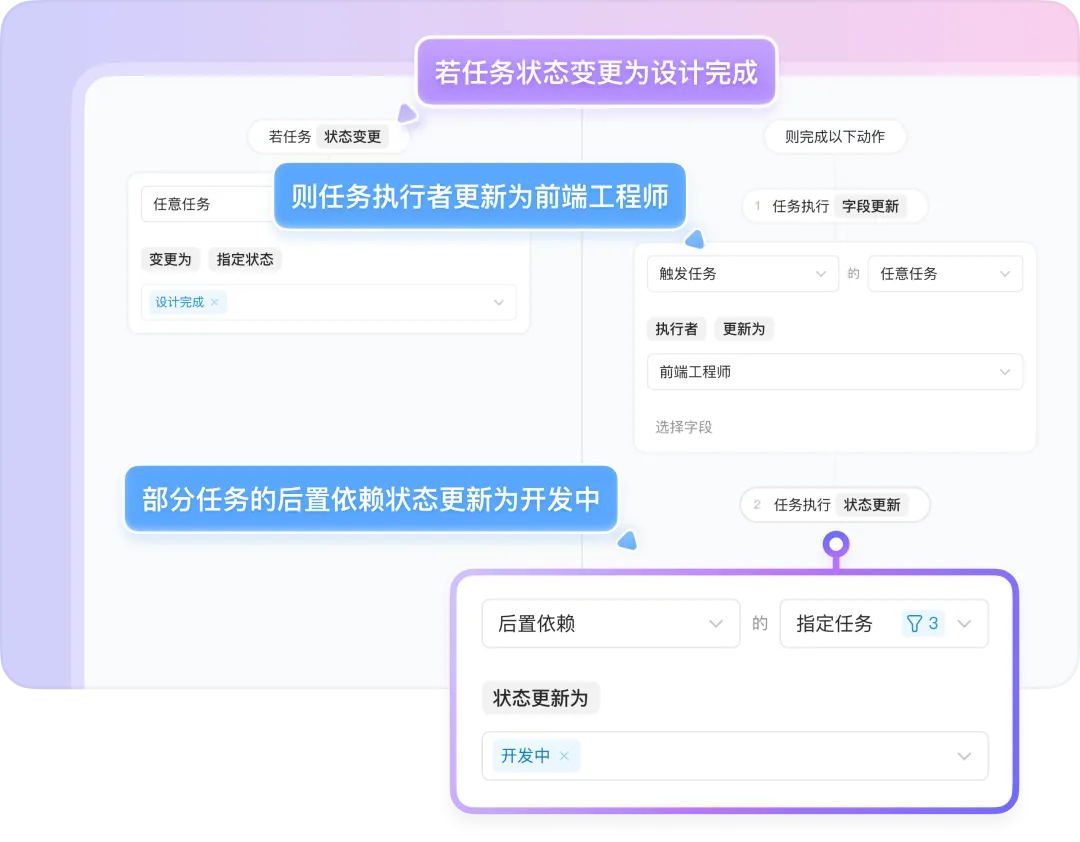
Automatically complete solution evaluation tasks to track progress: After a solution is submitted, the system automatically advances related tasks, ensuring timely communication with stakeholders and minimizing delays. For example, once a design document is submitted, the design task is automatically marked as complete, and relevant personnel are notified immediately.
Automatically lock demands after review to prevent changes: After a demand is reviewed and delivered, the system automatically locks the relevant fields, preventing further modifications and reducing the risk of scope creep. For instance, once employees upload deliverables and the approval process is completed, the file fields are locked to prevent additional changes.

3. Development & testing
Automatically route tasks to ensure smooth transitions: Tasks move automatically to the appropriate person at each stage, ensuring a seamless handover of work.
Automatically synchronize interdependent tasks to avoid delays: Once a prerequisite task is completed, the system automatically triggers the next task and assigns it to the relevant person, ensuring that task dependencies are never overlooked.
Automatically send overdue reminders to quickly address risks: When a task is overdue, the system automatically alerts the responsible person, ensuring that unfinished tasks are addressed promptly and preventing delays.
Integrate with third-party systems to automatically update task status: After code is submitted, merge requests are made, or branches are updated, the system automatically adjusts the status of development tasks, ensuring seamless integration across systems.
4. Release & launch
Automatically send release reminders to ensure preparation: Before a release, the system automatically reminds relevant team members, ensuring everyone is ready for the launch.
Automatically track release check items to ensure high-quality delivery: Before a release can proceed, all associated check-item sub-tasks must be completed, ensuring that every step meets the required standards.

✦Final thoughts
Automation is transforming the way we work and redefining the possibilities of team collaboration. It is not just a tool—it represents humanity's deep pursuit of efficiency and creativity. As economist Adam Smith noted in "The Wealth of Nations," 'division of labor increases productivity,' and automation takes this principle to the next level. It reduces repetitive work while freeing up time and energy for more valuable, creative tasks.
At DingTalk Project (Teambition), we believe that behind every automation rule lies a more efficient, harmonious future of work. Automation is not just a technical capability; it is a new work philosophy—one that uses the power of systems to maximize the value of every effort. Automation does not replace people—it empowers them, enabling us to reach new heights of efficiency and explore even greater possibilities.
In the future, DingTalk Project will further integrate automation with AI, using natural language processing to quickly generate automation rules and bring smarter, more convenient capabilities to team collaboration. This groundbreaking feature is currently under active development—stay tuned for its upcoming release!
DomTech is DingTalk's official service provider in Macau, dedicated to providing comprehensive DingTalk services to clients. If you'd like to learn more about DingTalk platform applications, feel free to contact our online customer service or reach out via phone +852 95970612 or email [email protected]. Our skilled development and operations teams, backed by extensive market experience, are ready to provide you with professional DingTalk solutions and services!