




 Português
 English
DingTalk's small innovation, shared with everyone~
Hello, I'm Jun Xiaohong, an iOS developer for DingTalk's audio and video live streaming. In our daily work, in addition to supporting business needs, our audio and video team closely monitors the latest developments in Apple technologies like iOS—such as Picture-in-Picture, iPad Split View, Live Activities, video effects, and more. By integrating these new features and technologies with our business scenarios, we aim to deliver a better user experience and superior products. For example, last year DingTalk partnered with Apple to optimize for Apple Vision Pro (DingTalk officially launched on Apple Vision Pro). With this new type of device, virtual avatars can join meetings or watch large-screen live streams. So what other native app innovations are we exploring this time? Let's dive in👀
The Need for Dual-Camera Operation in Live Streaming Scenarios
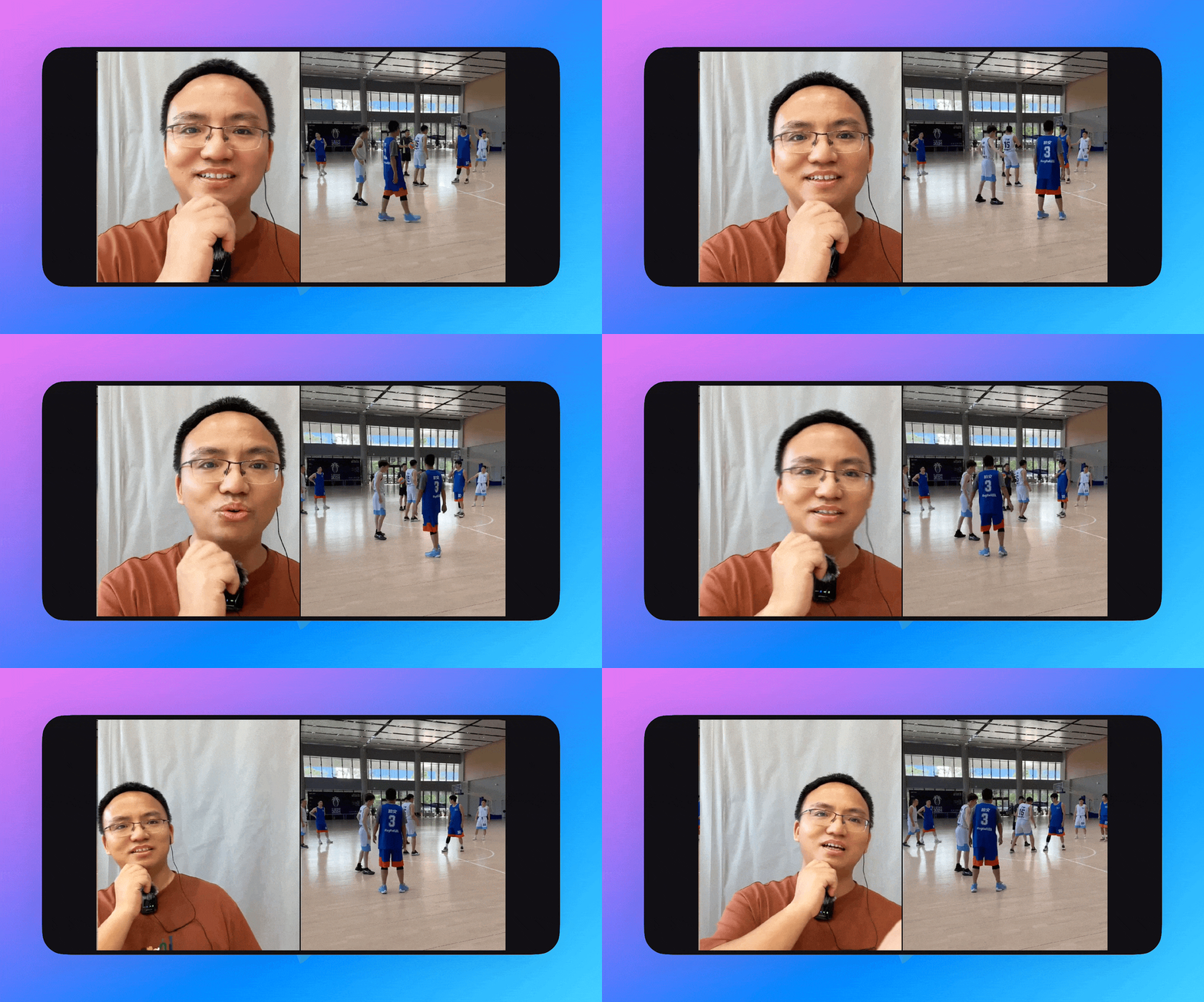
Consider this scenario: During a warm-up live stream of a basketball game in your department, the camera not only captures the court but also allows the host to interview fans on-site. We've heard feedback from colleagues: "I only have one phone—I can't capture two feeds simultaneously for live streaming." "To achieve multi-camera, multi-feed live streaming, you'd need professional equipment."
Indeed, on many popular video platforms today, commentary videos often show both the commentator's face and the main video feed at the same time. Viewers no longer just want to hear the commentary—they also want to see the commentator's expressions, gestures, and other visual cues. So can this challenge be solved?
Is it possible to use just one phone to fully stream the game while still allowing the host to provide lively commentary?
The answer is absolutely yes.
The Evolution of Apple's Video Camera Technology
As an audio and video developer, I pay close attention to Apple's iterative advancements in video-related technologies, including Picture-in-Picture, video effects, and cameras. While sound is the most fundamental aspect of communication and content delivery—and must always be prioritized—improving the visual experience can significantly enhance the overall user experience. This makes it worthwhile for us to explore and research new possibilities. As we know, a single camera typically captures a single video stream, which is then pre-processed, previewed, and published. But could we capture and output multiple video streams simultaneously to create a richer experience in specific scenarios? We're exploring how to combine Apple's dual-camera technology with live streaming workflows.
The Technical Integration of Apple's Dual Camera with DingTalk's Live Streaming
To use a dual camera, you need to employ AVCaptureMultiCamSession to manage the capture of multiple video streams. Here's how it works:
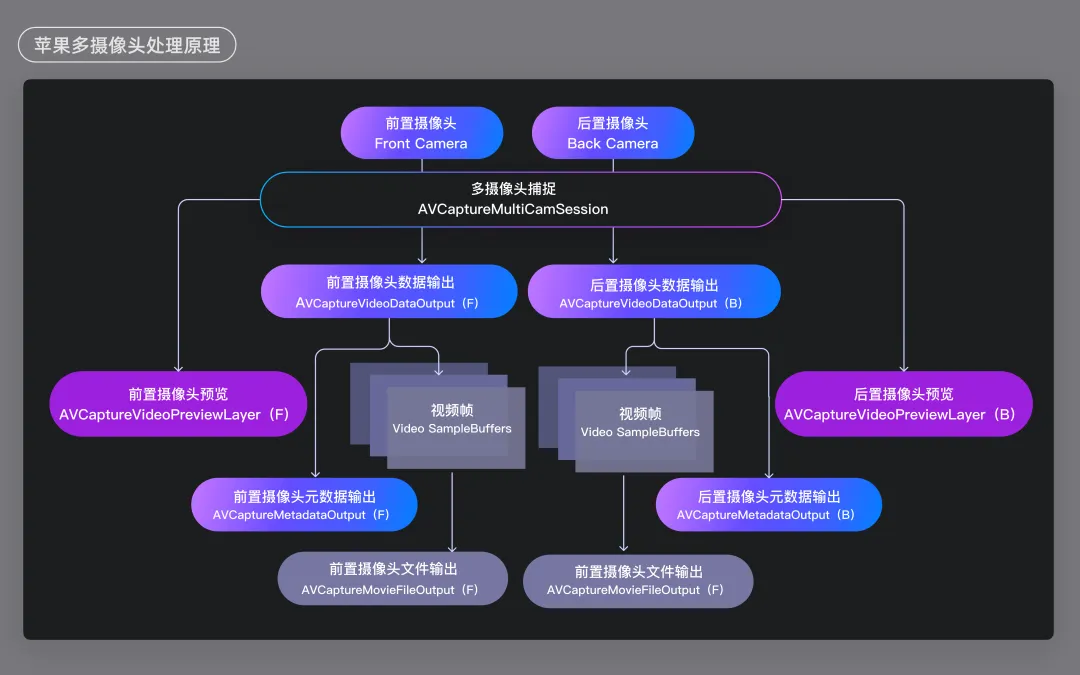
Since we also need to apply beauty filters, stream merging, and other enhancements to the recorded video frames, we've optimized the dual-camera model to better suit live audio and video scenarios. To do this, we choose AVCaptureVideoDataOutput as the output component. The optimized camera recording workflow looks like this: This workflow simplifies the process of creating and managing multiple camera sessions and outputting the streams. Next, let's look at how this technology is applied in DingTalk's live streaming scenarios.
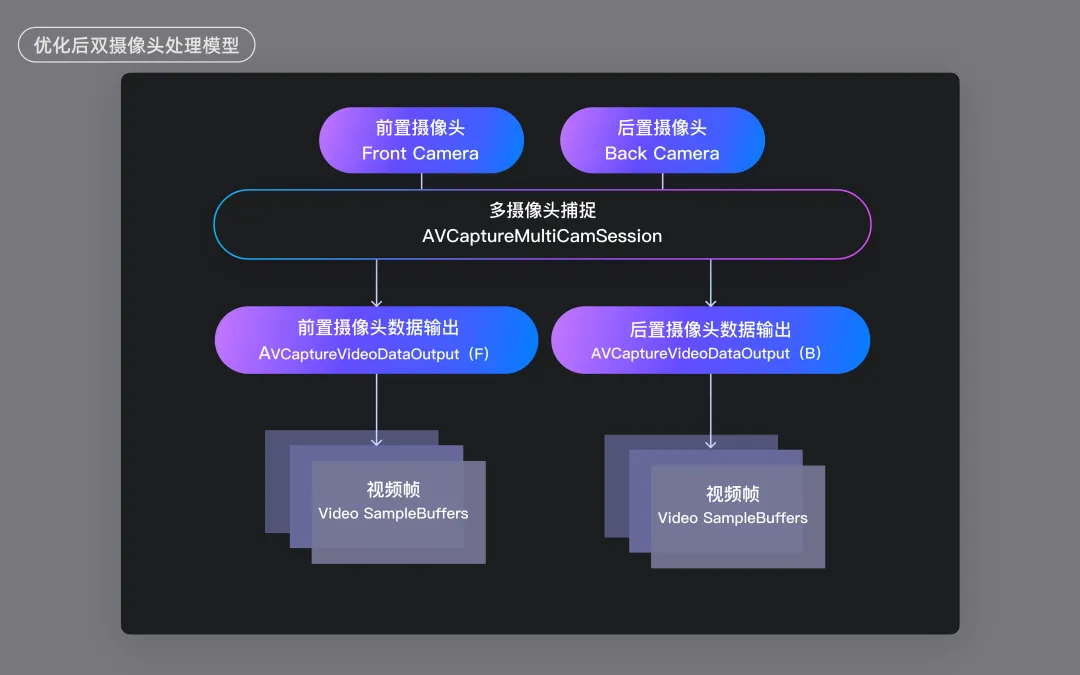
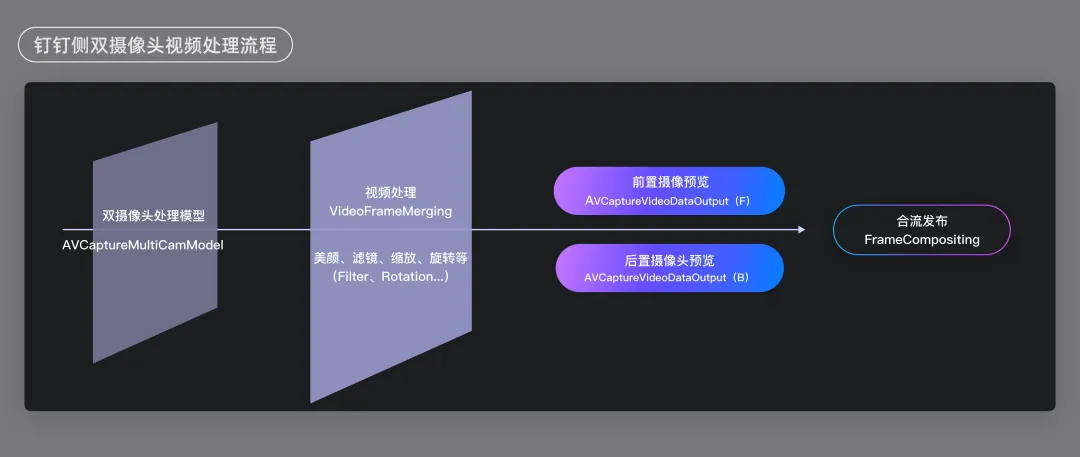
The Application of Dual-Camera Processing Technology in Live Streaming
Through the dual-camera model, we further process the video frames with features like beauty filters, virtual backgrounds, and zoom adjustments before merging the streams for publication.
In addition, since the dual camera relies on AVCaptureMultiCamSession for managing multiple camera sessions, this feature is supported on iOS 13 and devices with A12 chips or later. Supported systems: iOS 13 and above. Supported devices: iPhone models: iPhone XR, iPhone XS, iPhone XS Max, and later models. iPad models: 2019 iPad Pro and later models.
Let's give it a try!
Screen Layout Options
The dual-camera preview view outputs two video streams to two separate preview windows, allowing for different layout combinations: Each video stream is fixed in one preview window, and the preview windows swap when the camera direction changes; or the preview windows remain fixed, and the video streams swap between the two preview windows when the camera direction changes.
When capturing with a dual camera, the host side needs to output previews of both the front and rear cameras to the business layer for display. After discussions with our interaction designers and considering existing multi-video layouts, gesture-based interactions, and other factors, we finalized two preview layout options: based on landscape or portrait orientation, with the screens split horizontally or vertically. Here's the first layout option: the front camera is displayed at the top, and the rear camera is displayed at the bottom.
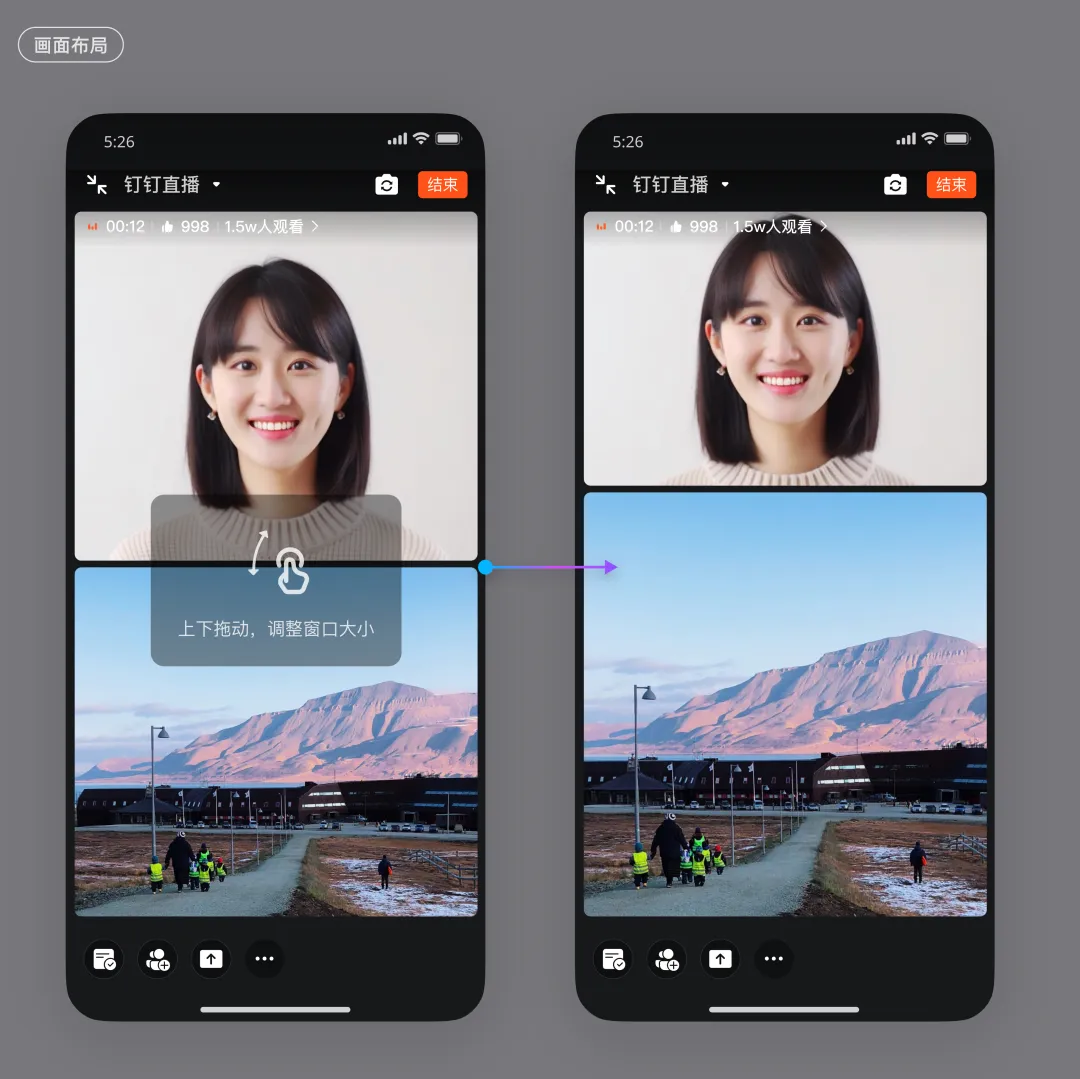
Seamless Interactive Experience
We allow users to drag left and right to adjust the size of each screen. When the user releases the screen, if the combined size falls below a certain threshold, the dual-camera mode automatically turns off, and the system switches back to single-camera mode. Of course, users can also re-enable dual-camera mode in the settings menu.
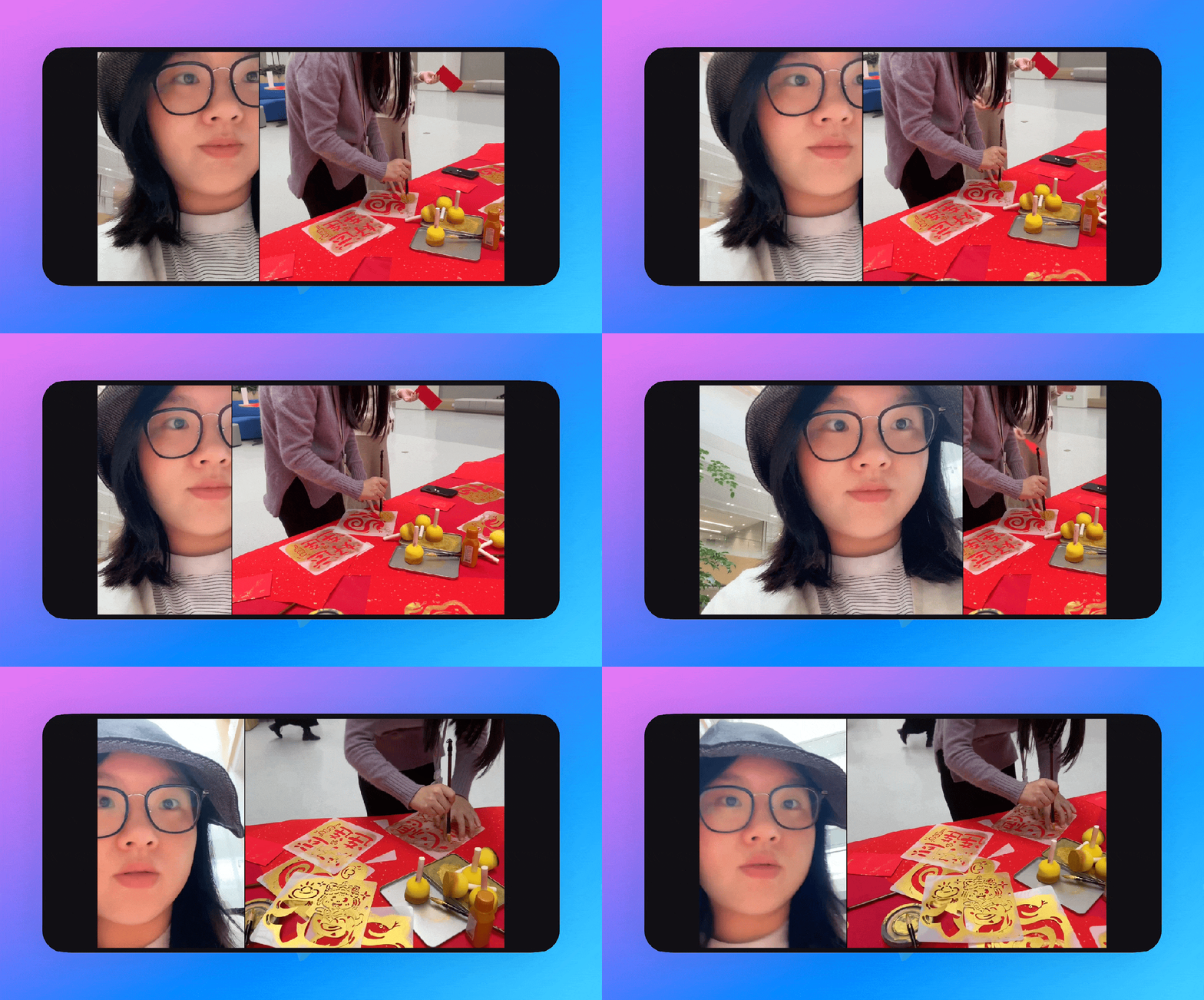
With the dual-camera feature, when our audio and video department hosts its fall soccer league, our colleagues can easily use their Apple phones to provide pre-game commentary, build excitement for the event, and make the live stream even more engaging~
Conclusion
Beyond This... There's a Bonus!
The DingTalk tech team is also exploring capabilities based on Picture-in-Picture, aiming to create innovative interactive effects that allow multiple cameras to merge during content sharing, enabling faces to appear on the screen. This includes AI-powered recognition of faces and gestures, as well as further innovations in DingTalk's AI capabilities that integrate with advanced audio and video recognition technologies.
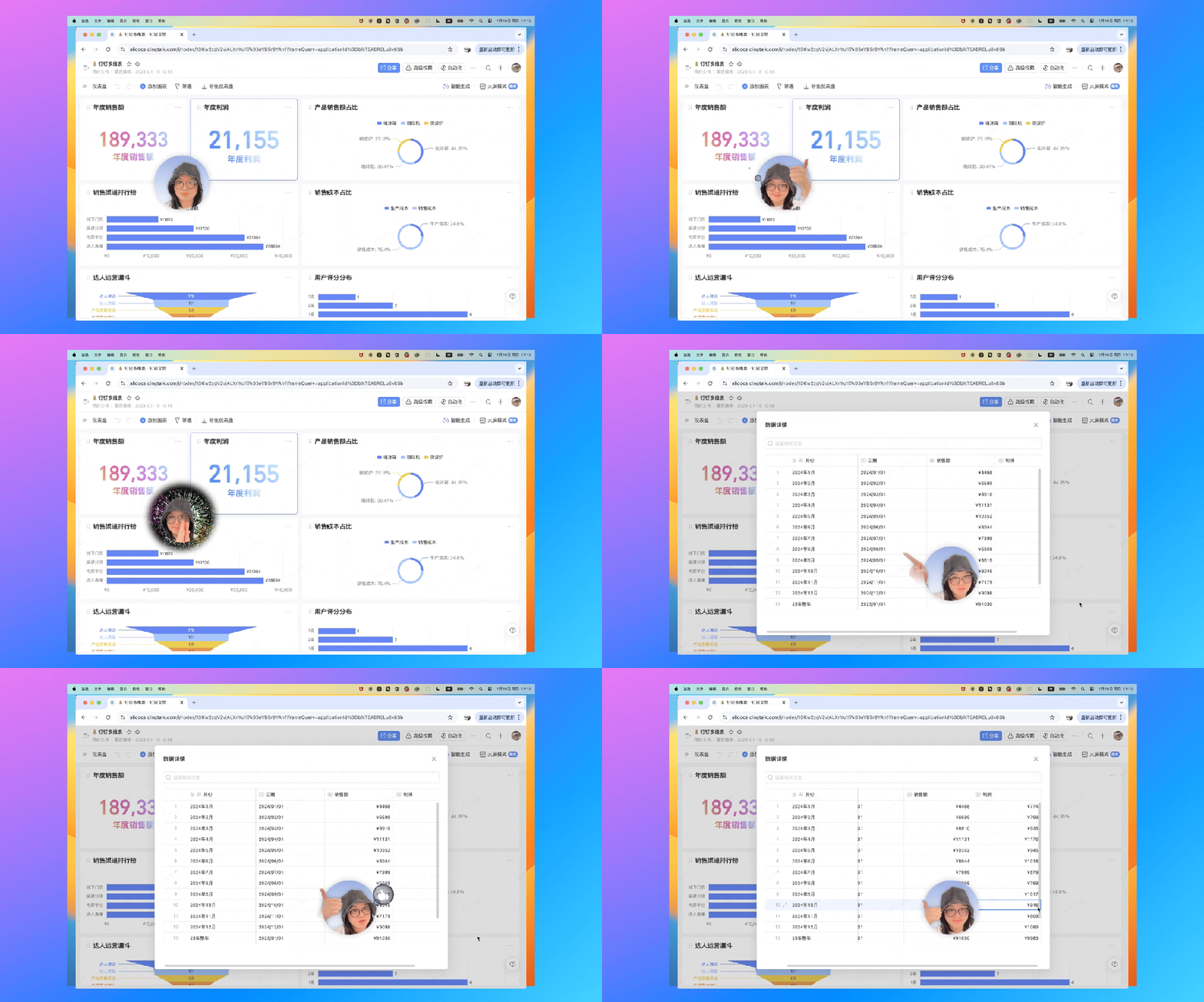
DingTalk's small yet beautiful innovations continue to unfold!
DomTech is DingTalk's official designated service provider in Macau, dedicated to providing DingTalk services to a wide range of customers. If you'd like to learn more about DingTalk platform applications, feel free to contact our online customer service, or call +852 95970612 or email [email protected]. Our expert development and operations teams bring extensive market experience, ensuring we can provide you with professional DingTalk solutions and services!
Beyond This... There's a Bonus!
The DingTalk tech team is also exploring capabilities based on Picture-in-Picture, aiming to create innovative interactive effects that allow multiple cameras to merge during content sharing, enabling faces to appear on the screen. This includes AI-powered recognition of faces and gestures, as well as further innovations in DingTalk's AI capabilities that integrate with advanced audio and video recognition technologies.
DingTalk's small yet beautiful innovations continue to unfold!
DomTech is DingTalk's official designated service provider in Macau, dedicated to providing DingTalk services to a wide range of customers. If you'd like to learn more about DingTalk platform applications, feel free to contact our online customer service, or call +852 95970612 or email [email protected]. Our expert development and operations teams bring extensive market experience, ensuring we can provide you with professional DingTalk solutions and services!