




 Português
 English
In the fast-paced work environment, we’re often surrounded by a barrage of notifications, messages, meetings, and other琐碎 tasks.
In the morning, when you start your day, you need to sift through numerous messages to identify key information, jot down your work schedule, organize or summarize reports on project progress—these repetitive daily tasks can feel a bit exhausting, right?
Imagine this: If you had a personal assistant who could organize your daily tasks according to your habits, prioritize them precisely, prepare detailed materials for important meetings, and clearly highlight critical data. When faced with tough challenges, this assistant could draw on its vast reservoir of information and sharp analytical skills to present viable solutions and help you make decisions. Even better, it could remind you to drink water, take a 5-minute break from your desk, and encourage you to treat yourself well after a long day... bringing you abundant emotional value—it truly sounds like a wonderful thing.
With the upgrade of DingTalk’s AI Assistant, all this has become possible. On DingTalk, simply claim your personal AI assistant with one click, letting it free you from the drain of mundane tasks so you can devote more time and energy to more meaningful, creative endeavors.
Your AI Assistant—You Define It
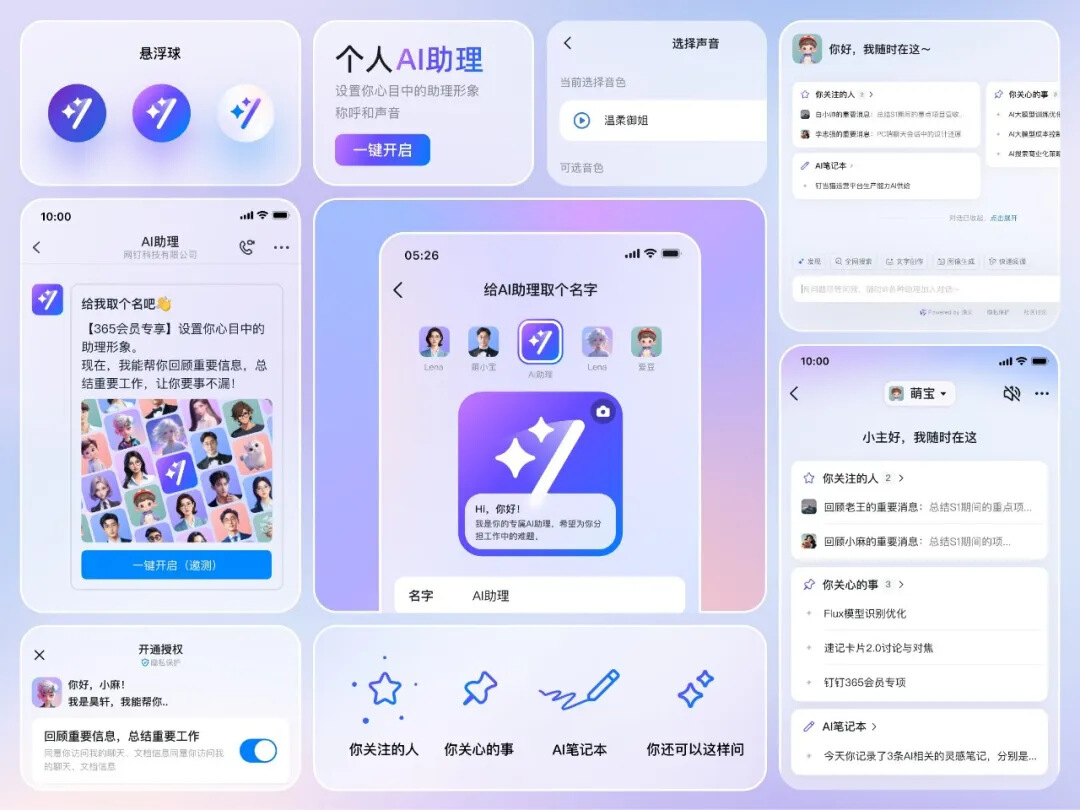
Your personal AI assistant is no longer one-size-fits-all; personalized settings are entirely up to you. You can set your AI assistant’s avatar, voice, and nickname, making it truly your own personal AI assistant.
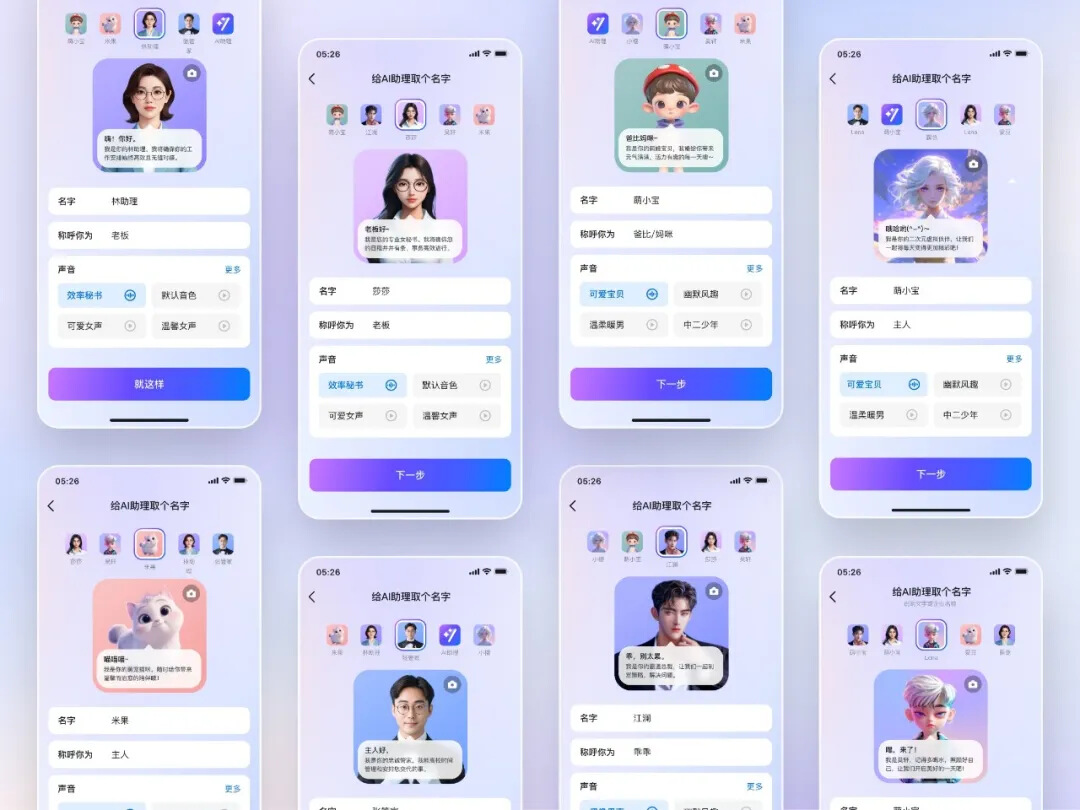
Your AI Assistant at Your Service
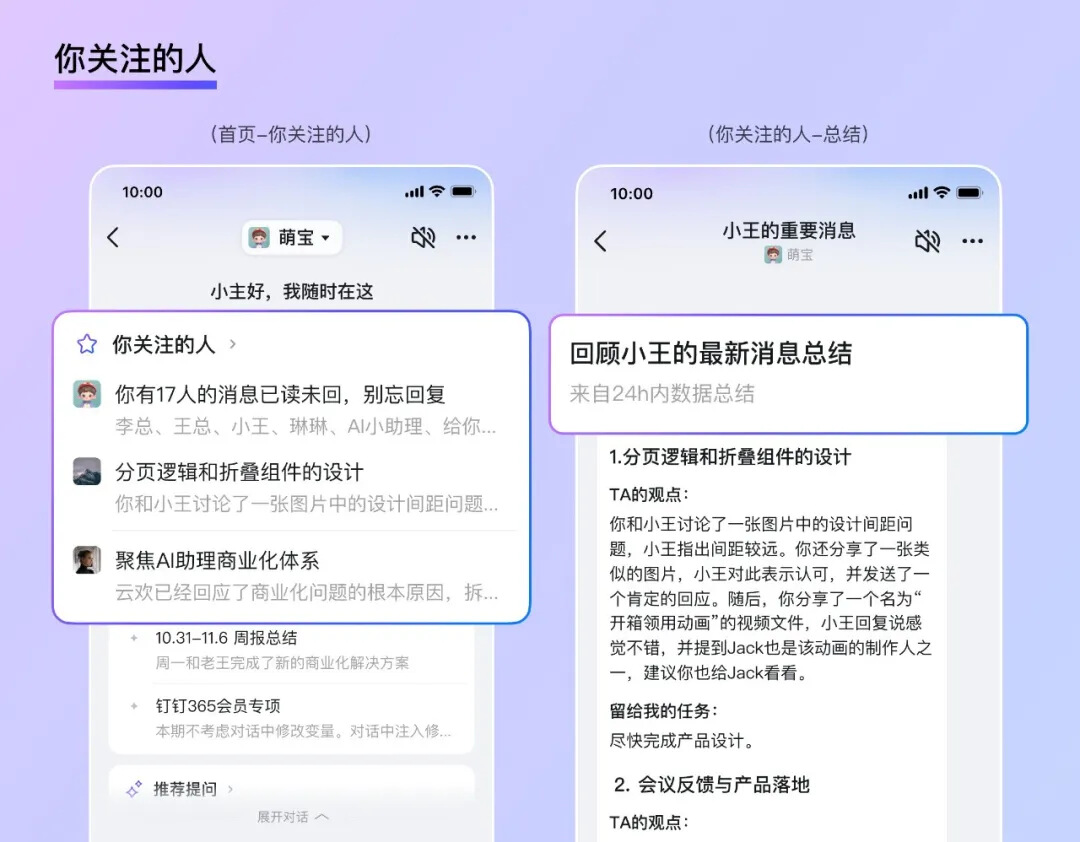
1. Set Up People You Care About: Keep an Eye on Important Messages
As collaboration grows, tasks assigned by clients, partners, or supervisors in private chats or group chats can easily get mixed in with other messages, making them easy to overlook.
Previously, to record tasks, you’d have to manually add them to to-do lists or other task management tools—a tedious process that, over time, could blur the context of the tasks themselves.
Now, DingTalk’s personal assistant can keep an eye on your messages for you!
Simply add “People You Care About,” and your personal AI assistant will automatically aggregate messages by “people you care about,” providing details on the context of each message and keeping track of tasks and decisions they’ve arranged in chats (only content you can view and have authorized for your personal AI assistant). At the same time, it supports “Ask Based on Current Content,” ensuring every important item is properly accounted for.
For parents, this feature is equally useful: After setting your child’s teacher as a “People You Care About,” you’ll never miss a single notification about your child’s studies and life, no matter where you are.
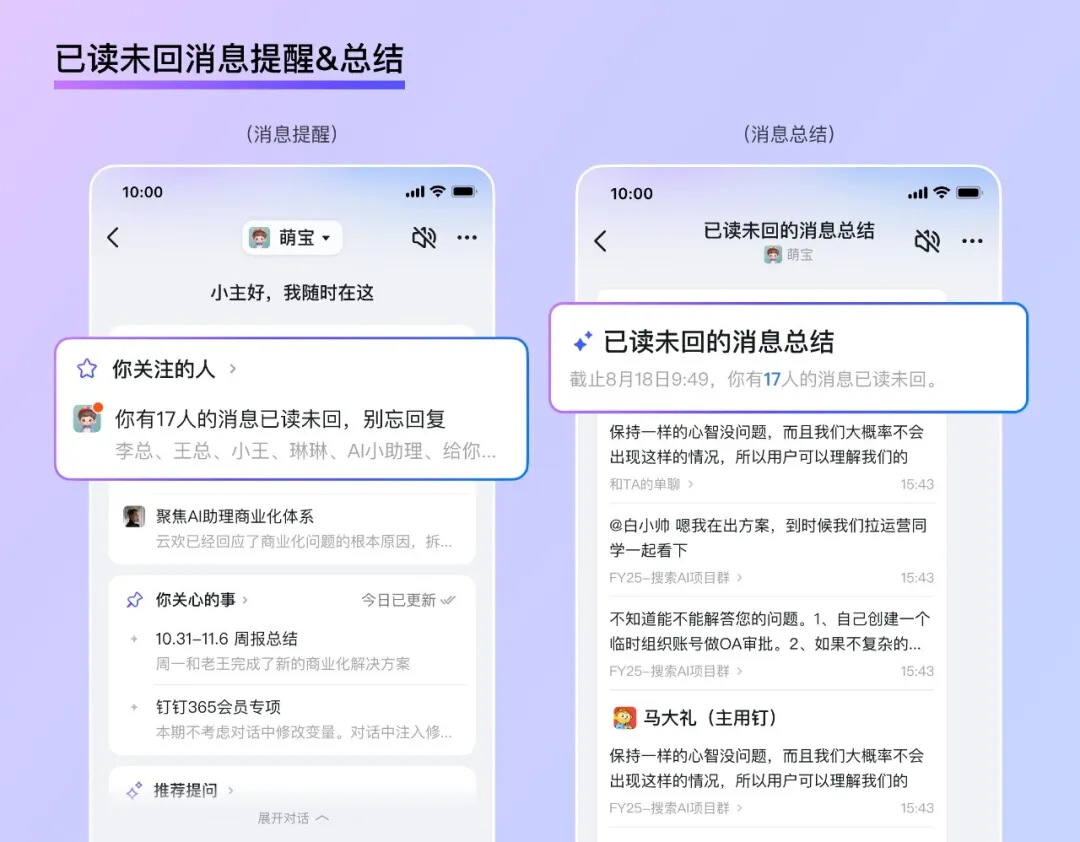
2. Smart Reminders for Read but Unanswered Messages: Catch Missed Replies
In today’s information-overload world, many people have probably experienced the awkwardness of “thinking about replying” but forgetting to do so because of current circumstances, leading to unnecessary misunderstandings. Especially in the workplace, forgetting to reply can often result in work mistakes.
No worries—DingTalk’s personal assistant will remind you of read but unanswered messages!
It can aggregate all your read but unanswered messages under “People You Care About”; just click to jump directly to the original message and respond, ensuring no message gets overlooked.
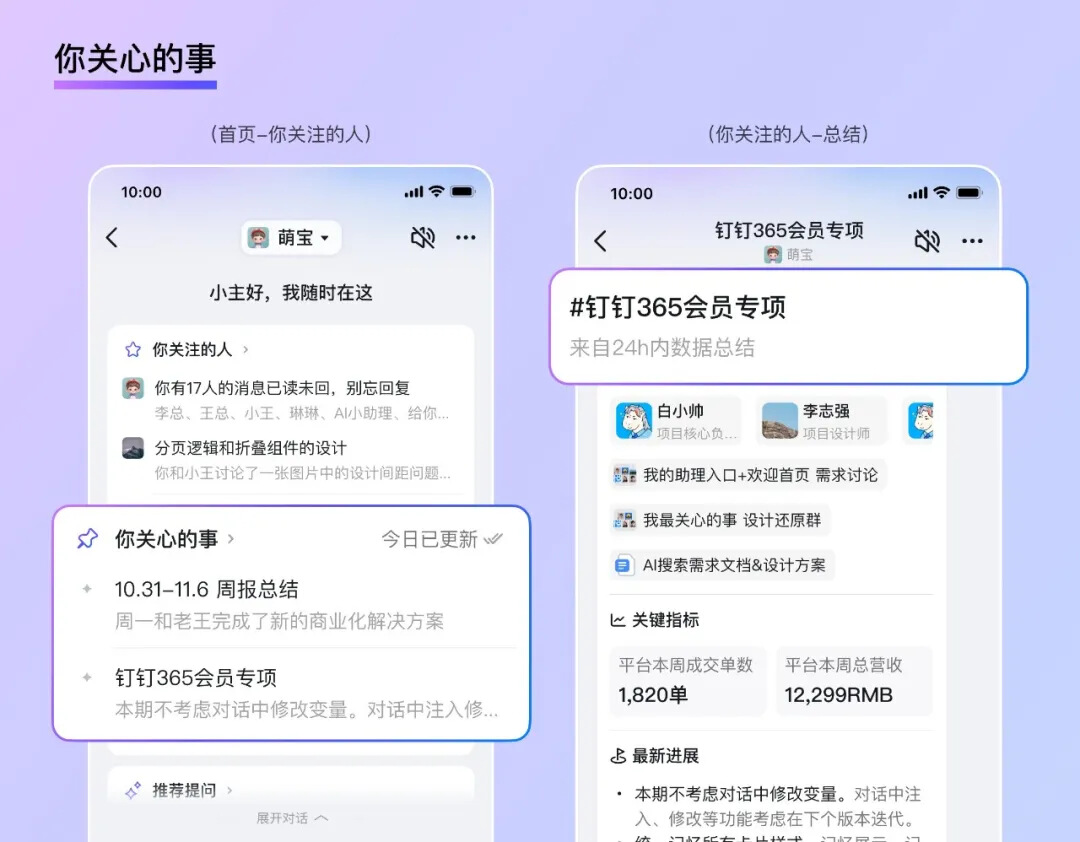
3. Add What You Care About: Keep Track of Project Updates and Never Miss Key Tasks
When you want to know the latest updates on a project or a specific task, you might have to search through groups, private chats, emails, weekly project reports, and schedules—all to find the information and then analyze and organize it. A lot of time can be spent searching, locating, and sorting through these materials.
Now, DingTalk’s personal AI assistant can keep an eye on things for you!
Your personal AI assistant can automatically monitor key updates and aggregate them, showing you the source of the content and related documents. No matter which group chat, log, or meeting schedule it’s in, you can locate it in seconds, making it easy to trace back and understand the context. You can also continue asking the AI questions to get key updates and conclusions.
Besides, based on the work content authorized by users, it can automatically generate detailed weekly reports covering all key activities within a week. The generated documents are standardized in format, rich in content, and come with clear attribution tags—almost no further editing needed! From now on, you won’t have to write weekly reports—you’ll just focus on monitoring them~
So with this assistant: reviewing, writing weekly reports, tracking daily/weekly work progress, and summarizing important tasks from the past day—these tedious chores are no longer a hassle. Give it a try and let it handle them for you.
Tips: Users can add up to 3 items you care about; “DingTalk 365 Members” can add up to 10 “items you care about,” and you’ll even receive a daily morning summary of your assistant’s previous day’s work.
4. AI Notebook: Organize and Record Fragmented Information
For office workers, we often need to jot down inspirations, short meeting minutes, saved files, and other materials. Previously, we might have used various different tools, leaving this content scattered and hard to find.
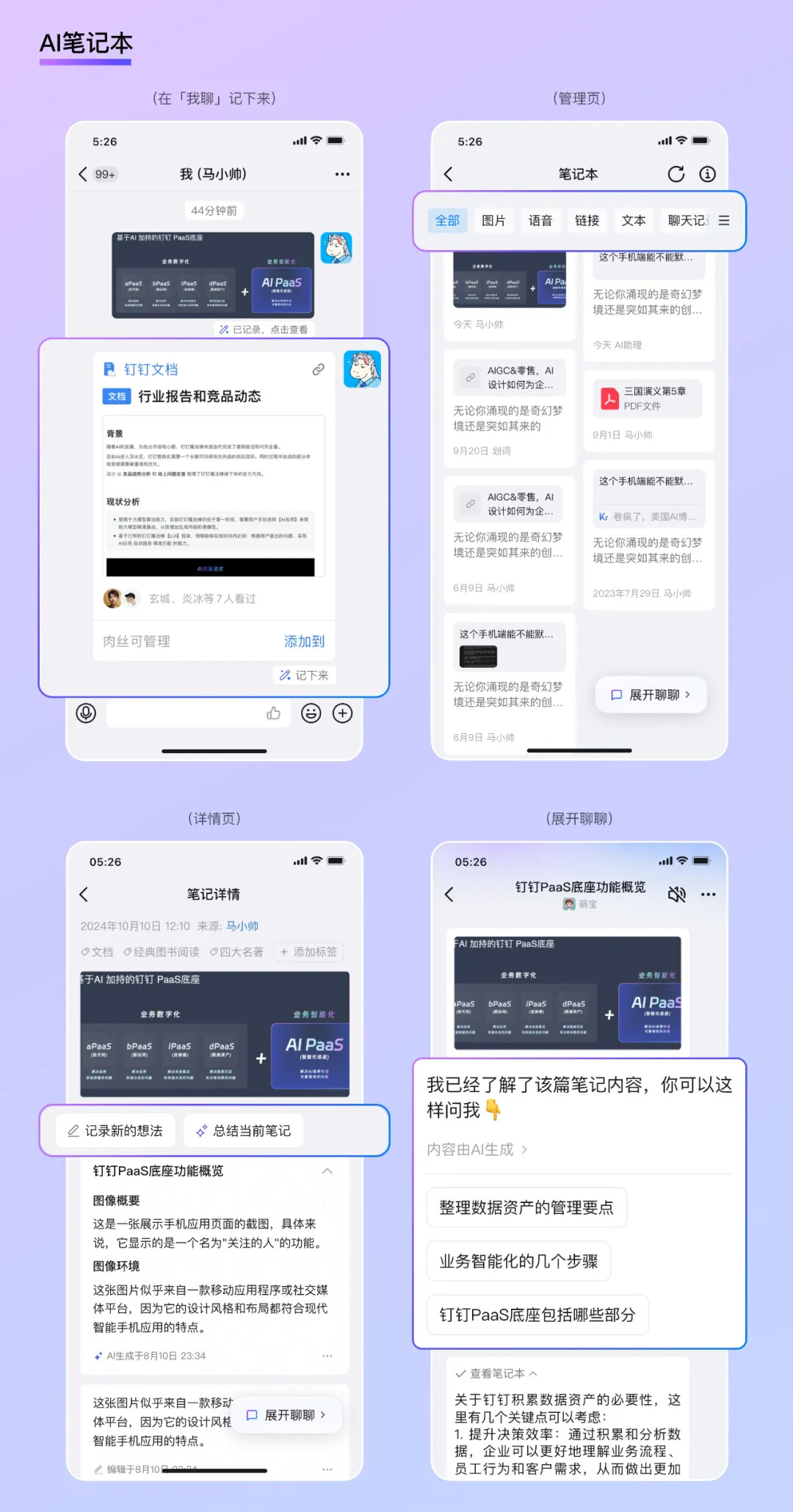
Now, with the “AI Notebook,” we can quickly jot down fragmented pieces of information. Whether it’s messages sent to yourself, highlighted text, web pages, images, PDFs, or links, just tap “Note It Down,” and your assistant will automatically archive it for you, supporting the addition of tags for quick retrieval.
Of course, DingTalk’s personal AI assistant also supports secondary creation based on existing notes. Just tap “AI Notebook”—“Start Chatting” in your conversation with yourself, and you can ask your personal AI assistant questions. For example: “Help me analyze the necessity of accumulating DingTalk’s data assets.”
For students, the “AI Notebook” is also a great choice for efficiently organizing wrong-answer collections and key knowledge points.
Previously, creating wrong-answer collections or outlining key knowledge always required manual classification, copying, or typing.
Now, just send your wrong answers or key points from teachers to yourself and “Note It Down,” and your personal AI assistant will summarize them for you. Ask it questions, and you’ll get neatly formatted, clearly organized summary documents—helping you better consolidate knowledge while saving time to sleep a little longer and greatly improving your study efficiency.
5. AI Floating Ball: One-Click Activation of Your AI Assistant
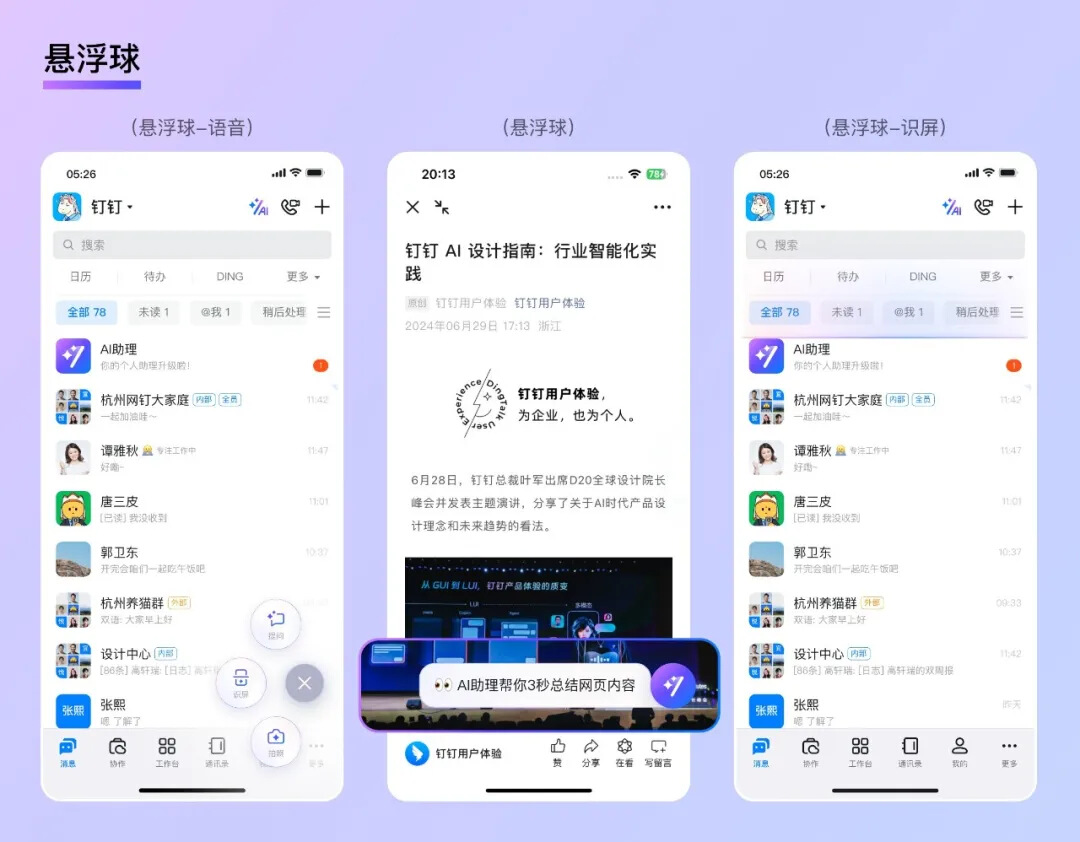
To make it even easier and faster for users to access the AI assistant’s features, DingTalk’s personal AI assistant has added an AI floating ball feature on mobile devices.
By tapping the floating ball, you can quickly activate your personal AI assistant. You can “directly ask the AI” via voice, “ask by screen recognition,” or “take a photo and ask.”
The screen recognition function helps us quickly summarize content on the screen and allows you to ask questions about what’s displayed; taking a photo lets the AI automatically answer questions or write reviews for food photos—greatly boosting creativity and convenience. Plus, the floating ball works even outside the DingTalk app on Android devices, allowing you to quickly activate your personal AI assistant without opening DingTalk~
Conclusion
From customizing your AI assistant’s appearance and deeply learning user-related information, to intelligently managing people and matters you care about, reminding you of unread messages, automatically organizing fragmented information, and generating detailed weekly reports—DingTalk’s personal AI assistant is committed to providing users with more efficient, personalized AI support, helping super-individuals stand out and become your understanding personal AI assistant. Hurry up and upgrade your AI assistant with one click!

DomTech is DingTalk’s official designated service provider in Macau, specializing in providing DingTalk services to a wide range of customers. If you’d like to learn more about DingTalk platform applications, feel free to consult our online customer service, or contact us by phone at +852 95970612 or email at [email protected]. We have an excellent development and operations team and rich market service experience, ready to provide you with professional DingTalk solutions and services!